Brand: SAMSUNG
Category: Other
Document Type: Manual
Language: EN
Brand: SAMSUNG
Category: Other
Document Type: Manual
Language: EN
Uploaded: Nov. 21, 2025, 6:28 p.m.
Manual Publish Date: 2022-08-01
Refer to the manual for warranty information, though specific details are not provided in this excerpt.
About the Galaxy Buds2 Pro: Wireless earbuds for music and calls. Avoid use in high-traffic areas.
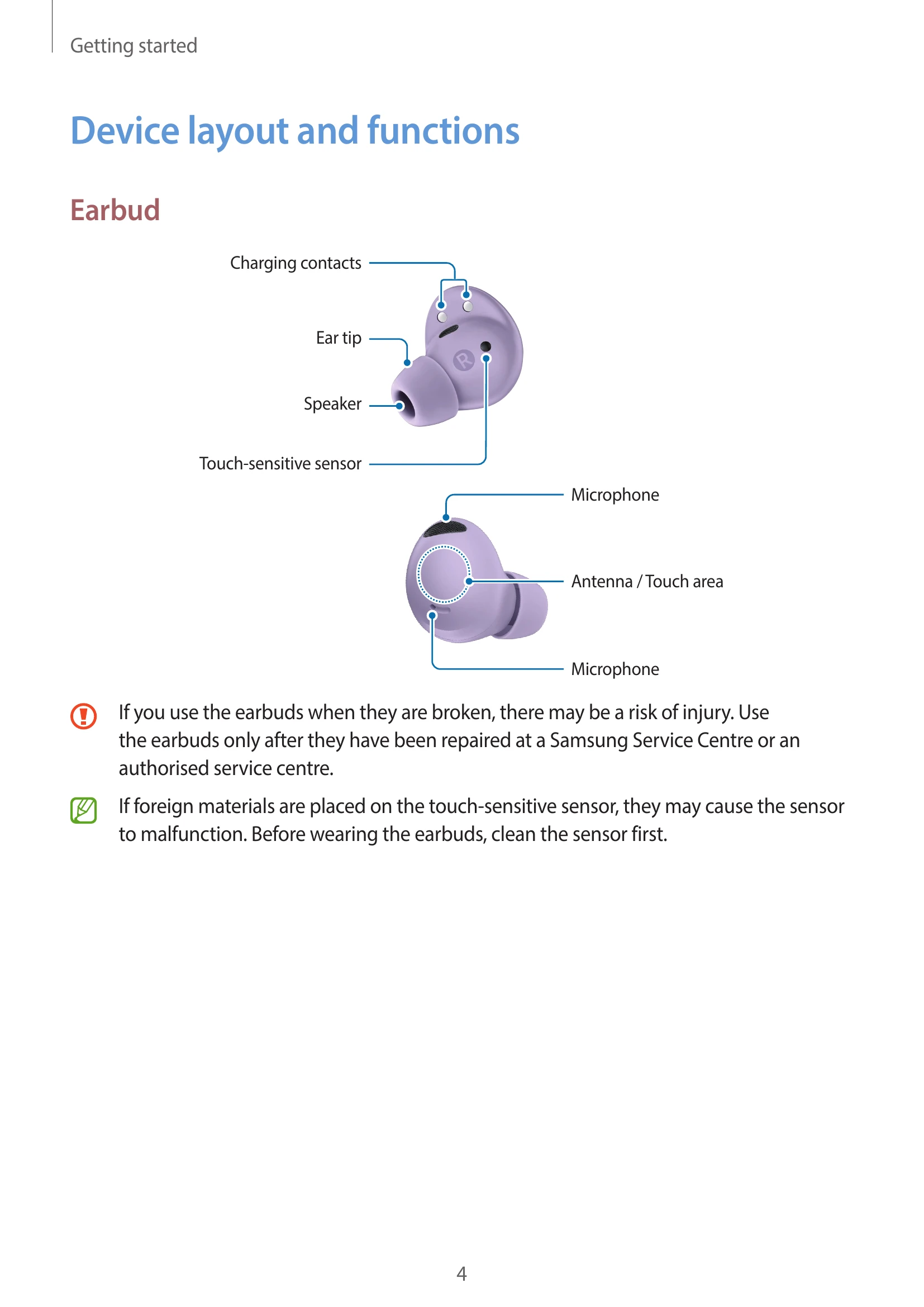
Device Layout: Identifies earbud components like charging contacts, ear tip, speaker, touch-sensitive sensor, and microphone.
Charging Case: Identifies charging contacts, USB port, wireless charging coil, and indicator lights.
Attaching Ear Tip: Select appropriate ear tip, align latch, and push firmly.
Charging the Battery: Wired charging involves connecting the case to a power source. Wireless charging uses a wireless charger or compatible device. Wireless power sharing is also supported.
Checking Battery Level: Use the Galaxy Wearable app to view earbud and case battery status.
Reducing Battery Consumption: Store earbuds in a charged case when not in use.
Battery Indicator Lights: Explains the meaning of different light colors and patterns for earbuds and the charging case.
Connecting to a Mobile Device: Requires the Galaxy Wearable app. Connects to Samsung and non-Samsung Android devices.
Wearing the Earbuds: Adjust for a comfortable fit, ensuring touch sensors make contact.
Tips for Bluetooth: Maintain connection range, avoid obstacles, and handle the device with care.
| Issue | Solution |
|---|---|
| Your earbuds do not work |
|
| Bluetooth device cannot locate your earbuds |
|
| A Bluetooth connection is not established or your earbuds and the mobile device are disconnected |
|
| The battery does not charge properly (For Samsung-approved chargers) |
|
| The charging time and the battery life is different between the earbuds | Charging time and battery life may differ due to internal components. |
| The battery depletes faster than when first purchased |
|
| You cannot hear others speaking | Adjust volume on the connected mobile device. |
| Sound echoes during a call | Adjust volume or move to another area. |
| Sound is emitted from the connected mobile device, not the earbuds, during a call |
|
| Audio quality is poor |
|
| Your earbuds sound comes slower than the screen when playing videos and games | A time lag may occur. |
| The noise controls mode does not work well |
|
| Your Galaxy Buds2 Pro are hot to the touch | Some warmth is normal. If overheating, stop use and contact service. |
| A small gap appears around the outside of the Galaxy Buds2 Pro | This is a normal manufacturing feature. |
| When the earbuds are removed from your ears, the ear tips are turned upside down | Realign the ear tips. |