Brand: SAMSUNG
Category: Other
Document Type: Manual
Language: EN
Brand: SAMSUNG
Category: Other
Document Type: Manual
Language: EN
Uploaded: Nov. 21, 2025, 6:44 p.m.
Manual Publish Date: 2024-02-01
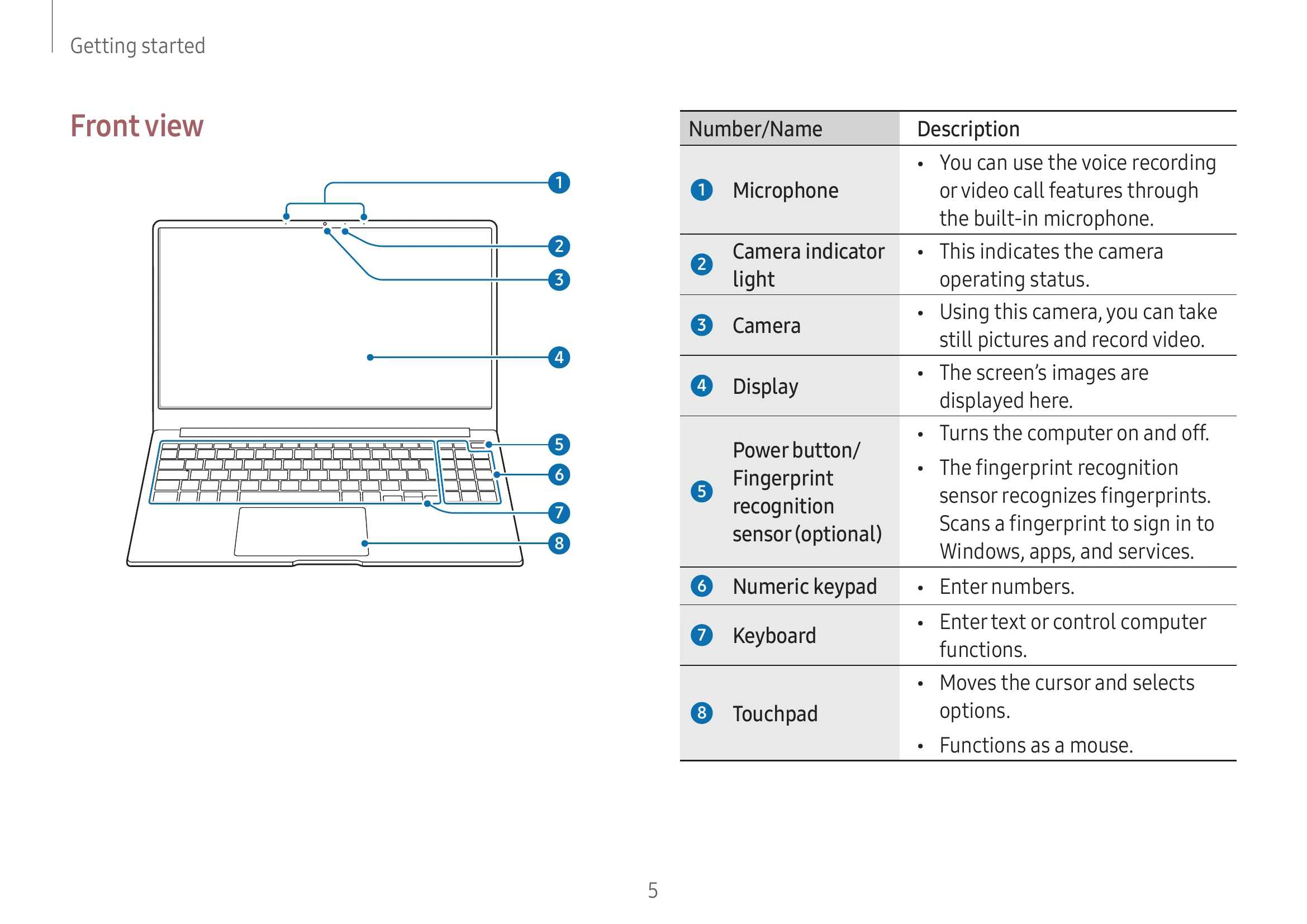
Device Layout and Functions: Understand the layout of your device and be aware of screen burn-in. Features may vary by model.
Turning On/Off: Fully charge the battery before first use. Open the display panel to turn on. Select Start > Shut down to turn off.
Unlocking: Use mouse, keyboard, or touchpad to unlock. Enter password if required.
Keyboard: Use for typing and accessing functions. Hot keys can be used with or without the Fn key.
Touchpad: Use for cursor movement, clicking, and gesture functions like swiping and pinching.
Wired LAN: Connect a LAN cable for internet access. Configure network settings via Control Panel.
Wireless LAN: Connect to Wi-Fi networks. Deactivate Wi-Fi to save battery. Use Airplane mode to turn off all wireless functions.
Bluetooth: Connect to Bluetooth-enabled devices for audio and data transfer. Ensure devices are trusted and secured.