Brand: SAMSUNG
Category: MOBILE PHONE
Document Type:
Language: EN
Brand: SAMSUNG
Category: MOBILE PHONE
Document Type:
Language: EN
Uploaded: Aug. 10, 2025, 12:09 a.m.
Manual Publish Date: 2009-02-25
Samsung warrants phones and accessories for 1 year, batteries and leather cases for 90 days against defects.
| Phone does not turn on | Press and hold the LOCK key for two or more seconds. Ensure the battery is charged. |
| Cannot place or receive calls | Check if you are in a coverage area or roaming area. Try again later or at another location. Ensure service is activated. |
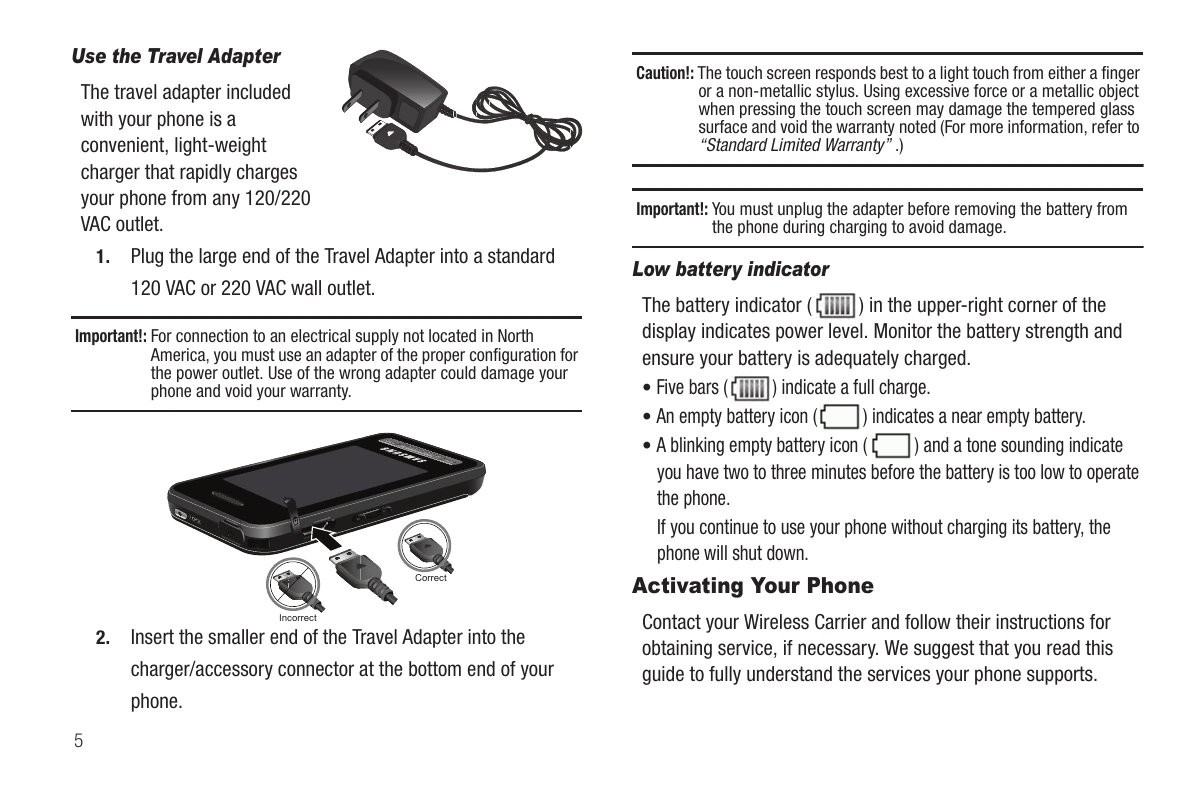
| Low battery | Charge the battery. The battery indicator shows the power level. |
| Touch screen not responsive | Use a light touch with a finger or non-metallic stylus. Avoid excessive force or metallic objects. |
| Cannot access menus or Volume key when phone is locked | Unlock the phone by pressing and holding the Power On-Off/LOCK key. |