Brand: SAMSUNG
Category: Microwave Oven
Document Type: Parts/Service
Language: EN
Brand: SAMSUNG
Category: Microwave Oven
Document Type: Parts/Service
Language: EN
Uploaded: Nov. 21, 2025, 6:03 p.m.
Manual Publish Date: 2016-05-19
| Error Code | Check Point | Causes | Step |
|---|---|---|---|
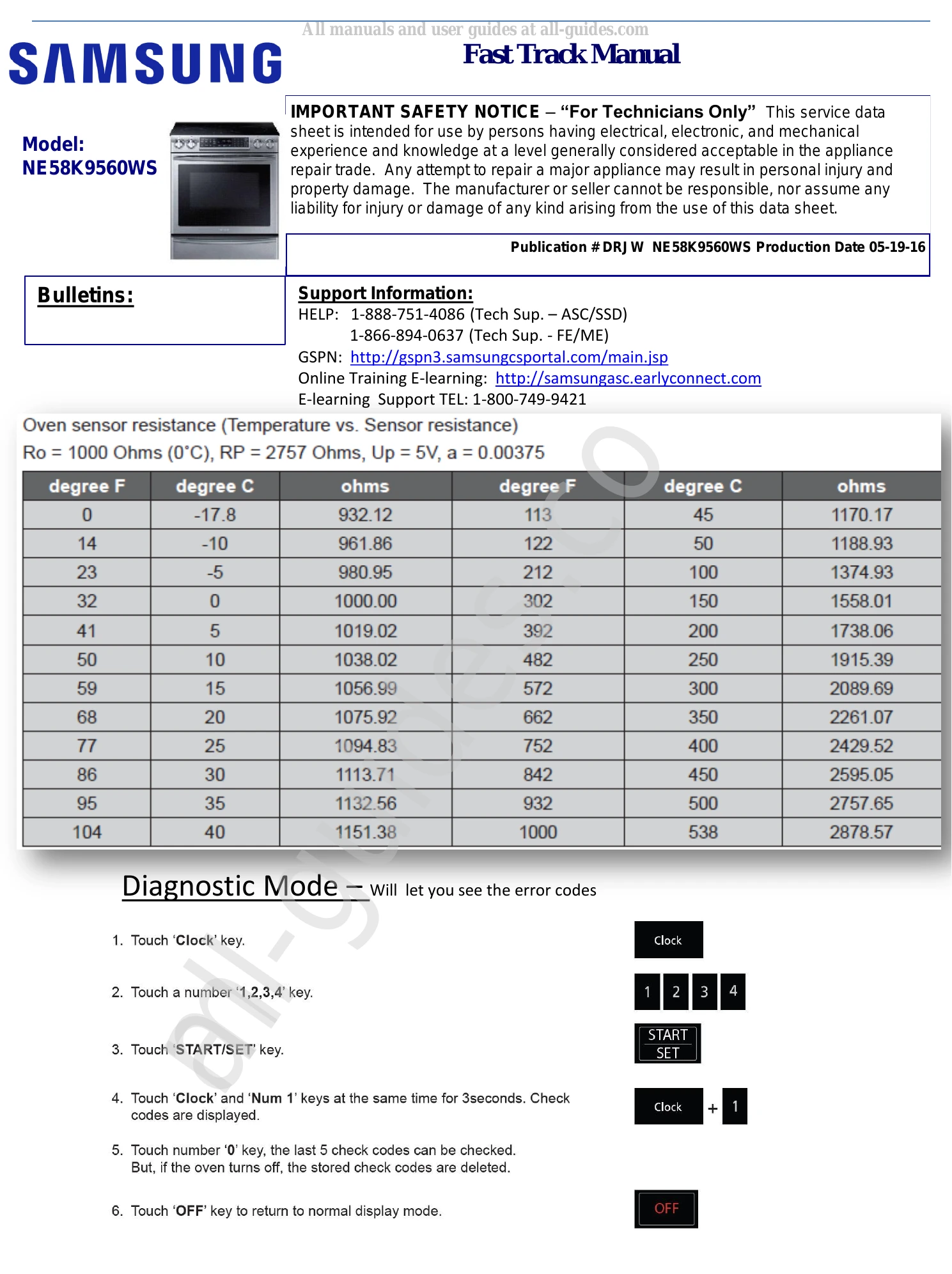
| C-20 Error -Oven sensor | Oven sensors/Sensor harness/Main PCB | Oven sensor open (resistance over 2950Ω) Oven sensor shorted (resistance under 930Ω) Damaged sensor harness |
Step 1: Remove temperature sensor connector and measure resistance at sensor terminals: approx. 1080Ω at 75°F at room temperature. Replace sensor if out of range. Check connector CN320make sure is properly seated on the Main PCB. Visually inspect harness to sensor, repair or replace any damaged harness. Check wire continuity to sensor. Step 2: Remove connector CN320. Measure DC voltage between pin1 and pin2. Meter should read about 4.9VDC. Lower than 4.5VDC replace main PCB. |
| C-21 Error -Oven overheating | Oven Sensor/Broil, Bake and Convection heater relay | Faulty oven sensor Heater relays Main PCB |
Step 1: Remove sensor connector and measure resistance at sensor terminal: Approx. 1080Ω at 75°F at room temperature. Remove power to unit and measure the resistance of DLB, Broil, Bake and Convection heater relays. NOTE: if you get a low resistance reading between any of the terminals suspect relay is stuck. Replace main board. C-21 only occurs when there's a temperature runaway due to stuck relay or just a defective temp sensor. |
| C-30 Main PCB internal sensor | Main PCB | Main PCB Sensor open Main PCB Sensor shorted |
Step 1: C-30 occurs when the main PCB internal sensor is open/short. Main PCB needs to be replaced and diagnose cause of over heat if any. |
| C-d1 Error-Door lock error | Door lock motor/Door lock switch/Main PCB | Door lock switch Door lock motor Main PCB did not sense door lock position |
Step 1: Remove switch connector. Door lock motor might start turning to find default position. With door unlocked check continuity across the door lock switch: COM to NO should have continuity or less than 10Ω. Replace door lock assembly if out of range. With the door locked, measure resistance across the door lock switch: COM to NO should be open when door is locked. Replace door lock assembly if meter reads continuity. Step 2: Reinstall switch connector. With door unlocked, measure DC voltage across the door lock switch: COM to NO: OVDC. If it reads any voltage lock switch is defective. With the door locked, measure DC voltage across the door lock switch: COM to NO: 4.7VDC to 5VDC. If lower than 4VDC, check switch harness and MAIN PCB. Step 3: Remove connector to lock motor and measure resistance of door lock motor: Approx. 1950Ω. Reinstall connector to lock motor and measure AC voltage when door lock is activated: Meter should read 120VAC. If voltage is present and motor is not rotating, replace lock motor. If voltage is not present when activated check harness and MAIN PCB. |
| C-d0 Error- Shorted key | Membrane/Touch control PCB | Shorted key Damaged membrane/touch panel Sub PCB |
Step 1: Visually inspect the membrane overlay for any damage to the cable. Check whether the keypad cable has been inserted into connector of the Display PCB. Check for signs of moisture around connector caused by previous spills. Remove power to the unit, disconnect membrane switch and turn on power to the unit. If C-d0 shows up then replace the Sub PCB. |
| C-F0 Communication Error Main PCB-Sub PCB | Main PCB/Sub PCB/Harness | Loose connection Torn or damaged harness Main PCB defective Sub PCB defective |
Step 1: Visually inspect wire harness for any damaged or torn wires from main board connector CN470 to Sub PCB CN200. Check an make sure both connectors are properly seated on the board. |
| C-F2 Communication Error Main Touch Panel | Main PCB/Sub PCB/Harness | Loose connection Torn or damaged harness Main PCB defective Display PCB defective |
Step 1: Check to make sure touch panel overlay is properly seated and that is not damaged from moisture. Visually check the overlay cable to make sure that is not burned or damaged. |
| C0 Element sensor error | Element Sensor | Top Sensor detected a temperature higher than 482F on the ceramic glass surface Empty cookware was placed on burner while operating |
Step 2: Remove Sensor connector and measure resistance of the sensor at room temperature: Approx. 7.65KΩ~9.34KΩ at room temperature. Replace sensor if out of range. Visually inspect condition of sensor harness for any damage. Make sure sensor is connected properly to the inverter. Measure resistance of the sensor terminal going to the Inverter PCB: Approx. 2.7KΩ. |
| C1 Element sensor error overheated | Element Sensor | Top Sensor detected a temperature higher than 482F on the ceramic glass surface Empty cookware was placed on burner while operating |
Step 1: Instruct customer that turning on the burner with an empty cookware causes heat to transfer to the cooktop surface. Check the CO error code if C1 shows up if cooktop is being used normally. |
| C2 IGBT Sensor Error | IGBT sensor/Inverter PCB | IGBT sensor open IGBT sensor short Faulty Inverter PCB |
Step 1: Check resistance of the IGBT sensor: Approx. 56KΩ at room temperature. Replace inverter if open or short. |
| A2 DC Motor error | DC Motor/Inverter PCB | Stuck or defective motor | Step 1: Check if any foreign objects are stuck on the motor blades*remove foreign object. Visually inspect condition of the motor harness to the Inverter PCB. If torn or damage, replace DC motor or repair harness. When fan is operating, 12 VDC should be present between the black and red wires, if voltage is missing, replace the Inverter PCB. |
| F0 Communication Error | Inverter PCB/Cooktop Main PCB | Communication error between Main PCB and Inverter | Step 1: Make sure connectors CN101 and CN102 are properly seated on the cooktop Main PCB. Measure voltage output of the inverters to the Main PCB at CN901 (left inverter) and CN902 (right inverter): Pins 4 and 5 12VDC. Pins 4 and 9 5VDC. |
| Pan detection error | size and/or type of cookware | Cookware too small Cookware not suitable for induction |
Step 1: Instruct customer to use proper size according to the burner being used. Advise customer that induction cooktop will only work with a magnetic based material such as cast iron, magnetic stainless steel. Check the status of the following parts: Harness, Top Sensor, Inverter PCB, Assy. PCB Touch. |