Brand: SAMSUNG
Category: Microwave Oven
Document Type: Manual
Language: EN
Brand: SAMSUNG
Category: Microwave Oven
Document Type: Manual
Language: EN
Uploaded: Nov. 21, 2025, 7:55 p.m.
Manual Publish Date: 2023-04-19
Limited warranty covers manufacturing defects for 1 year on parts and labor, and 10 years on the magnetron.
| Problem | Cause | Action | |
| General | Buttons cannot be reset correctly. | Remove foreign objects between buttons and try again. | |
| There is moisture on the outside (for touch models). | Wipe the exterior dry. | ||
| Child lock is activated. | Deactivate child lock. | ||
| Hour is not displayed. | No power supply. | Ensure the outlet is powered. Confirm the microwave is plugged in. Check fuses or circuit breakers. | |
| Eco mode is activated. | Deactivate Eco mode. | ||
| The oven does not function. | No power supply. | Ensure the outlet is powered. Confirm the microwave is plugged in. Check fuses or circuit breakers. | |
| The door is open. | Close the door and try again. | ||
| Safety mechanisms for door opening are obstructed by foreign objects. | Remove foreign objects and try again. | ||
| The oven stops during operation. | User opened the door to turn food. | After turning the food, press START to resume. | |
| The oven has cooked for a very long time. | After a long cooking session, let the oven cool down. | ||
| The cooling fan is not working. | Listen for the cooling fan's sound. | ||
| The ventilation space around the oven is insufficient. | Consult the installation guide for proper spacing. | ||
| Multiple appliances are plugged into the same outlet. | Unplug other devices from the outlet. | ||
| The appliance turns off during operation. | The oven has cooked for a very long time. | After a long cooking session, let the oven cool down. | |
| The cooling fan is not working. | Listen for the cooling fan's sound. | ||
| The ventilation space around the oven is insufficient. | Consult the installation guide for proper spacing. | ||
| Multiple appliances are plugged into the same outlet. | Unplug other devices from the outlet. | ||
| The oven is not powered on. | No power supply. | Ensure the outlet is powered. Confirm the microwave is plugged in. Check fuses or circuit breakers. | |
| The oven makes a crackling sound during operation and does not function. | Food is cooked in a sealed container or with a sealed lid. | Do not cook food in sealed containers or with hermetic lids. Steam can cause containers to burst or lids to eject. | |
| The exterior of the oven becomes too hot during operation. | The ventilation space around the oven is insufficient. | Consult the installation guide for proper spacing. | |
| Objects are placed on top of the oven. | Remove any objects from the oven top. | ||
| The door cannot be opened correctly. | Food residue is stuck between the door and the oven interior. | Clean the oven door. | |
| The oven does not heat. | The oven may not function if too much food is added or an inappropriate utensil is used. | Test the oven by placing a cup of water inside and heating for 1-2 minutes. If water heats, reduce food quantity or try again with a flat-bottomed dish. | |
| Heating is weak or slow. | The oven may not function if too much food is added or an inappropriate utensil is used. | Test the oven by placing a cup of water inside and heating for 1-2 minutes. If water heats, reduce food quantity or try again with a flat-bottomed dish. | |
| The keep warm function does not work. | The oven may not function if too much food is added or an inappropriate utensil is used. | Test the oven by placing a cup of water inside and heating for 1-2 minutes. If water heats, reduce food quantity or try again with a flat-bottomed dish. | |
| The oven does not defrost. | The oven may not function if too much food is added or an inappropriate utensil is used. | Test the oven by placing a cup of water inside and heating for 1-2 minutes. If water heats, reduce food quantity or try again with a flat-bottomed dish. | |
| Interior light is dim or not on. | The door was left open for a long time. | Close and reopen the door, or press STOP/CLEAR. | |
| The interior light is covered with foreign objects. | Clean the oven interior and check again. | ||
| A beep sounds during cooking. | If Auto Cook is used, this beep indicates it is time to turn the food. | After turning the food, press START to resume. | |
| The oven is not level. | The oven is installed on an uneven surface. | Ensure the oven is installed on a level and stable surface. | |
| Sparks appear during cooking. | Metal utensils are used during cooking or defrosting. | Do not use metal utensils. | |
| When under power, the oven operates immediately. | The door is not closing properly. | Close the door and check again. | |
| There is electricity coming from the oven. | The power supply or electrical outlet is not properly grounded. | Ensure the power supply and outlet are properly grounded. | |
| Water is dripping. | Depending on the food, water or steam may be generated during cooking or defrosting. This is not a malfunction. | Let the oven cool down, then wipe with a dry cloth. | |
| Steam escapes through a crack in the door. | Depending on the food, water or steam may be generated during cooking or defrosting. This is not a malfunction. | Let the oven cool down, then wipe with a dry cloth. | |
| There is water remaining in the oven. | Depending on the food, water or steam may be generated during cooking or defrosting. This is not a malfunction. | Let the oven cool down, then wipe with a dry cloth. | |
| The interior light varies. | Changes in brightness indicate changes in electrical power. These changes are dependent on the functions used and are not malfunctions. | - | |
| Cooking is finished, but the cooling fan continues to run. | To ventilate the oven, the fan continues to run for about 3 minutes after cooking. This is not a malfunction. | - | |
| Pressing START allows the oven to operate. | This occurs when the oven is not in use. The microwave is designed to start when START is pressed. | - | |
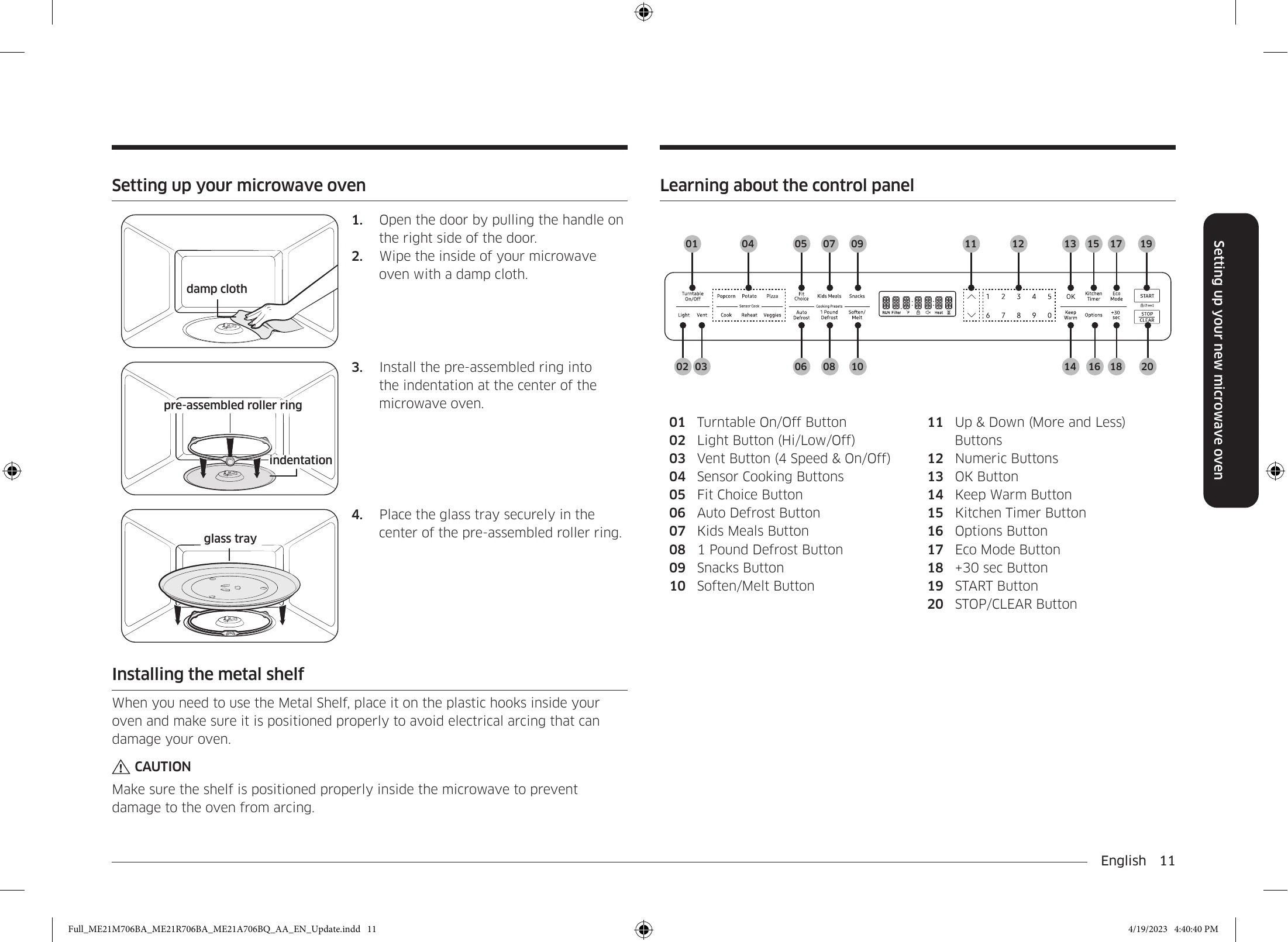
| Turntable | When turning, the turntable displaces or stops turning. | Ensure the guide ring is installed correctly and try again. | |
| The turntable rubs when turning. | Ensure the guide ring is installed correctly. Adjust food quantity. Do not use excessively large dishes that contact the oven walls. | ||
| The turntable clicks and is noisy when turning. | Food residue is stuck to the bottom of the oven. | Remove food residue from the oven bottom. |