Brand: SAMSUNG
Category: Microwave Oven
Document Type: Manual
Language: EN
Brand: SAMSUNG
Category: Microwave Oven
Document Type: Manual
Language: EN
Uploaded: Nov. 21, 2025, 7:29 p.m.
Manual Publish Date: 2009-04-27
None
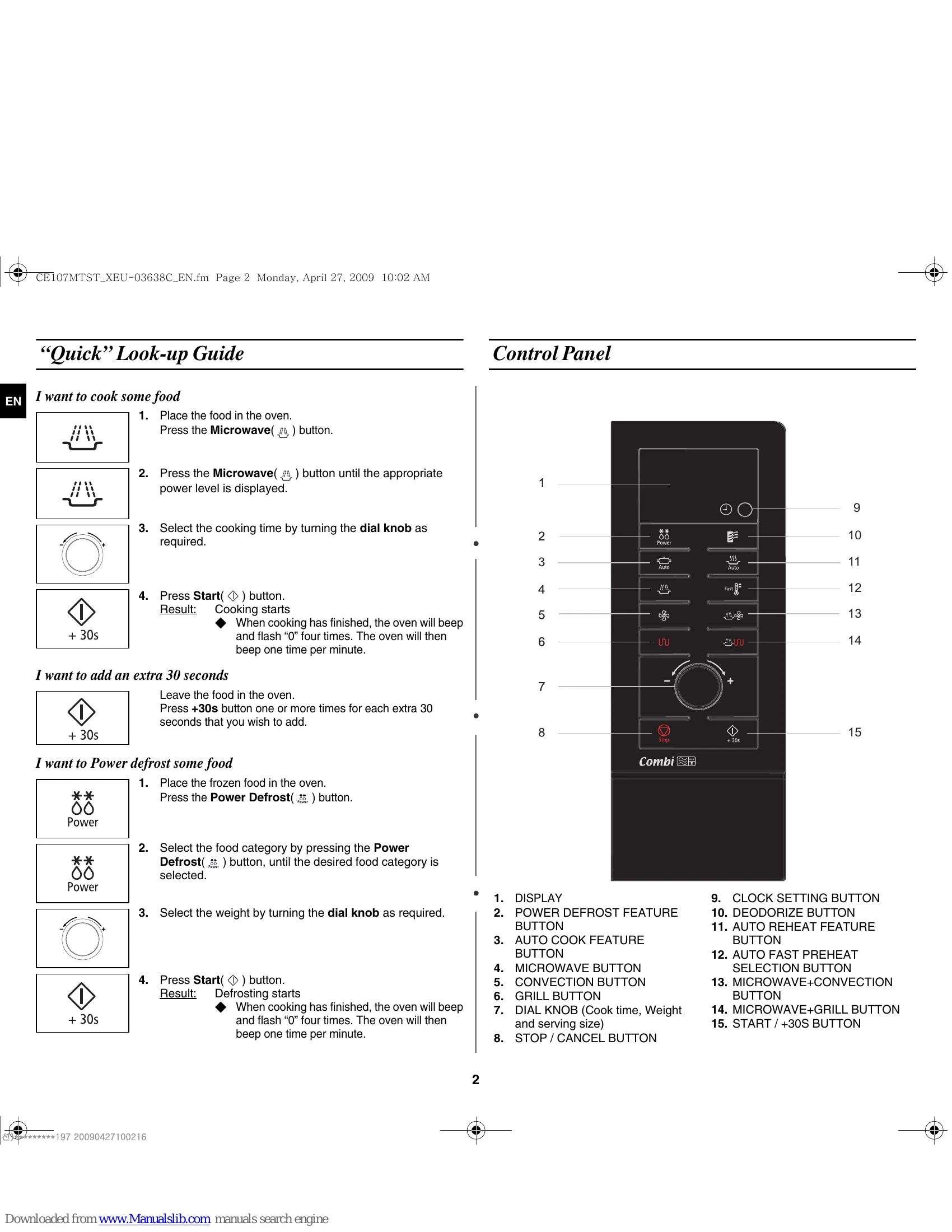
To cook food: Place food, press Microwave, select power level, set time, press Start.
To add 30 seconds: Press +30s button.
To Power Defrost: Place food, press Power Defrost, select food category, set weight, press Start.
Includes display, feature buttons (Power Defrost, Auto Cook, Microwave, Convection, Grill, Auto Reheat, Fast Preheat, Deodorize), Dial Knob (for time, weight, serving size), and Stop/Cancel button.
IMPORTANT SAFETY INSTRUCTIONS: Read carefully. Use only microwave-safe utensils. Do not use metallic containers. Remove twist ties. Be aware of potential ignition of paper/plastic containers. Allow standing time for liquids. Never operate when empty. Never attempt to operate with the door open. Keep door and seals clean. Do not use abrasive cleaners. If damaged, have it repaired by a qualified technician.
| Problem | Possible Cause | Solution |
|---|---|---|
| Condensation inside the oven | Normal occurrence | None |
| Air flow around the door and outer casing | Normal occurrence | None |
| Light reflection around the door and outer casing | Normal occurrence | None |
| Steam escaping from around the door or vents | Normal occurrence | None |
| Food is not cooked at all | Timer not set correctly or Start not pressed. Door not closed. Circuit overloaded (fuse blown/breaker tripped). | Check timer and press Start. Ensure door is closed. Check household circuit. |
| Food is either overcooked or undercooked | Incorrect cooking length or power level set. | Adjust cooking length and power level. |
| Sparking and cracking occur inside the oven (arcing) | Dish with metal trimmings. Metal utensil inside oven. Aluminium foil too close to walls. | Use microwave-safe dishes without metal. Remove all metal objects. Keep foil away from walls. |
| Oven causes interference with radios or televisions | Normal occurrence. | Install oven away from radio/TV/aerials. If display resets, disconnect and reconnect power plug, then reset time. |
| "E-24" message | Microwave oven overheating. | Depress "Stop/Cancel" key to utilize initialization mode. |