Brand: SAMSUNG
Category: Dryer
Document Type: Manual
Language: EN
Brand: SAMSUNG
Category: Dryer
Document Type: Manual
Language: EN
Uploaded: Nov. 21, 2025, 7:34 p.m.
Manual Publish Date: 2014-01-21
This service manual does not contain specific warranty period details.
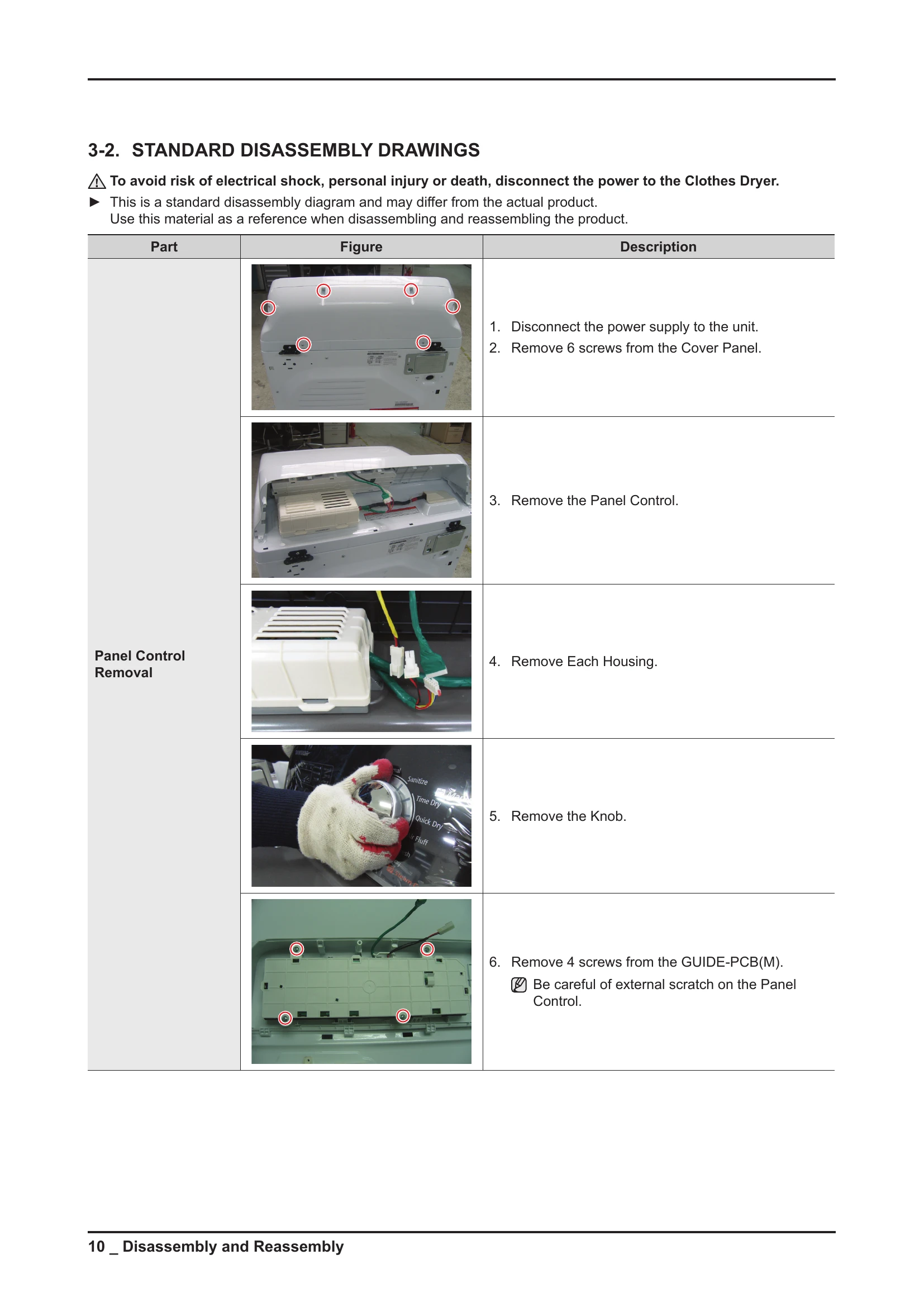
This manual provides detailed instructions for servicing the SAMSUNG Clothes Dryer, model DV400EWHD**. It covers safety precautions, features and specifications, disassembly and reassembly procedures, troubleshooting common issues, PBA diagrams, wiring diagrams, and model number naming rules.
Key sections include:
The manual is intended for qualified service technicians.
| Issue | Troubleshooting Steps | Notes |
|---|---|---|
| The clothes are not dried. | 1. Is the vent properly installed? (No: Install vent properly. Yes: Continue) | Check the exhaust hole. |
| 2. Did you clean the filter before drying? (No: Clean the filter. Yes: Continue) | Check for alien particles in the filter. | |
| 3. Is the terminal block connection normal? (No: Connect terminal block properly. Yes: Continue) | Check connection of Live 2, Neutral, Live 1. | |
| 4. Is the touch sensor normal? (No: Connect touch sensor. Yes: Continue) | Check PCB and touch sensor. Refer to page 38. | |
| 5. Is the Tamp. Sensor normal? (No: Replace thermistor. Yes: Continue) | Check connection between PCB and thermistor. Refer to page 38. | |
| 6. Is the safety, Hi-limit thermostat normal? (No: Check safety, Hi-limit thermostat. Yes: Continue) | Check the cause of safety being off. | |
| 7. Is the heater normal? (No: Replace the heater. Yes: Problem is in PCB assembly. Replace it.) | Check heater coil resistance (approx. 10Ω). | |
| The lamp does not work. | 1. Is the door S/W structurally on/off? (No: Replace door S/W. Yes: Continue) | Check door operation of door S/W. |
| 2. Is the power connection normal? (No: Connect power properly. Yes: Continue) | Check connection between terminal block and door S/W. | |
| 3. Is the lamp normal? (No: Replace the lamp. Yes: Check input voltage.) | Check for disconnection of lamp and socket. | |
| There is an abnormal noise in the dryer. | 1. Do you hear a whistling sound from the door seal? (Yes: Reassemble door seal. No: Continue) | Check assembled condition of door seal and door lever. |
| 2. Does the noise come from the drum? (Yes: Check roller and drum. No: Continue) | Check roller support and drum welding. | |
| 3. Is there an abnormal noise in the motor part? (Yes: Check idler and fan. No: Continue) | Check idler bracket, fan for alien particles. | |
| 4. Is there an abnormal noise from the heater part? (Yes: Check contacting part and heater wire. No: It is normal.) | Change contacting part, check screw fixation, heater wire fixation. |