Manual for DashCam-402

Manual for DashCam-402

Brand: Rollei

Category: Camera

Document Type: Manual

Language: EN
Uploaded: Aug. 10, 2025, 12:32 a.m.

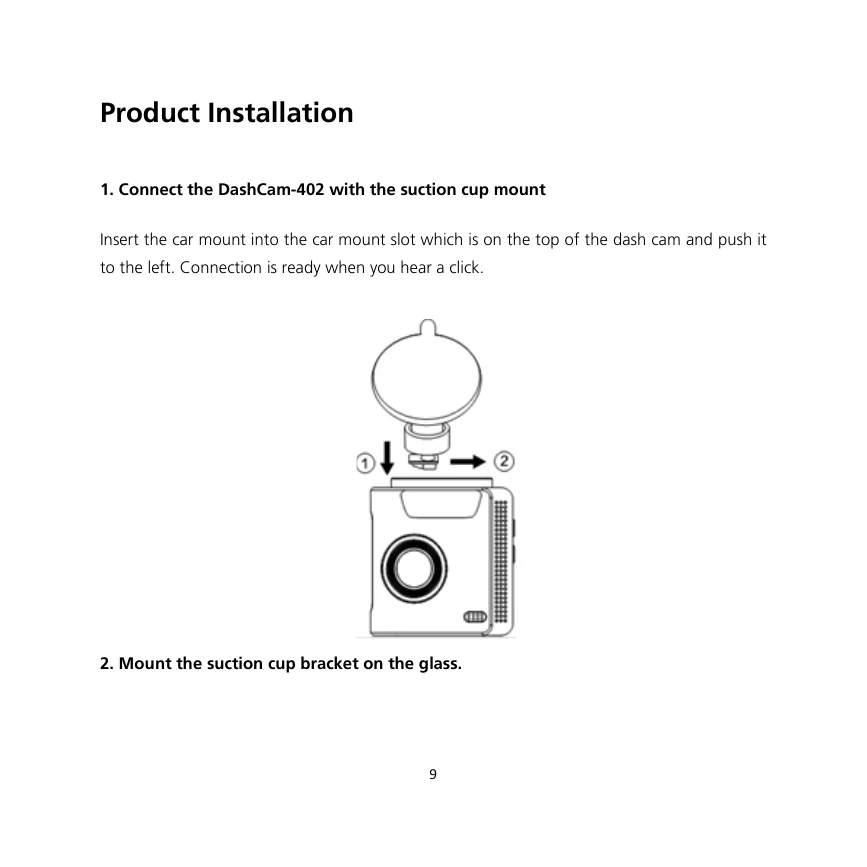
  • Product Installation: Connect the DashCam-402 with the suction cup mount, mount the bracket on the glass, and install the device on the windshield. Route the car charger cable to the cigarette lighter.
  • Directions for Use: Adjust the angle of the DashCam-402. Recording starts automatically when the dashcam is turned on. The flashing red dot indicates recording. Insert an SD card if prompted.
  • Menu Navigation: Press the BACK button to enter the Menu. Use UP and DOWN buttons to select settings, and OK to confirm.
  • Features: Includes Movie Quality, Sound Record, Exposure, Parking Monitoring, Protect Level, LCD Power Save, Time Sync, Time Zone Select, Clock Settings, Format SD-Card, Reset Setup, and Version.
  • Emergency Functions: Press the UP button for emergency video recording and the DOWN button for emergency photos.
  • Playback: Press OK to enter the video list, which includes Normal videos, Emergency videos, and photos. Select files to play or delete them.
  • Storage: The manual details recording storage for different SD card sizes (16G, 32G, 64G) for ordinary and emergency videos.

Troubleshooting and error codes

Problem Device not operating normally
Solution Long press the reset button to reset the system.
Problem Memory card error
Solution Ensure the memory card is inserted correctly. Format the memory card if it's 16G or more than class 10. Replace the memory card if it's old and experiencing write speed decrease.
Problem Cannot record video
Solution Check if an SD card is inserted and has enough space. Ensure the dash cam is within the operating temperature range (-20°C to +70°C).
Problem Videos not saved
Solution Check memory card health and storage. Export important videos regularly.
Problem System time reset after long inactivity
Solution When restarting the dash cam after a long period of inactivity, reset the system time.
Privacy Policy