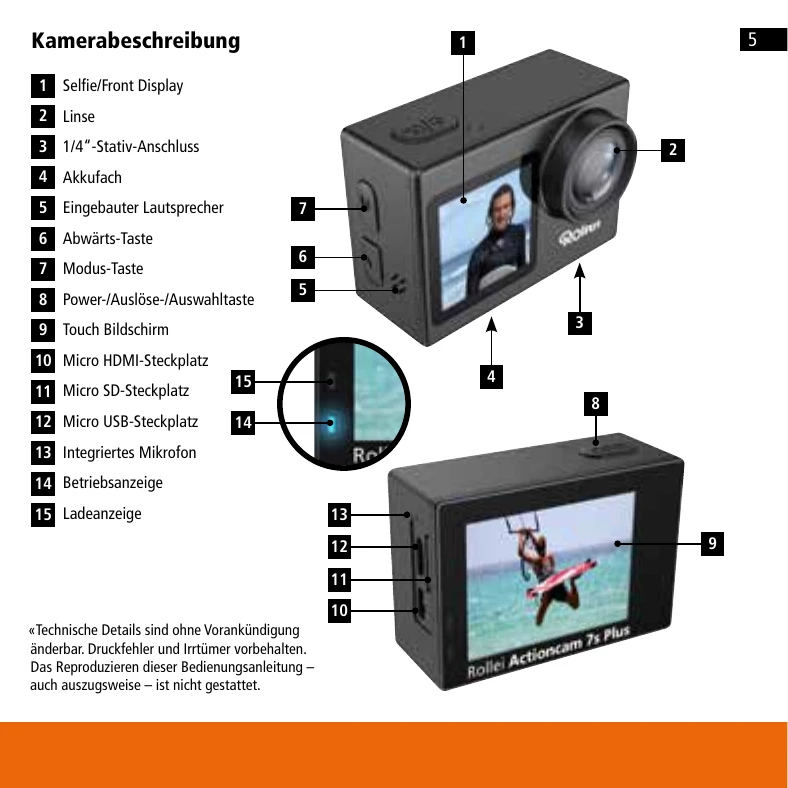
Before first use: Read operating and safety instructions. Keep manual with device.
Getting Started: Charge battery fully. To turn on, press and hold the Power button for 3 seconds. The operation indicator lights up. To turn off, press and hold the Power button for 3 seconds.
Modes: The camera offers various photo and video modes. Switch between modes using the Mode button.
Touchscreen: Swipe left/right to switch between video and photo modes. Access playback mode or settings from the bottom corners. Tap the middle icon during playback to play/pause video and swipe up/down to adjust volume.
Buttons: Use the Mode button to access menus and the Down button to scroll. The Select button confirms choices.
Webcam: Insert SD card, connect via USB, select "Webcam mode". Note: requires separate microphone for audio.
Remote Control: Use the supplied remote to operate the camera from a distance.
WiFi: Connect to smartphone via built-in WiFi. Download the "Rollei 5s/6s/7s Plus" app.