Manual for AC 420

Manual for AC 420

Brand: Rollei

Category: Camera

Document Type: Manual

Language: EN
Uploaded: Aug. 10, 2025, 12:31 a.m.

Warranty Information

None

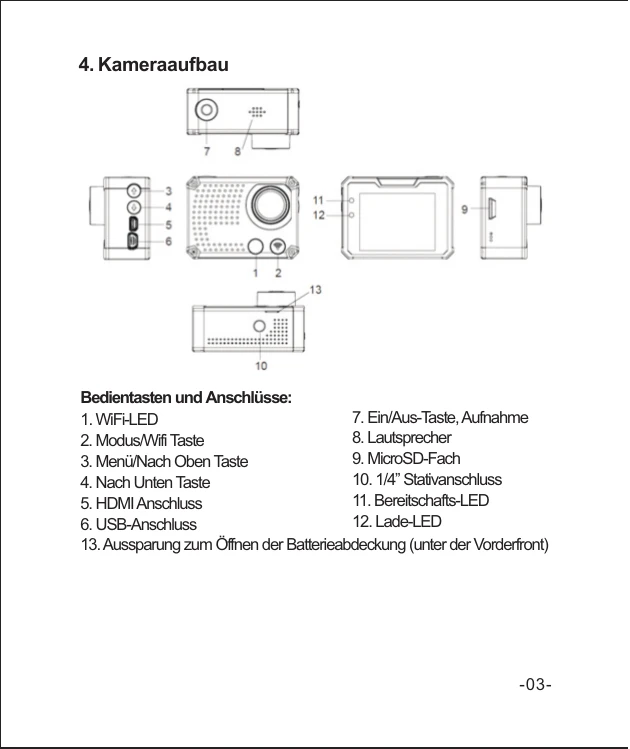
  • Power On/Off: Short press the Power button to turn the camera on. The blue indicator lights up, and the camera enters standby mode. Long press the Power button to turn the camera off.
  • Insert/Remove Battery: The camera has an exchangeable Li-Ion battery. Remove the front cover to insert or exchange the battery.
  • Battery Charging: Connect the camera via USB cable to a computer's USB port or a USB charger. The red LED indicates charging. The red LED turns off when the battery is full. For faster charging, turn the camera off during charging.
  • Video Mode: Displayed icons include Record icon, Exposure Compensation, White Balance, Frame rate, Video resolution, Microphone, Remaining recording time, Battery indicator, and Date and Time.
  • Picture Mode: Displayed icons include Photo icon, Exposure Compensation, White Balance, Picture size, Remaining photos, Battery indicator, and Date and Time.
  • Playback Mode: Select video or photo files and press the Power button for a preview (photo) or playback (video).
  • Menu Setting: Long press the "Up" button to open the settings menu. Use the "Mode" button to switch between menus. Use "Up" and "Down" buttons to navigate and the Power button to confirm.

Troubleshooting and error codes

Problem Possible Cause Solution
WiFi function cannot be activated No memory card in camera Insert a memory card
Weak WiFi signal or delayed response Environmental factors Normal during use, may be affected by surroundings.
WiFi connection unsuccessful Incorrect password or pairing issue Check password, re-pair the remote control/smartphone. Ensure WiFi-connection is active on the smartphone.
Camera not responding to remote control Pairing issue or battery low Re-pair the remote control. Check/replace the remote control battery (CR 2032).
Cannot record video/take photos Memory card full or not inserted Format or replace memory card, or delete old files. Ensure memory card is properly inserted.
Poor video/photo quality Dirty lens or incorrect settings Clean the lens. Adjust settings like resolution, exposure, and white balance.
Privacy Policy