Brand: RICOH
Category: Digital Camera
Document Type:
Language: EN
Brand: RICOH
Category: Digital Camera
Document Type:
Language: EN
Uploaded: Aug. 9, 2025, 11:56 p.m.
The camera is guaranteed against defects for twelve months from the date of purchase.
Turning the Camera On and Off: Press the Power button.
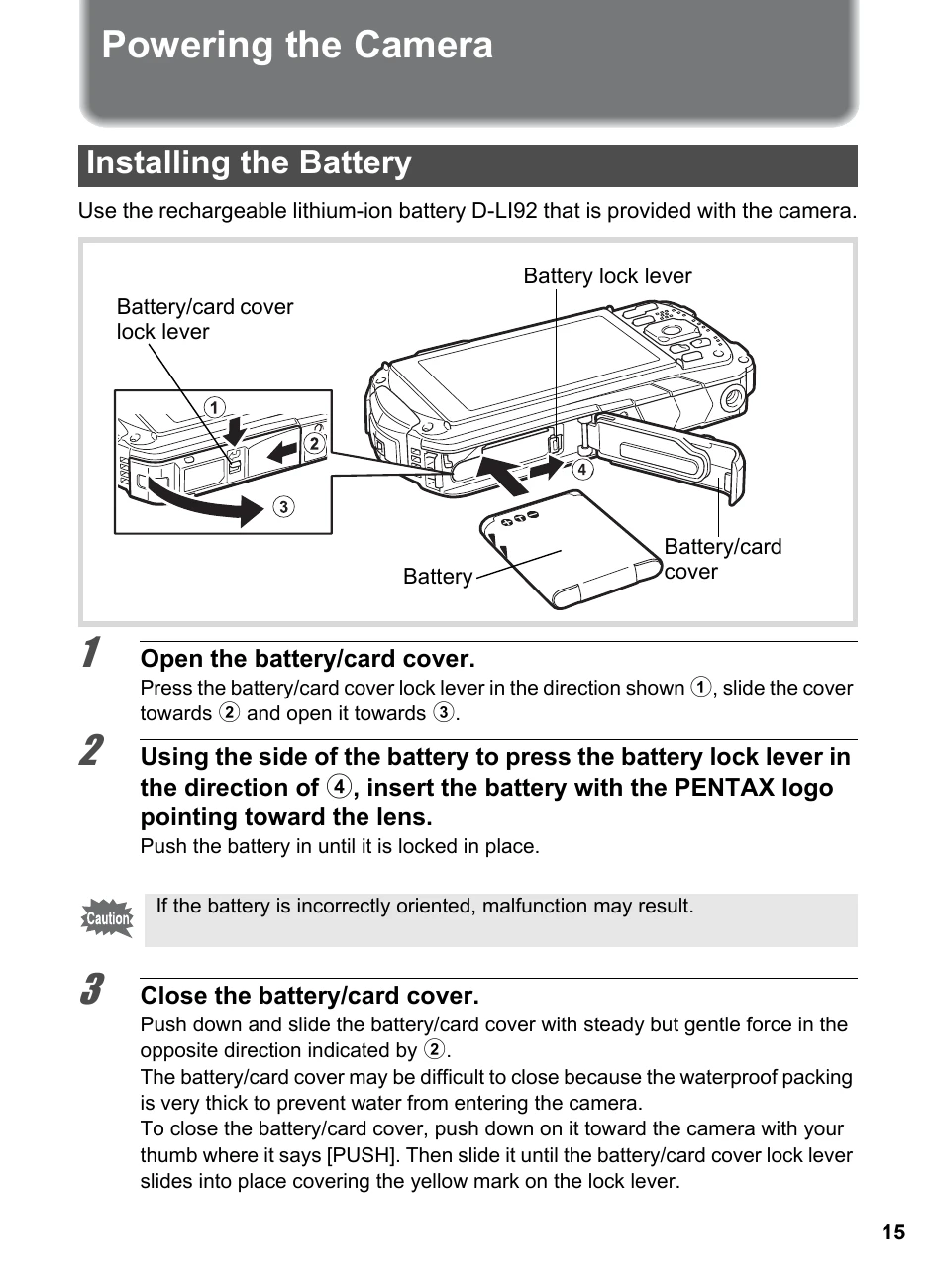
Installing the Battery: Open the battery/card cover, insert the battery with the PENTAX logo pointing toward the lens, and close the cover.
Installing an SD Memory Card: Ensure the camera is off, open the battery/card cover, insert the SD Memory Card into the socket, and close the cover.
Taking Pictures: Press the shutter release button halfway to focus, and fully to take a picture.
Recording Movies: Press the Movie button to start and stop recording.
Playback: Use the playback controls to view images and movies.
| Header 1 | Header 2 | Header 3 | Header 4 |
|---|---|---|---|
| Data 1-1 | Data 1-2 | Data 1-3 | Data 1-4 |
| Data 2-1 | Data 2-2 | Data 2-3 | Data 2-4 |
| Data 3-1 | Data 3-2 | Data 3-3 | Data 3-4 |