Brand: RICOH
Category: Camera
Document Type:
Language: EN
Brand: RICOH
Category: Camera
Document Type:
Language: EN
Uploaded: Aug. 9, 2025, 11:56 p.m.
Refer to specific warranty documentation for details.
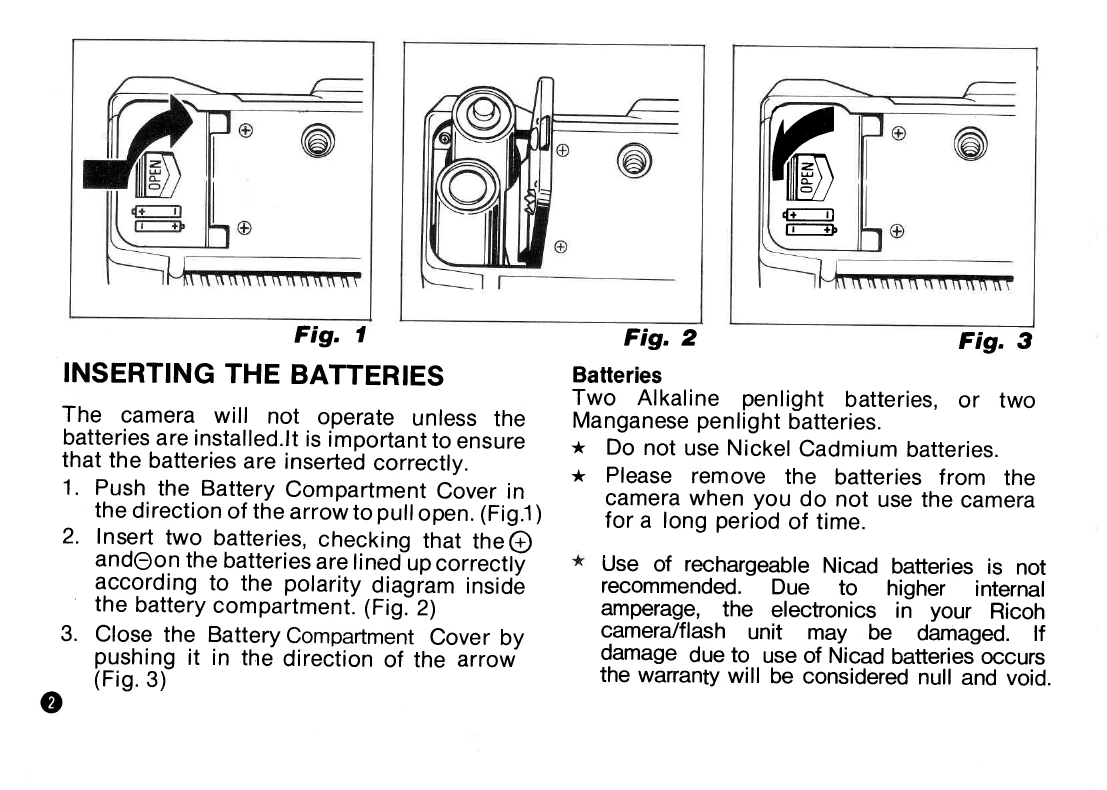
1. Insert Batteries: Open the battery compartment, insert two alkaline or manganese penlight batteries, ensuring correct polarity, and close the compartment.
2. Open Lens Shield: Slide the lens shield switch to open the lens.
3. Load Film: Open the back cover, load the film, pull the leader over the take-up spool, ensuring it's within the film guides, and close the cover. The camera will advance the film to frame 1.
4. Check Batteries: Cover the photocell, press the shutter release halfway. If the flash unit pops up, batteries are working.
5. Set Film Speed: If film has DX code, setting is automatic. For non-DX film, use the film speed selector to match the film's ISO.
6. Focusing: Frame your subject using the viewfinder. The camera automatically focuses. For close subjects, an "AF Monitor" indicates focus. For difficult subjects or off-center subjects, use pre-focus shooting.
7. Shooting: Press the shutter release button fully to take the picture. The film advances automatically.
8. Flash: The flash pops up automatically in low light. Ensure the Flash Ready Lamp is lit before shooting.
9. Self-Timer: Slide the self-timer switch for a 10-second delay before the shutter releases.
10. Rewinding Film: The film rewinds automatically at the end of the roll. A manual rewind option is available.
| Problem | Possible Cause | Solution |
|---|---|---|
| Flash Unit does not pop up | Batteries not inserted or depleted. | Check battery insertion and replace if necessary. |
| Shutter will not release | Lens shield closed. | Open the lens shield. |
| Shutter will not release | Flash Ready Lamp not lit (when flash is required). | Wait for the Flash Ready Lamp to light up. |
| Film does not advance | Film not loaded correctly. | Reload the film. |
| Film does not advance | Low battery power. | Replace batteries. |
| Focusing is inaccurate | Distance Measuring Window is dirty or covered. | Clean the Distance Measuring Window. Ensure it is not covered. |
| Overexposed pictures (bright sunlight with ISO 1000 film) | Incorrect film speed setting or lighting conditions. | Adjust film speed setting or use appropriate exposure settings. |