Manual for AF-2

Manual for AF-2

Brand: RICOH

Category: Camera

Document Type:

Language: EN
Uploaded: Aug. 9, 2025, 11:55 p.m.

Warranty Information

None

Basic Operation:

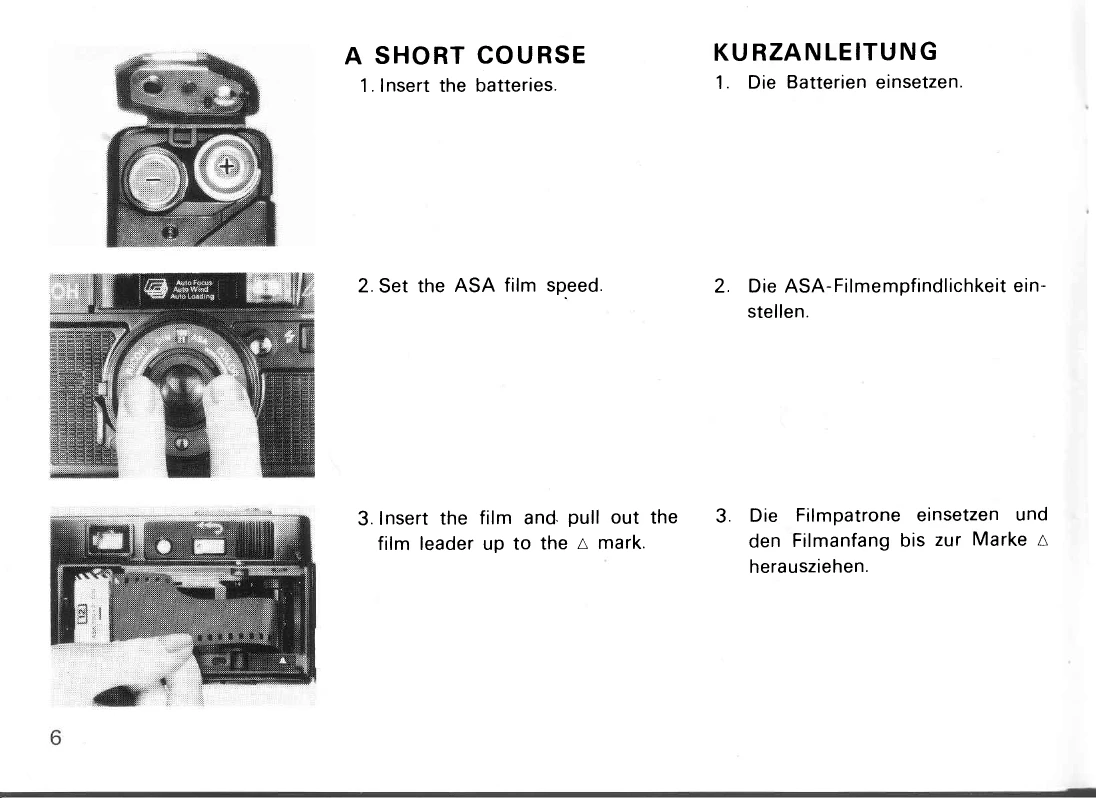
  1. Inserting Batteries: Push the Battery Compartment Cover in the direction of the arrow and pull out to open. Insert two new AA alkaline batteries as shown in the diagram.
  2. Setting Film Speed: Turn the Film Speed Ring so the correct film speed appears in the Film Speed Window. Set to a click-stop position.
  3. Inserting Film: Load film in the shade. Push the Back Cover Opening Button to open the Back Cover. Insert the film into the Film Chamber. Pull out the film leader to the mark and place it on the Film Take-up Spool.
  4. Advancing Film: Press the Shutter Release Button fully. The film advances automatically.
  5. First Shot: Close the Back Cover. Release the shutter until "1" appears in the Frame Counter window.
  6. Taking Pictures: Compose the picture within the Auto Focus Frame. Press the Shutter Release Button lightly to ensure the Camera Shake Warning Lamp is off. Press further to set focus. Press fully to release the shutter.
  7. Flash Photography: Turn the Flash Switch on if the Camera Shake Warning Lamp lights up. The flash unit will pop up. Wait for the Flash Ready Lamp to light up. Press the shutter release gently.
  8. Rewinding Film: Push the Film Rewind Button fully. Keep the Film Rewind Switch pressed until the Film Transport Indicator stops moving. Open the Back Cover and remove the film.

Troubleshooting and error codes

Problem Possible Cause Solution
Shutter cannot be released. No batteries, incorrectly inserted, or worn-out batteries. Insert new batteries correctly.
Flash Ready Lamp takes more than 30 seconds to light up. Low battery power. Replace batteries.
Shutter cannot be released even if Flash Ready Lamp lights up. Low battery power. Replace batteries.
Film advance or rewind cannot be operated. Low battery power. Replace batteries.
Camera malfunction. Shock, humidity, salt air, chemicals. Handle with care, wipe clean after exposure.
Camera malfunction. Extreme temperatures or sudden temperature changes. Avoid exposure to extreme temperatures and sudden changes.
Privacy Policy