Brand: Prestigio
Category: Car Video Recorder
Document Type: Quick Start Guide
Language: EN
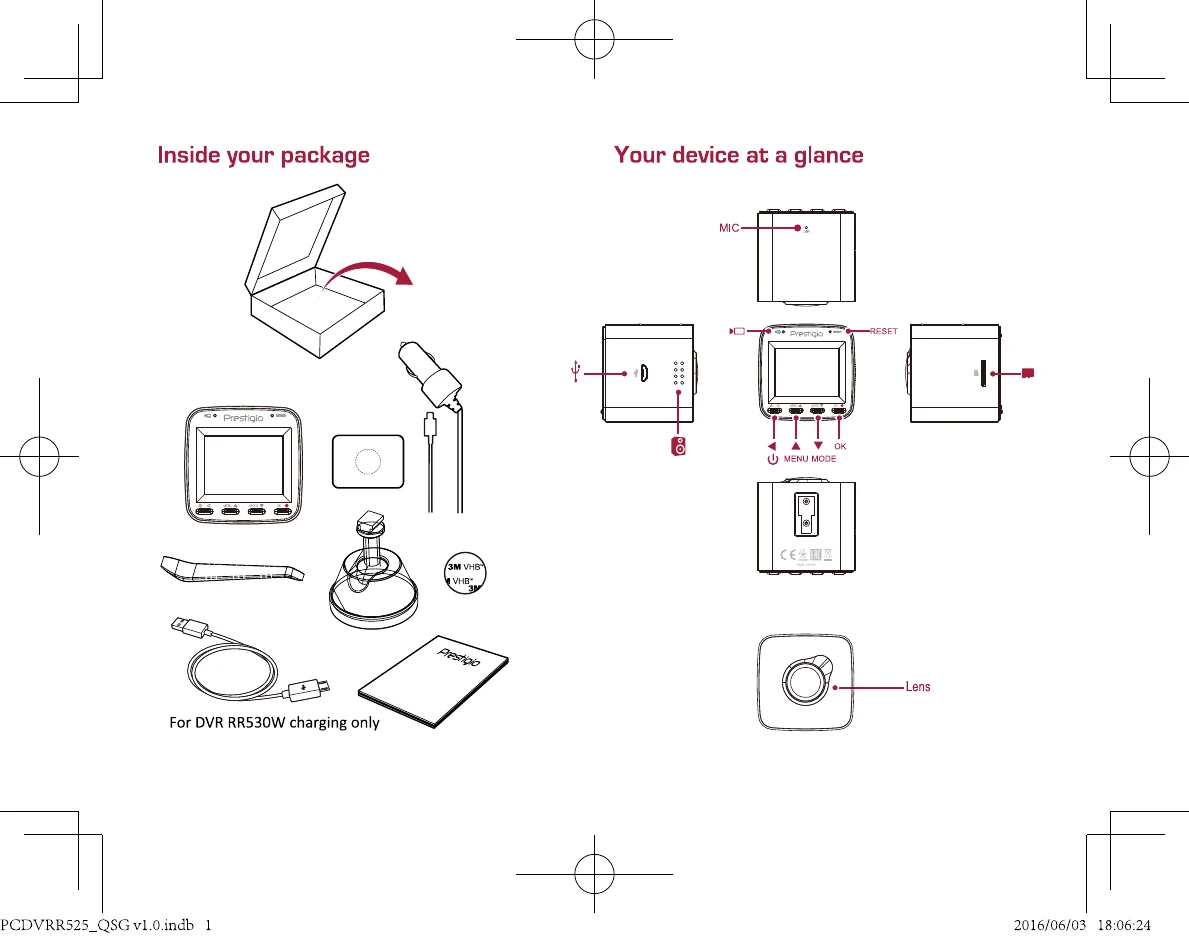
Brand: Prestigio
Category: Car Video Recorder
Document Type: Quick Start Guide
Language: EN
Uploaded: Aug. 10, 2025, 12:47 a.m.
Manufacturer's warranty period is 1 year from date of sale.
Starting Recording:
1. Insert a micro SD card (not included).
2. Connect the device to the car charger. When the car engine starts, the device will begin loop recording.
Taking Photos:
Press and hold [MODE] to select the picture mode, and then press [OK] to take photos.
Settings:
In preview mode, press and hold [MENU] to enter settings. Use [▲]/[▼] to navigate the menu.
Video Settings:
Picture Settings:
General Settings:
In preview mode, press and hold [OK] twice to enter general settings.
Playback and Media Connection:
Playback Mode: In preview mode, press and hold [MODE] to select playback mode. 1. Press [▲]/[▼] to scroll through the files. 2. Press [OK] to start playback. 3. Press and hold [ ] again to exit playback mode.
| Problem | Solution |
|---|---|
| Device does not turn on | Fully charge the battery. For the first use, it is recommended to charge the battery for at least 1.5 hours using the car adapter or at least 3 hours using the USB port of your personal computer. |
| Cannot take a photo or record video | Check if there is enough free space on the memory card. |
| Images and video recordings are not displayed | Change the resolution, picture quality, and frame rate. Replace the current memory card with one with sufficient capacity. Delete some files saved on the memory card. |
| "File Error" message appears when playing video or photos | Format the memory card. |
| Device automatically stops recording video | Use high-speed microSDHC Class 10 memory cards, as high-resolution video recording requires more memory. |
| MOV video format is not played on PC, audio lags behind video, or only audio/video is played | Most likely, the PC lacks the necessary codecs. Install the required codecs or install a VLC player. |
| The image received is blurry | Clean the camera lens. If the lens is dirty, clean it. Ensure that the maximum video recording resolution is set in the settings. |
| The device does not respond to controls | Make sure the memory card is correctly inserted into the corresponding slot. |