Manual for RoadRunner 555

Manual for RoadRunner 555

Brand: Prestigio

Category: Car Video Recorder

Document Type: Manual

Language: EN
Uploaded: Aug. 10, 2025, 12:47 a.m.

Getting Started

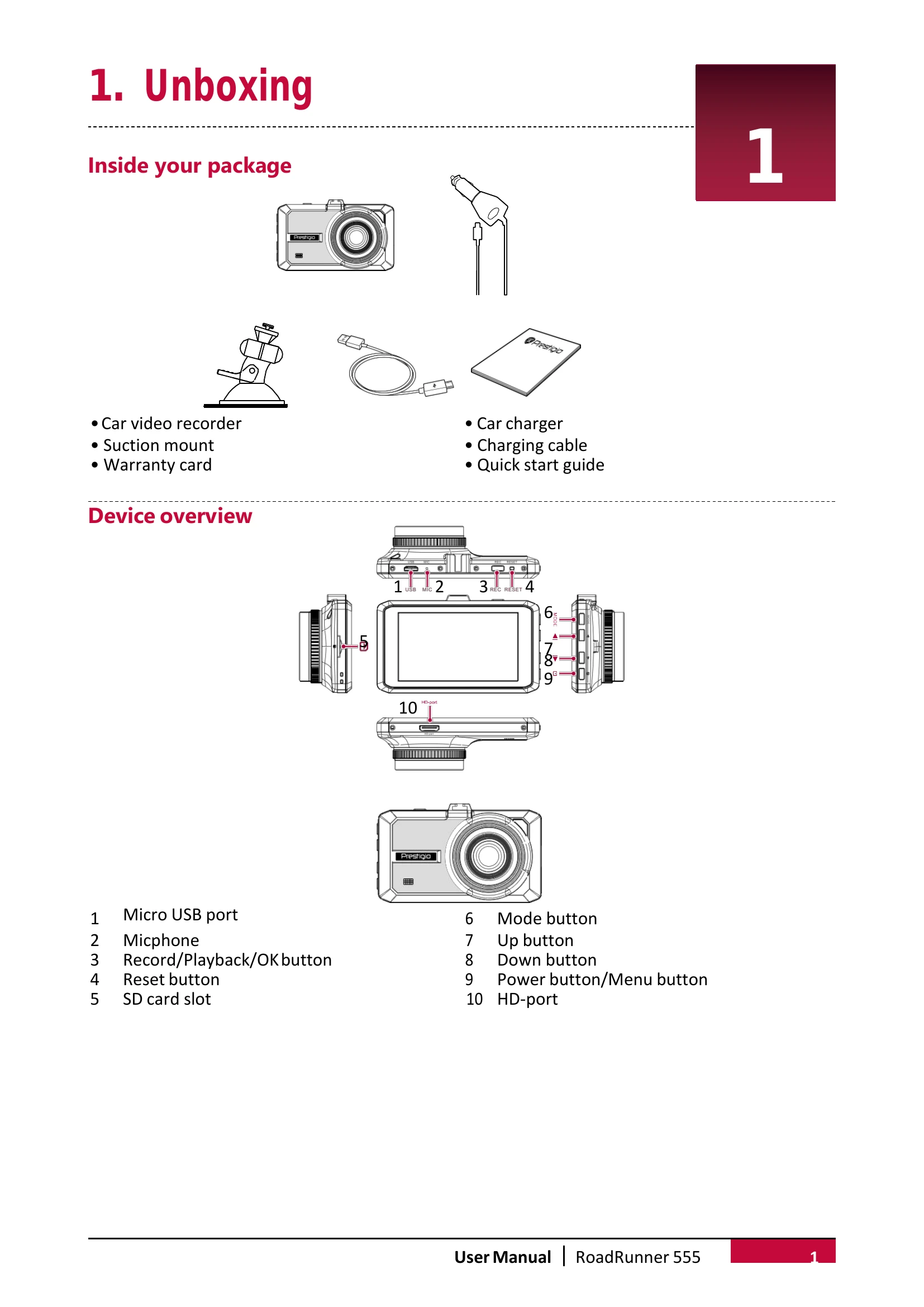
  1. Insert microSD Card: Before recording, insert a microSD card (not included) into the slot until it locks. The device will automatically recognize it as default storage.
  2. Install Suction Mount: Match the mounting slots, push the suction mount until it locks, remove the protective film, position on a clean windshield or dashboard, and twist the lock knob to secure.
  3. Charge Battery: Fully charge the Li-ion battery before first use. This takes 2-3 hours. Use the car charger via the cigarette lighter (starts charging when the car engine is on) or a micro USB cable connected to an AC 5V adapter or computer/laptop USB port.

Settings

In video/picture preview mode, press [MODE] to enter settings. Use [▲]/[▼] to navigate and [REC] to confirm. Use [MODE] to exit.

  • Video Settings: Adjust Resolution, Seamless loop recording, Motion detection, Automatic recording upon start/turn on/off, Time lapse, and Video stamp.
  • Picture Settings: Set Photo Quality, Self-capture, Sequence Capture, Continuous Shooting, Self-timer, and Date Plate.
  • General Settings: Configure Language, Format memory card (caution: erases data), Date, TV out, Sound recording, Auto LCD off Time, Saving Power, Exposure, Light frequency, Sharpness, Car number set, Stamp, White Balance, EV compensation, Time zone Settings, G-sensor sensitivity, Factory reset, System info, and Card info.

Recording

  • Auto Video Recording: Device turns on and starts recording when the car engine launches. It saves the last file and turns off when the engine shuts off.
  • Manual Video Recording: Press [REC] in preview mode to start/stop recording.
  • Record Sound: Press [▲] in preview or recording mode to turn the microphone on/off.
  • Lock Recording: During recording, press [MODE] to lock/unlock the video.
  • Take Picture: Press [MODE] to select picture mode, then press [REC] to take photos.

File Management

  • Browse Files: In preview mode, press [MODE] twice to enter playback mode. Use [▲]/[▼] to scroll through files.
  • Delete File: Press [REC] to delete one or all files, then press [REC] to confirm. Protected files must be unlocked first.
  • Lock/Unlock File: Press [MODE] to protect or unprotect selected files.

Playback

  • Play Video on DVR: In playback mode, use [▲]/[▼] to scroll, [REC] to start playback, and [▲]/[▼] to play backward/forward.
  • Playback on PC: Remove the memory card and insert it into a computer's card reader. The DVR's USB port is for charging only.
Privacy Policy