Powering On/Off:
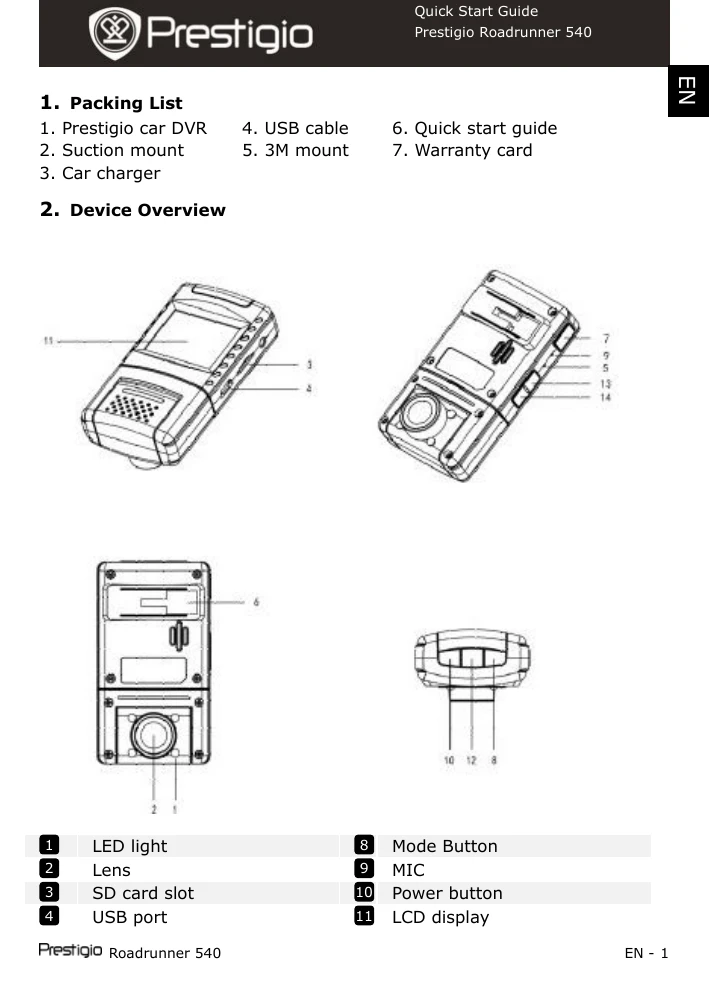
- Position the device using the suction/3M mount and press the Power button to turn it on. Hold for 3 seconds to power off.
- Connect to the car charger for automatic power on/off with the car engine.
Charging: Connect to the car charger. Full charge takes approximately 2-3 hours. Operating while charging may extend charge time.
Recording: Select Video Mode, press the Record button to start. Press again or stop the engine to stop. The device automatically turns on and records when connected to the car charger and the engine starts.
Taking Pictures: Select Picture Mode, press the Record button. Use Up/Down buttons to zoom.
Settings: Press the Menu button to access settings like Movie Mode, Quality, Clip Time, Sound Record, MIC Sensitivity, Scene, Exposure, White Balance, ISO Sensitivity, Color, and Effect. Use navigation buttons to select and adjust.
USB Connection: Connect via USB cable to download files (AVI for video, JPG for pictures) to your PC. Files are stored in the DCIM folder.