Manual for RoadRunner 5191 & RoadRunner 5201

Manual for RoadRunner 5191 & RoadRunner 5201

Brand: Prestigio

Category: Car Video Recorder

Document Type: Manual

Language: EN

Uploaded: Aug. 10, 2025, 12:47 a.m.

Manual Publish Date: 2015

Warranty Information

None

Getting Started

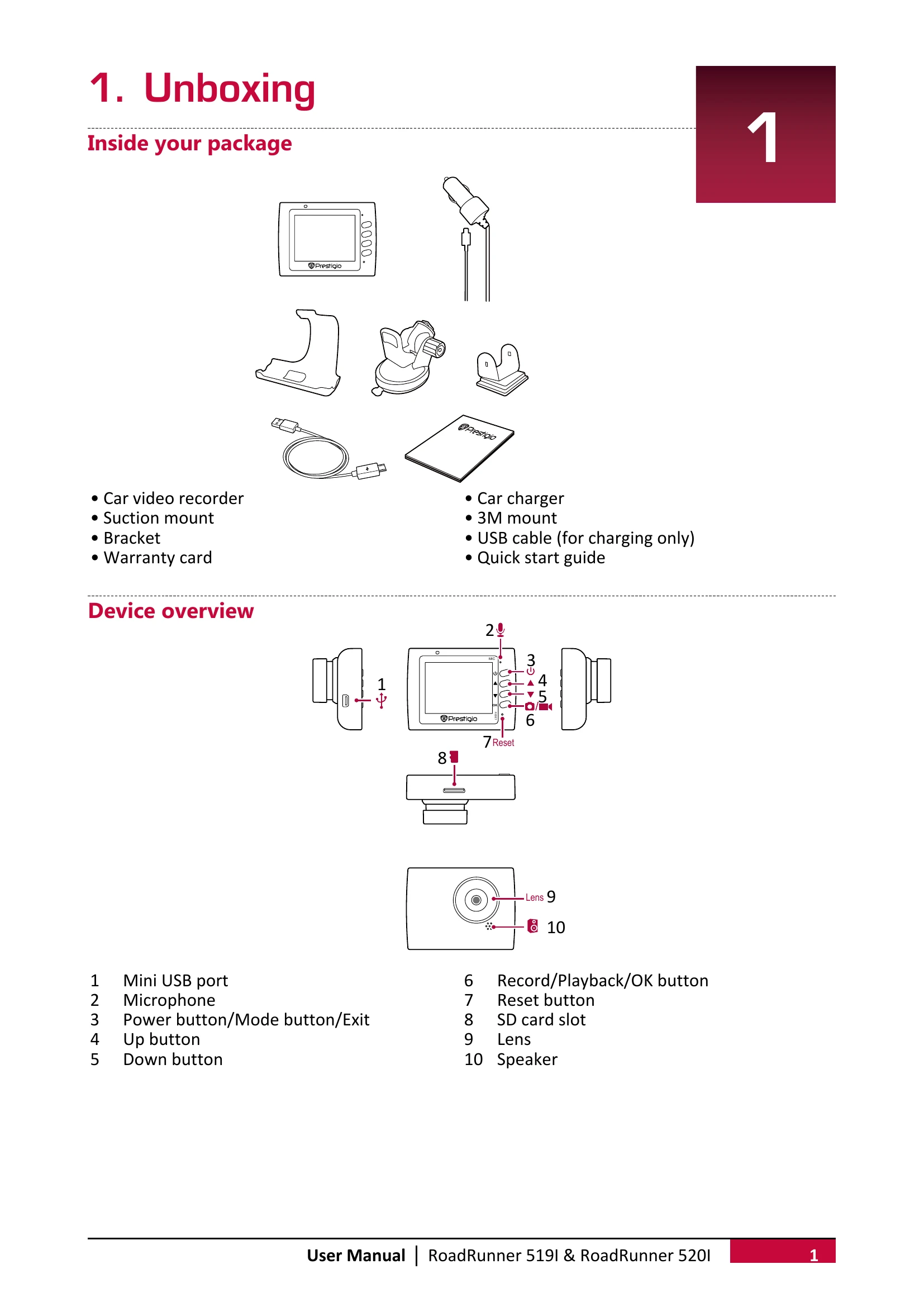
  1. Insert microSD card.
  2. Mount device using suction or 3M mount.
  3. Charge the battery via car charger or USB.

Recording

  • Auto: Device starts recording when car engine starts.
  • Manual: Press OK to start/stop recording.
  • Sound: Press ▲ to turn microphone on/off.
  • Exposure: Press ▼ to adjust exposure.
  • Take Picture: Press U to select picture mode, then OK to take photo.

File Management

  • Browse: Enter playback mode (press C twice), use ▲/▼ to scroll.
  • Delete: Press and hold OK to delete, press OK to confirm.
  • Lock/Unlock: Press and hold OK to protect/unprotect files.

Playback

  • On DVR: Scroll with ▲/▼, press OK to play, ▲/▼ to adjust speed, exit with C.
  • On PC: Remove microSD card and insert into card reader.
Privacy Policy