Brand: Prestigio
Category: Car Video Recorder
Document Type: Manual
Language: EN
Brand: Prestigio
Category: Car Video Recorder
Document Type: Manual
Language: EN
Uploaded: Aug. 10, 2025, 12:48 a.m.
1. Insert microSD card: Ensure the card is inserted until it locks.
2. Install suction mount: Attach the device to the windshield or dashboard securely.
3. Charge battery: Fully charge the Li-ion battery before first use (2-3 hours).
Auto video recording: Device turns on and records when the car engine starts.
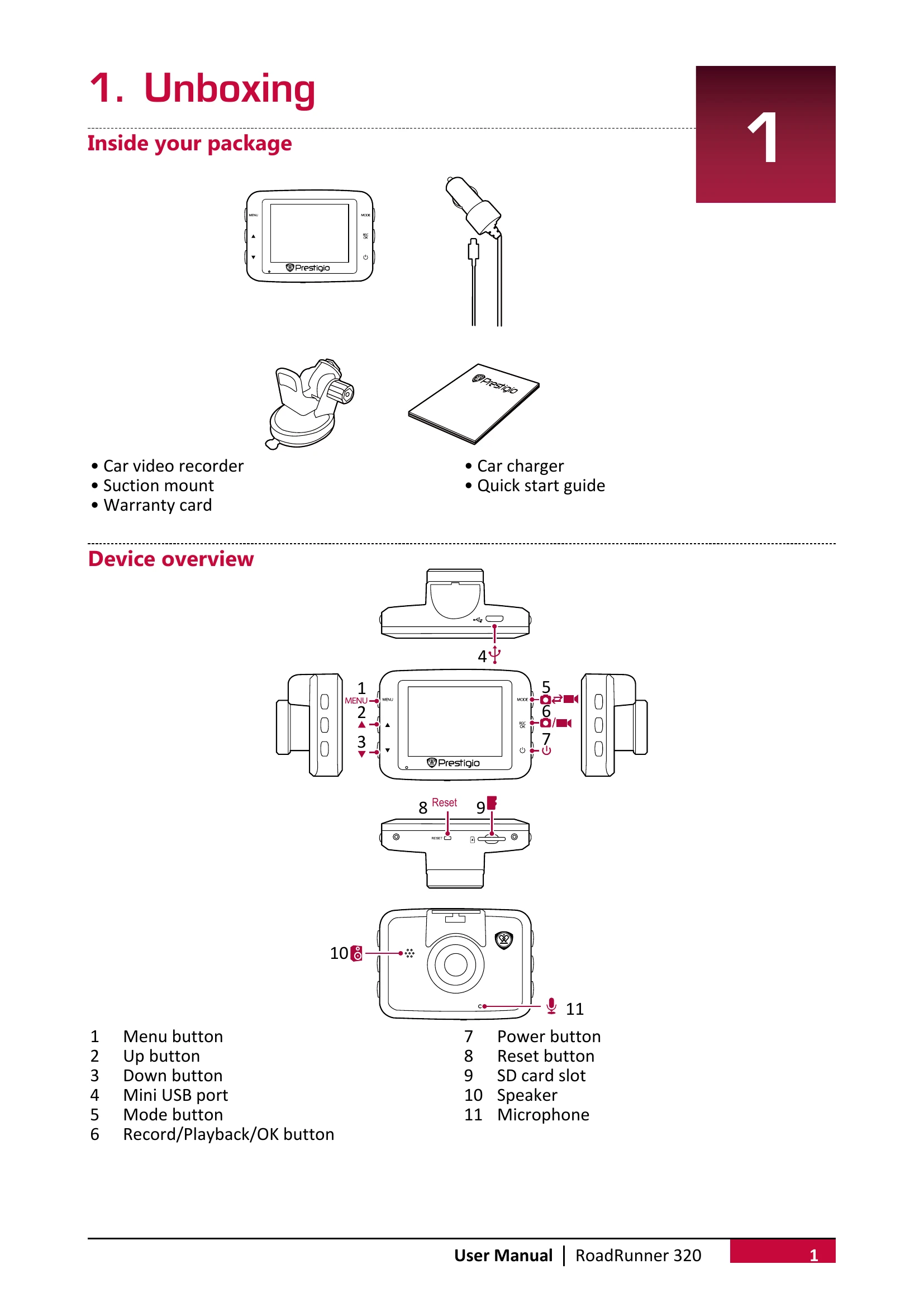
Manual video recording: Press [REC] to start and stop.
Record sound: Press [▲] to toggle microphone.
Set exposure: Press [▼] to adjust exposure.
Lock video: Press [MODE] during recording.
Take picture: Press [MODE] to enter picture mode, then [REC].
Browse files: Enter playback mode (press [M] twice), use [▲]/[▼] to scroll.
Delete file: Press [MENU], select file(s), press [OK] to confirm.
Lock/Unlock file: Press [MENU] to protect/unprotect.
On DVR: In playback mode, use [▲]/[▼] to scroll, [OK] to play. Use [▲]/[▼] to adjust speed. Press [MODE] to exit.
On PC: Remove microSD card and insert into computer's card reader.