Quick Start Guide for PCDVRR515

Quick Start Guide for PCDVRR515

Brand: Prestigio

Category: Car Video Recorder

Document Type: Quick Start Guide

Language: EN
Uploaded: Aug. 10, 2025, 12:47 a.m.

Warranty Information

The Prestigio RoadRunner PCDVRR515 comes with a two-year limited warranty.

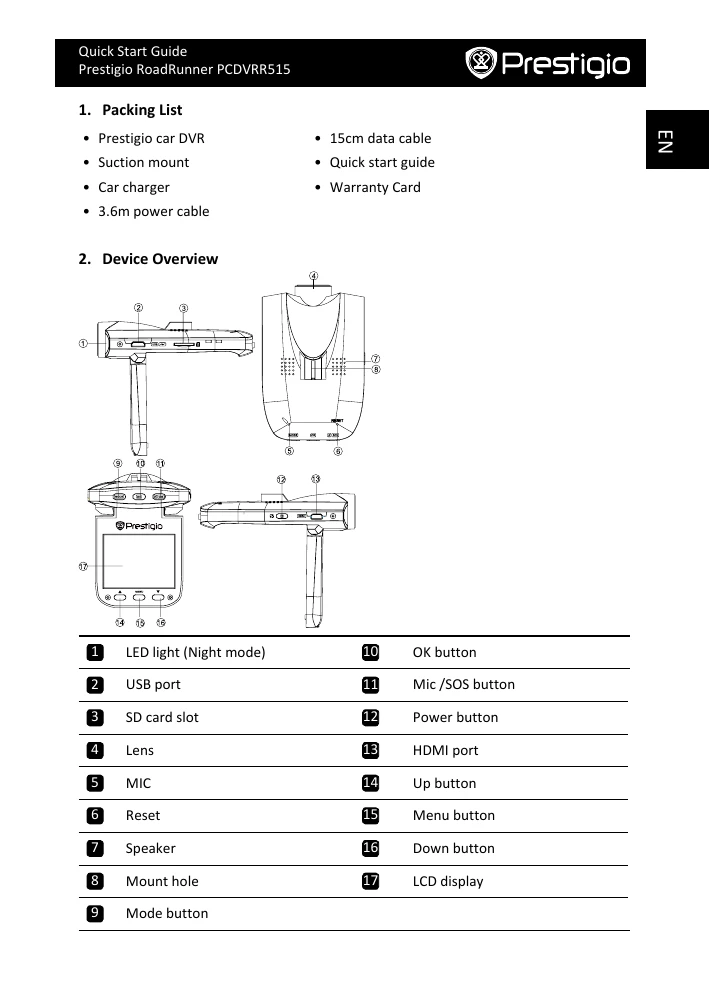
  • Power On/Off: Press the Power button to turn the device on. Press again to turn off. The device also turns on/off automatically with the car engine when connected to the car charger.
  • Charging: Use the provided USB cable to connect to a computer or use the car charger. A full charge takes approximately 2-3 hours.
  • Inserting Micro SD Card: Insert a Micro SD card (not included) into the slot before recording.
  • Recording: The device starts loop video recording automatically after 5 seconds of the car engine starting. Press OK to save the current file and enter standby.
  • Taking Pictures: Press the Mode button to select picture mode, then press OK to take a photo. Use the Menu button to adjust resolution and time settings.
  • Playback: Press Mode button to enter playback mode. Use up/down buttons to navigate files and OK to play.
  • USB Connection: Connect to a PC/notebook via USB to download files. Select 'Mass Storage' to access files in the DCIM folder.
  • PC Camera Mode: Connect to a computer via USB, select 'PC CAM' mode to use the device as a webcam.
  • Playback on TV: Connect to a TV using an HDMI cable (not included) for playback.
Privacy Policy