Brand: PIONEER
Category: Headphones
Document Type: Manual
Language: EN
Brand: PIONEER
Category: Headphones
Document Type: Manual
Language: EN
Uploaded: Nov. 21, 2025, 7:45 p.m.
Warranty information varies by region (Europe/U.S.A. and Canada/Japan).
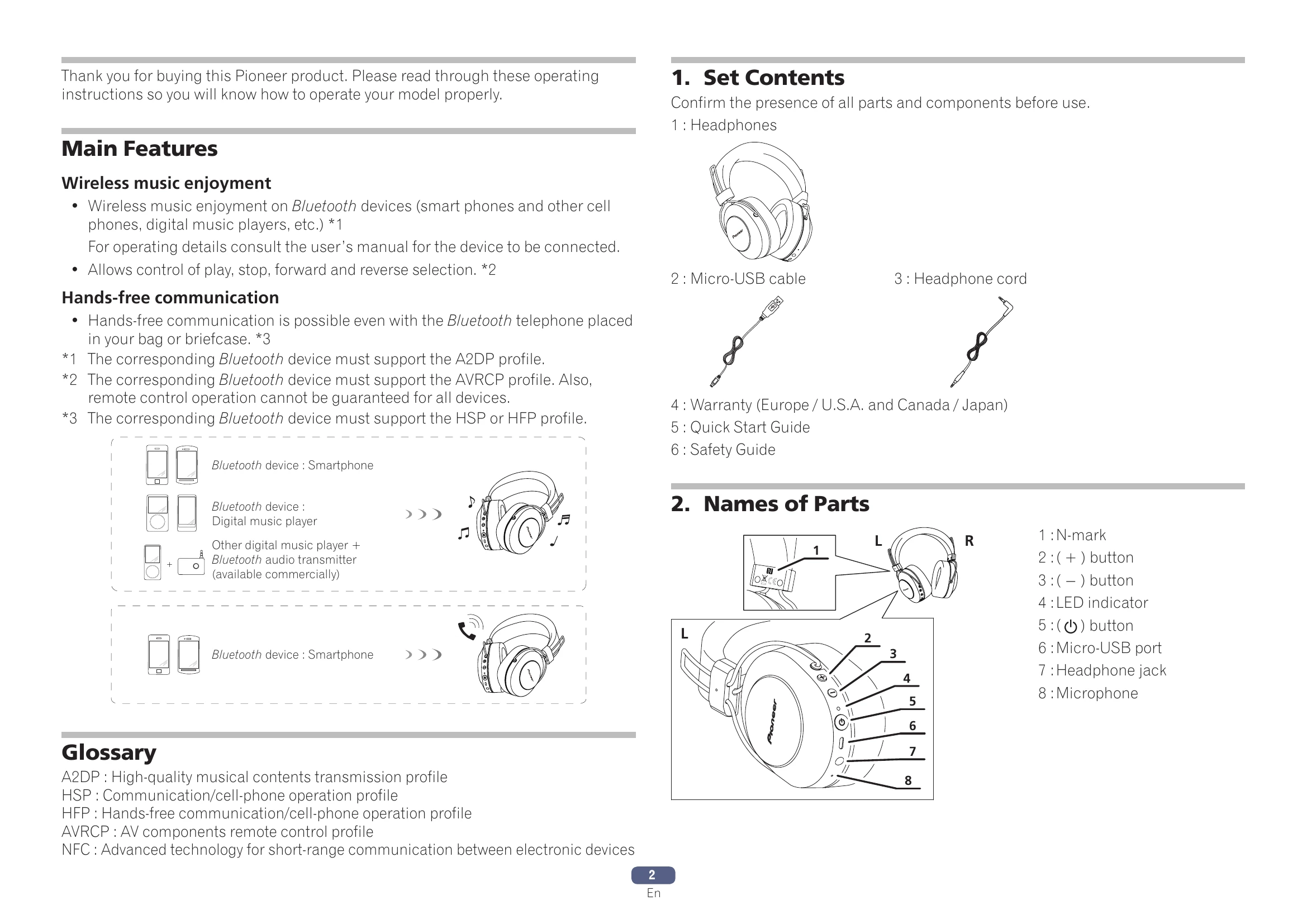
Connect the micro-USB cable to the headphones and a USB port on a computer. The LED indicator lights red during charging and turns off when complete. Full charge takes about 4 hours, providing up to 12 hours of use. A low battery is indicated by a beeping sound and flashing red LED.
Controls when listening to music:
Vocal communication controls:
| Problem | Remedy |
|---|---|
| Power won't turn on. | Recharge the wireless headphones. |
| The batteries will not charge. | Confirm that computer's power is ON. Confirm that computer is not in power-saving mode. Confirm that accessory micro-USB cable is securely connected to both the wireless headphones and the computer. |
| Can't perform pairing. | Place the wireless headphones and Bluetooth device closely together when performing pairing. |
| Can't perform Bluetooth connection. | Confirm that power is turned on for both wireless headphones and Bluetooth device. Confirm that Bluetooth function is turned ON in the device you are connecting to. |
| No sound. (When playing music) | Confirm that power is turned on for both wireless headphones and Bluetooth device. Confirm that connection with Bluetooth device is set for profile A2DP. Confirm that the connected music playback device is set for PLAY. Confirm that sound volume controls on both wireless headphones and music playback device are set to appropriate levels. |
| Sound is distorted. (When playing music) | Check that no other devices utilizing the 2.4 GHz wavelength (including microwave ovens, wireless radios, etc.) are nearby, and that no obstructions block the signal path. |
| Can't use hands-free operation. | Confirm that wireless headphones and Bluetooth device are connected using the profile HFP or HSP. If connection to the Bluetooth device is in profile A2DP, it may be necessary to change connection profiles (depending on the specifications of the Bluetooth device). |
| Communication distance is short, sound is garbled. | Check that no other devices utilizing the 2.4 GHz wavelength (including microwave ovens, wireless radios, etc.) are nearby, and that no obstructions block the signal path. |
| Can't perform connection with NFC. | Confirm that the Bluetooth device is equipped with NFC function. Activate the NFC setting on the Bluetooth device. Confirm that the orientation of the wireless headphones and Bluetooth device is correct when swiping. In some cases recognition of the device may require more time; in this event continue swiping the devices until connection is completed. Remove the Bluetooth device from its case or cover. |