Brand: PIONEER
Category: Audio Player
Document Type: Manual
Language: EN
Brand: PIONEER
Category: Audio Player
Document Type: Manual
Language: EN
Uploaded: Nov. 21, 2025, 7:48 p.m.
The warranty period for this product is one year from the date of purchase.
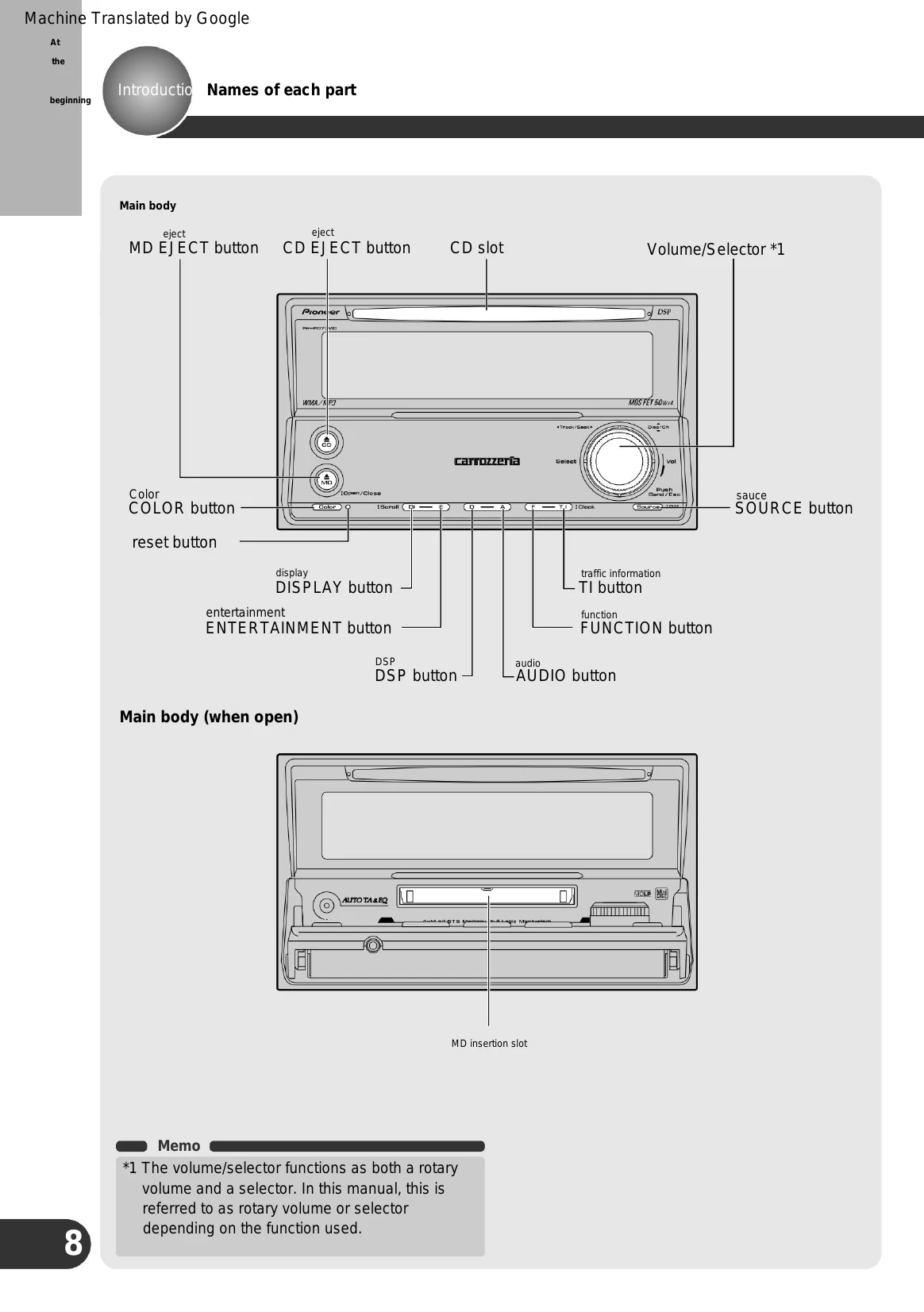
Switching Sources: Press the SOURCE button to cycle through available audio sources: Radio (FM/AM), TV, Built-in CD, Multi-CD, Built-in MD, External Unit 1 & 2, and AUX. Press and hold the SOURCE button for over 1 second to turn off the power.
Playing CDs: Insert a CD into the CD slot. The CD will start playing. Use the selector to choose songs, fast forward, or rewind. Adjust volume by turning the rotary volume control. Press the CD EJECT button to stop playback and eject the CD.
Playing WMA/MP3/WAV: Insert a CD-ROM containing WMA/MP3/WAV files. Navigate folders using the selector (up/down). Select songs and control playback (fast forward/reverse) using the selector (left/right). Adjust volume as with CDs.
Playing MDs: Press the MD EJECT button, open the front panel, and insert the MD with the label side up. The MD will play. Use the selector to switch between groups and songs, and to fast forward/reverse.
| Symptoms | Cause | Treatment |
|---|---|---|
| can not turn on. Do not work. | Each lead wire or connector is not connected correctly. | Please check again that the connection is correct and secure. (ÿ Installation manual) |
| fuse is blown | Correct the cause of the blown fuse and replace the blown fuse with one of the same capacity. (ÿInstallation manual) | |
| There is no sound. The sound is small. | I'm turning down the volume. | Please turn up the volume. (ÿWerty pages 19, 21, 23, 25, 27 only here) |
| Attenuator is turned on. | Please release the attenuator. (ÿUseful functions q page 96) | |
| There is no sound from the front or rear speakers. | The front/rear volume balance is not adjusted properly. | Please adjust correctly. (ÿ Adjust the sound w page 73) |
| There is no sound from the left or right speaker. | The left and right volume balance is not adjusted properly. | Please adjust correctly. (ÿ Adjust the sound w page 73) |
| There is a loud noise while playing a CD. Get out. CD playback stops midway. | There are large scratches or warps on the CD. If the CD is defective. | Please replace it with another CD. get better |
| The CD is extremely dirty. | Wipe any dirt off the CD. (ÿOther q page 109) | |
| The CD is cloudy or has water droplets on it. There is. | Wipe off any cloudy or water droplets from the CD. (ÿOther q page 109) | |
| Insert the CD upside down. I'm doing it. | Insert the CD with the title side facing up. please. (ÿOnly here we page 18 and 20) | |
| There is a loud noise while playing an MD. MD playback stops midway. The MD will come out automatically. | The MD is extremely dirty. | Please replace the MD. |
| If the MD becomes cloudy or has water droplets There is. | Please replace the MD. | |
| The MD is inserted in the correct direction. Not yet. | Take out the MD and insert it in the correct direction. please. (ÿ Page 22 only here) | |
| While receiving the radio, "G" "Gee, zaza" There are a lot of sounds. | The frequency of the broadcasting station is correct. do not have. | Please tune the frequency correctly. (ÿOnly here t page 25) |
| Broadcasting station signal is weak. | Try selecting another station. (ÿOnly here t page 25) | |
| There are obstacles around, etc. Reception is not good. | The better the reception, the less noise there will be. Become. | |
| Automatic channel selection is not possible. | Broadcasting station signal is weak. | Please select the station manually. (ÿOnly here t page 25) |