Manual for PCA635VC

Manual for PCA635VC

Brand: Philips

Category: Electronics

Document Type: Manual

Language: EN
Uploaded: Nov. 21, 2025, 8:37 p.m.

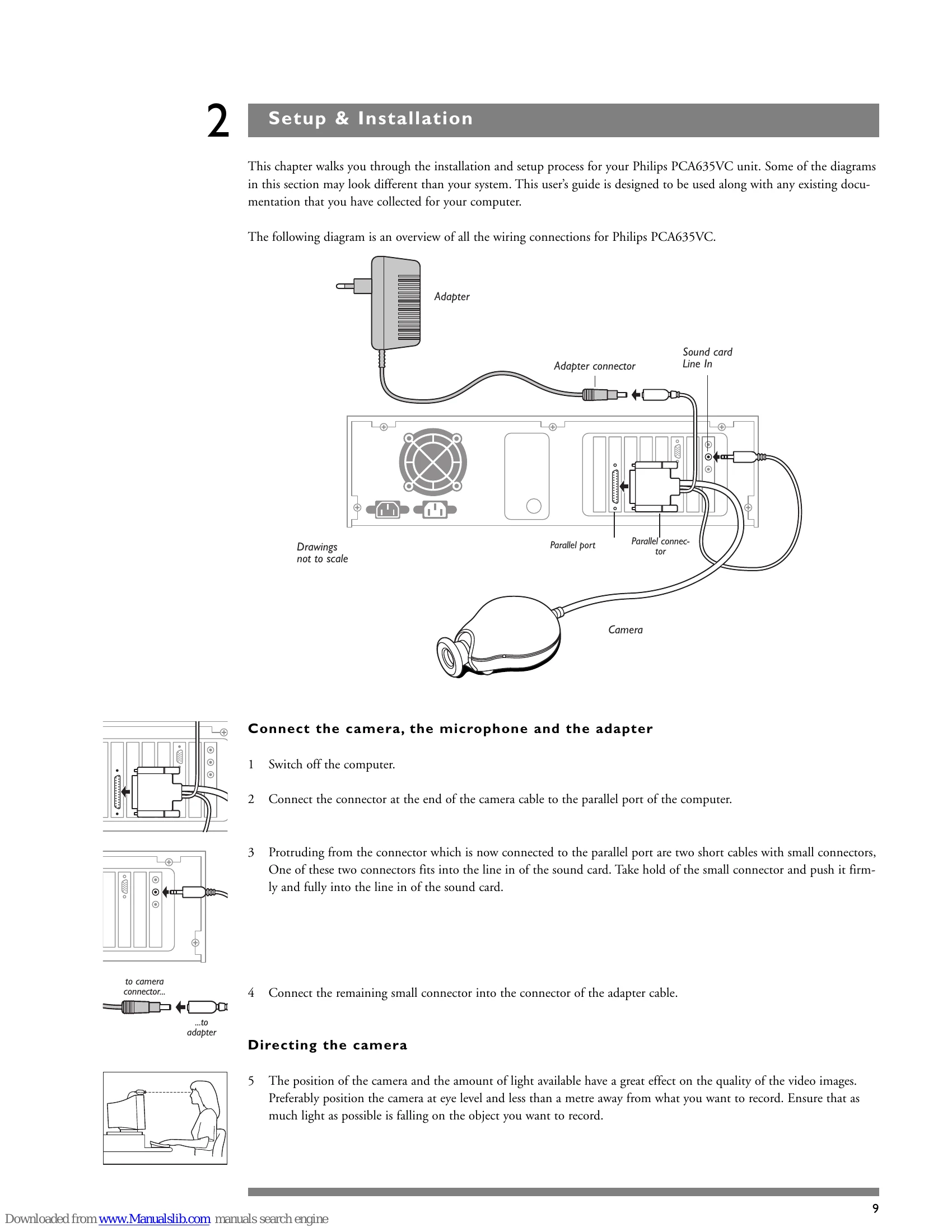
Connecting the Camera, Microphone, and Adapter

  1. Switch off the computer.
  2. Connect the camera cable to the computer's parallel port.
  3. Connect one small cable from the camera connector to the sound card's line-in.
  4. Connect the remaining small connector to the adapter cable.

Directing the Camera

Position the camera at eye level, less than a meter away from the subject, with ample light for optimal image quality.

Software Installation

  1. Reconnect power and turn on the system.
  2. Insert the PCA635VC CD-ROM.
  3. Click "Start", then "Run".
  4. Type the program name (e.g., X:\Setup, where X is the CD-ROM drive letter).
  5. Follow the on-screen installer directions.

Using the Videogram Creator

Access the application via Start > Programs > Philips PCA635VC > Videogram Creator. Use the PREVIEW, RECORD, and SEND buttons for video creation.

Video & Audio Settings

Adjust quality, size, format, and other settings in the Videogram Creator application to optimize video and audio capture.

Privacy Policy