Manual for GL-PH

Manual for GL-PH

Brand: PHILIPS

Category: Electronics

Document Type: Manual

Language: EN
Uploaded: Nov. 21, 2025, 7:04 p.m.

Warranty Information

One (1) year limited warranty from date of purchase for component failure.

Using the Philips GuideLight for the first time

  1. Charge the Philips GuideLight for at least 24 hours before using it for the first time.
  2. Connect the charger unit with the plug into the wall socket.
  3. Place your lamp unit on the charger in the dedicated slot.
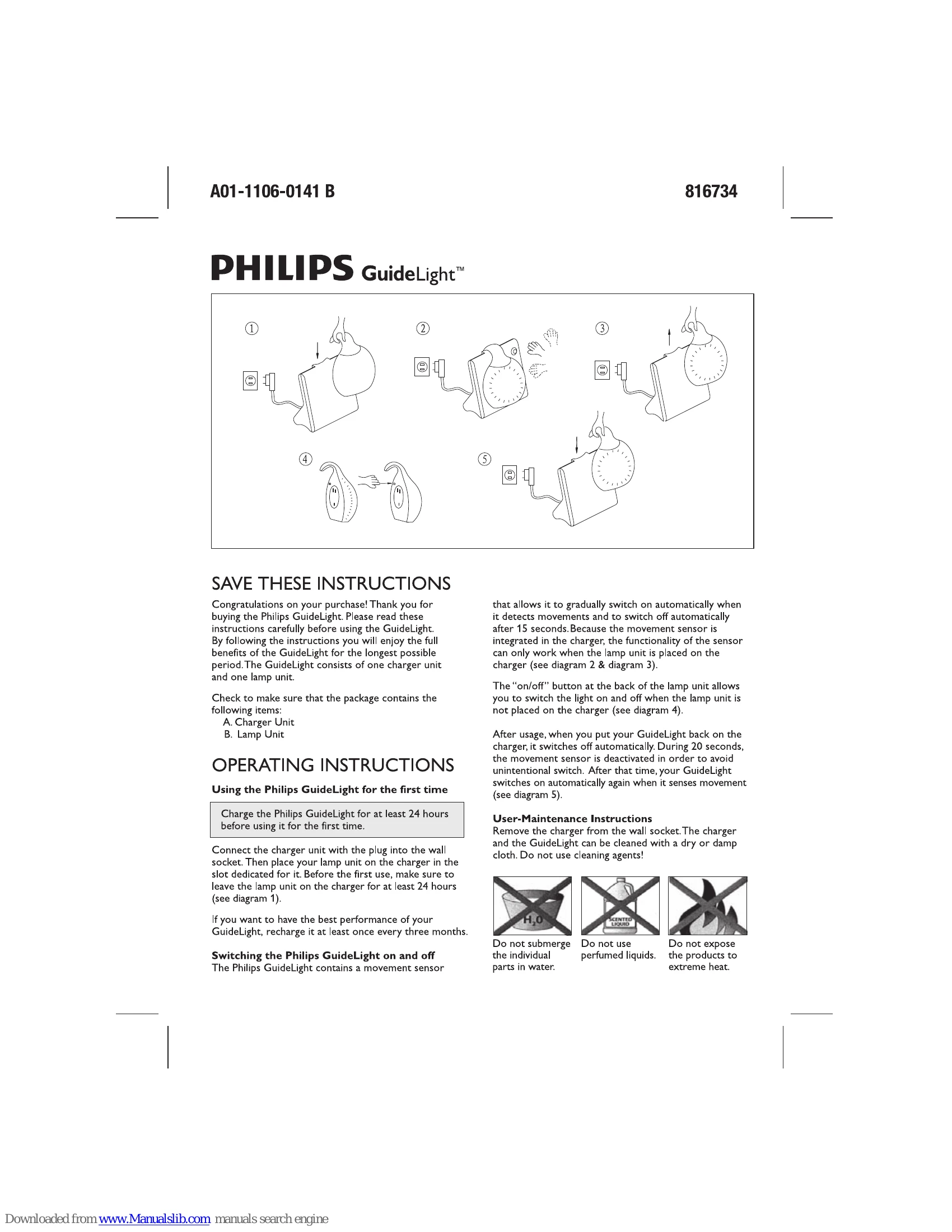
  4. Ensure the lamp unit stays on the charger for at least 24 hours before the first use (see diagram 1).
  5. Recharge the GuideLight at least once every three months for optimal performance.

Switching the Philips GuideLight on and off

  • The GuideLight has a movement sensor that automatically turns it on with movement and off after 15 seconds. This sensor only works when the lamp unit is on the charger (see diagrams 2 & 3).
  • Use the "on/off" button on the back of the lamp unit to control the light when it's not on the charger (see diagram 4).
  • When placed back on the charger, the light turns off automatically. The movement sensor is deactivated for 20 seconds to prevent accidental switching. After this, it will reactivate to movement detection (see diagram 5).

Troubleshooting and error codes

Philips GuideLight not turning on. Lamp unit not charged. Charge the lamp unit for at least 24 hours.
Movement sensor not working. Lamp unit not on the charger. Place the lamp unit on the charger. The sensor functions when the lamp is on the charger.
Light turning off too quickly. 15-second auto-off function. This is normal operation. The light will reactivate to movement.
Light not turning off automatically when placed on charger. 20-second deactivation period after placing on charger. Wait 20 seconds for the sensor to reactivate.
Privacy Policy