Brand: PHILIPS
Category: Audio
Document Type: Manual
Language: EN
Brand: PHILIPS
Category: Audio
Document Type: Manual
Language: EN
Uploaded: Nov. 21, 2025, 6:55 p.m.
Manual Publish Date: 2013-01-01
Warranty does not apply if damage is caused by failure to follow instructions.
| Troubleshooting | |
| No power or no sound | |
| • | The power supply from car battery is cut off, or the car battery runs out of energy. |
| • | Power the system with car battery. |
| • | Car engine is not on. Turn the car engine on. |
| • | Cable is not correctly connected. Check connections. |
| • | The fuse is burnt. Replace the fuse. |
| • | Volume is too low. Adjust volume. |
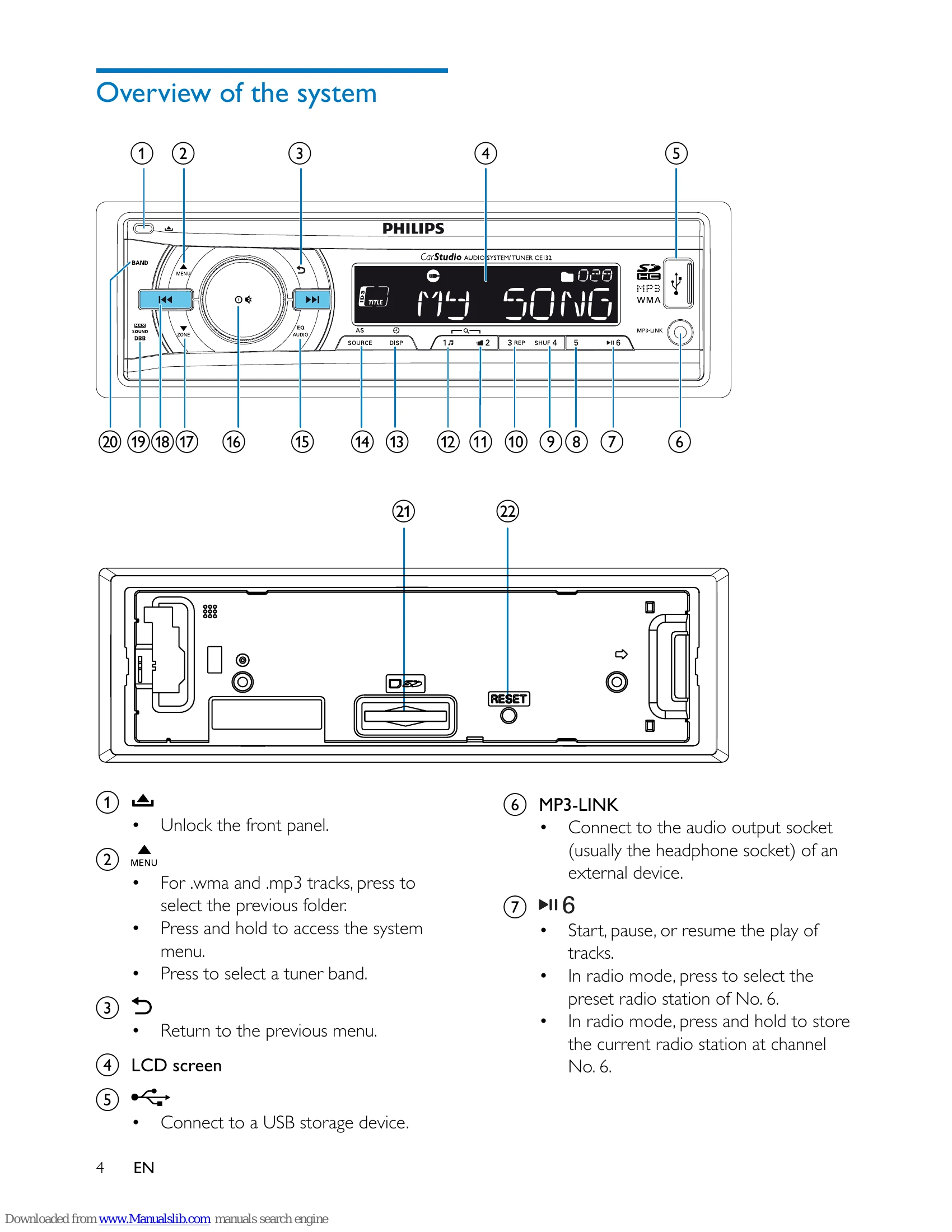
| • | If the above solutions cannot help, press the RESET button. |
| • | Make sure that the current track is in a compatible format. |
| Noise during broadcast | |
| • | Signals are too weak. Select other stations with stronger signals. |
| • | Check the connection of the car antenna. |
| • | Change the broadcast setting from stereo to mono. |
| Preset stations are erased. | |
| • | Battery cable is not correctly connected. Connect the battery cable to the terminal that is always live. |
| Display shows ERR-12. | |
| • | Data error. Check the USB storage device or SD/SDHC card. |