Brand: PARKSIDE
Category: Tools
Document Type: Manual
Language: EN
Brand: PARKSIDE
Category: Tools
Document Type: Manual
Language: EN
Uploaded: Nov. 21, 2025, 7:38 p.m.
This product comes with a 3-year warranty from the date of purchase.
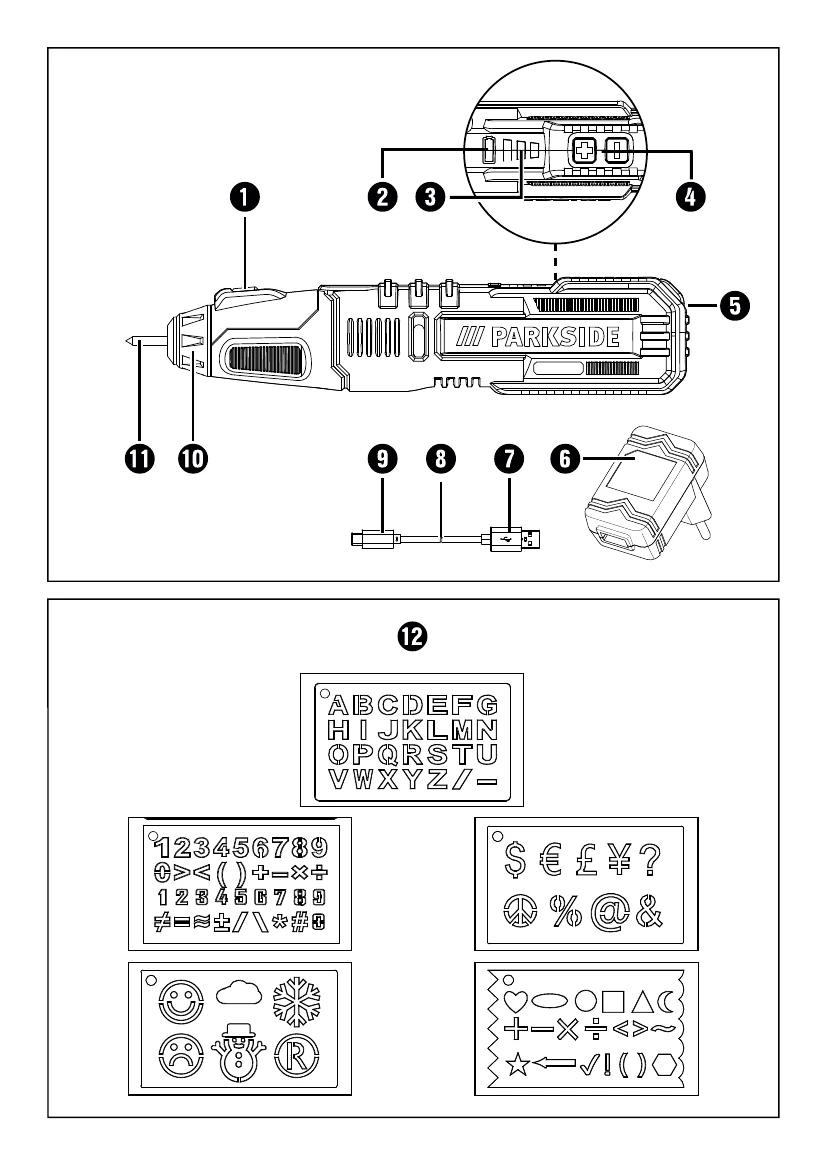
Charging the battery: The battery is partially charged upon delivery. Fully charge it before first use. Li-ion batteries can be charged anytime without reducing lifespan. Do not charge when the ambient temperature is below 10°C or above 40°C. Connect the USB-C cable to the device and the USB plug to the mains adapter. Plug the adapter into a 100-240V~ 50/60Hz power source. The charge indicator LED will turn red. A green LED indicates charging is complete.
Turning the device on/off: Press and hold the ON/OFF switch to turn the device on. Release the switch to turn it off.
Adjusting engraving depth: Use the +/- buttons to adjust the speed. Lower settings are usually sufficient for most applications. Press '+' to increase depth, '-' to decrease depth.
Changing the engraving tip: Ensure the device is off. Replace the tip when worn. Turn the tip lock counter-clockwise to remove it. Remove the tip from the lock. Remove springs and washers. Slide washer and spring onto the new tip. Insert the tip and turn the lock clockwise to secure.
Working tips: Hold the device at an angle like a pen, with your arm resting on the table. Apply light pressure to the workpiece. Practice feed speed on scrap material. The tungsten carbide tip is not suitable for engraving CDs/DVDs.
| Problem | Possible Cause | Solution |
| Device does not start | Battery not charged | Charge the battery. |
| Engraving is not deep enough | Engraving depth setting too low | Increase the engraving depth using the +/- buttons. |
| Engraving tip is worn out | Replace the engraving tip. | See "Changing the engraving tip" section. |
| Device overheats | Overloading or prolonged use | Let the device cool down. Do not overload. |