Brand: PARKSIDE
Category: Home Appliances
Document Type: Manual
Language: EN
Brand: PARKSIDE
Category: Home Appliances
Document Type: Manual
Language: EN
Uploaded: Nov. 21, 2025, 7:06 p.m.
This appliance has a 3-year warranty from the date of purchase for material or manufacturing faults.
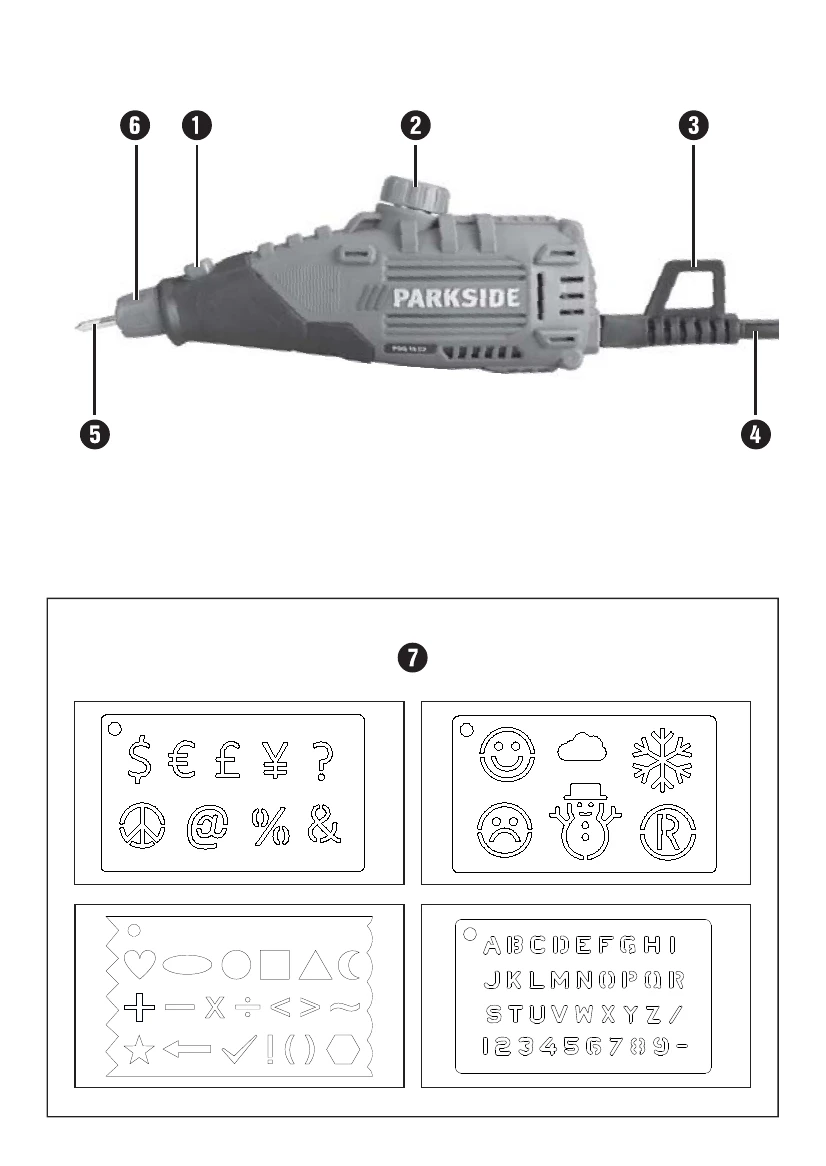
Switching on: Press the ON/OFF switch 1.
Switching off: Let go of the ON/OFF switch 1.
Turn the stroke rate control 2 towards the '+' to increase the stroke depth.
Turn the stroke rate control 2 towards the '-' to decrease the stroke depth.
Change the engraving tip 5 when it becomes worn and no longer delivers desired results. Turn the engraving tip lock 6 anticlockwise until the engraving tip 5 can be removed.
Remove the spring and washer.
Slide the washer and spring onto a new engraving tip 5. Insert it into the appliance and turn the engraving tip lock 6 clockwise to lock the tip.
Ensure the engraving tip 5 is fixed correctly.
Move the engraving tip 5 over the workpiece with gentle pressure. Practice on spare material to find the ideal speed.