Manual for KX-MB2085CX

Manual for KX-MB2085CX

Brand: Panasonic

Category: Office Equipment

Document Type: Manual

Language: EN
Uploaded: Nov. 21, 2025, 7:45 p.m.

Manual Publish Date: 2013-08-01

Warranty Information

Please refer to the warranty card for specific warranty details.

  • Connecting the unit: Connect the power cord, telephone line cord, and optional devices like an answering machine. For KX-MB2090 models, connect the LAN cable. Do NOT connect the USB cable until prompted during setup.
  • Initial Setup: Turn on the power switch. Set the dialling mode, date, time, and your fax number. Configure LAN settings if applicable (KX-MB2090). Install the printer, scanner, and other drivers on your computer.
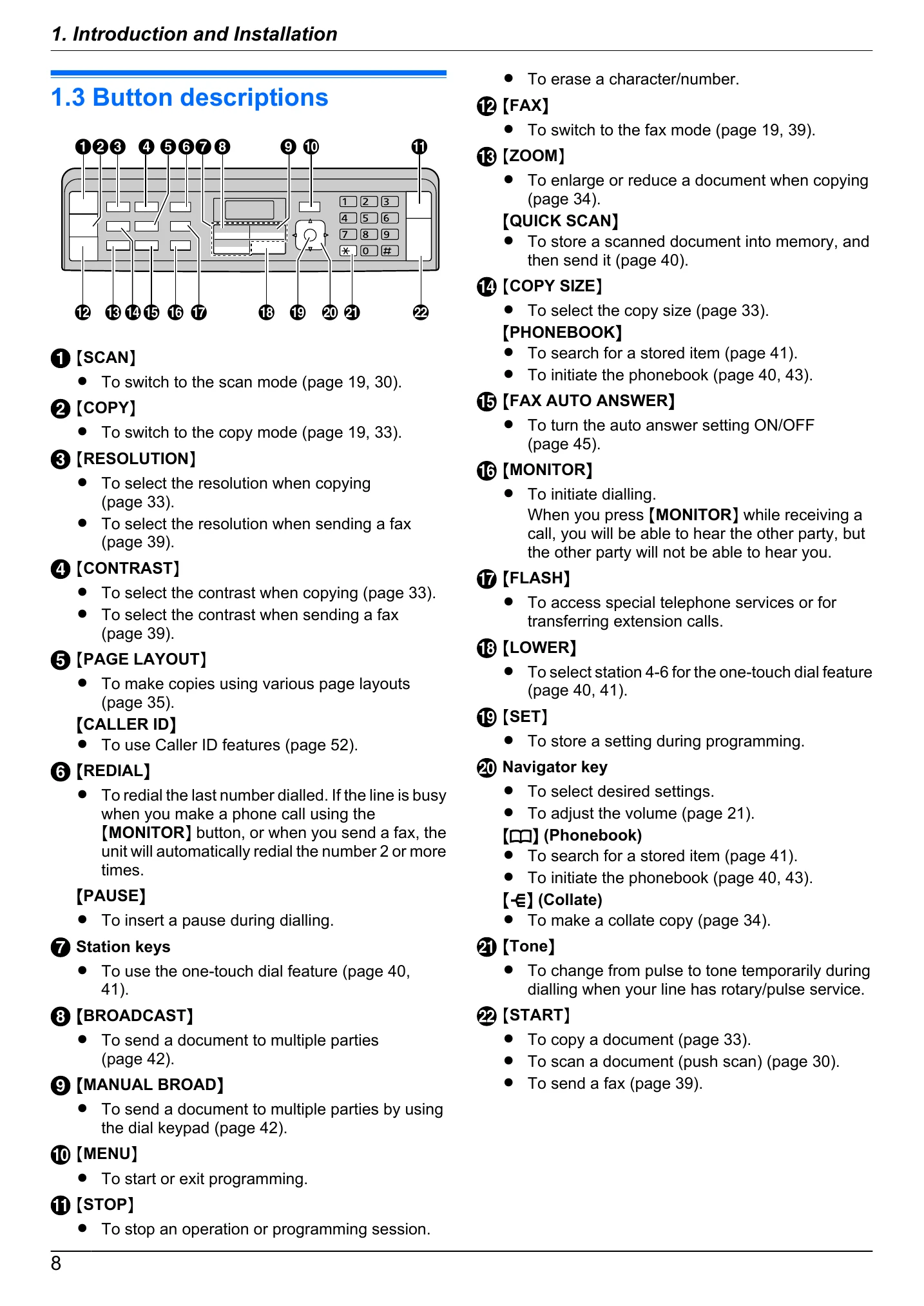
  • Using the unit: Select the operation mode (Scan, Copy, Fax) using the dedicated buttons. Load documents using the scanner glass or the automatic document feeder.
  • Printing: Print from Windows applications or using the Easy Print Utility.
  • Copying: Make single or multiple copies using various layout options and zoom features.
  • Scanning: Scan documents from the unit (Push Scan) or from your computer (Pull Scan).
  • Faxing: Send faxes manually, using one-touch dial or phonebook, or via broadcast. Configure auto answer and other fax settings.
  • Maintenance: Replace toner and drum cartridges when prompted. Clean the unit regularly.

Troubleshooting and error codes

When a function does not work (Page 89)
Check the power cord connection and ensure the unit is turned ON.
Check the telephone line cord connection.
Ensure the correct operation mode (Scan, Copy, Fax) is selected.
Restart the computer and the unit.
Refer to the "Table of Contents" for specific sections related to the function that is not working.
Privacy Policy