Brand: Panasonic
Category: Office Equipment
Document Type: Manual
Language: EN
Brand: Panasonic
Category: Office Equipment
Document Type: Manual
Language: EN
Uploaded: Nov. 21, 2025, 6:34 p.m.
The manual does not contain explicit warranty period information.
Preparation: Check and identify supplied accessories (AC Adaptor, AC Cord, Battery Pack, Operating Instructions). Contact Panasonic Technical Support if any are missing.
Latest Information on Windows 10: Visit http://pc-dl.panasonic.co.jp/itn/addendum/ for updates.
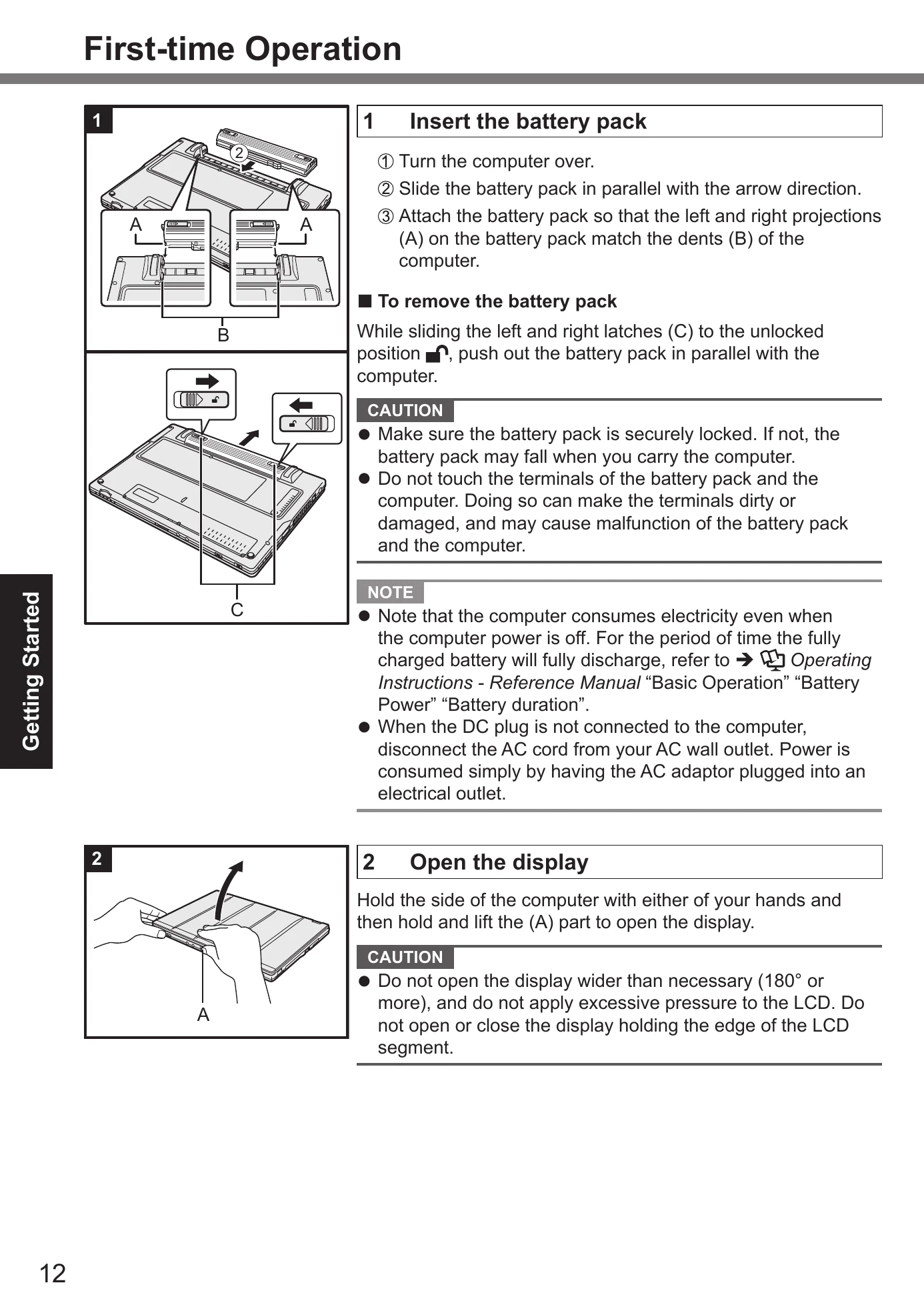
Step 1: Insert the battery pack. Turn the computer over, slide the battery pack in, and ensure it is securely locked. To remove, slide latches and push out.
Step 2: Open the display. Lift the display from the designated part.
Step 3: Connect to a power outlet. Battery charging starts automatically. Do not disconnect AC adaptor or switch on wireless until first-time operation is complete. Handle AC adaptor with care.
Step 4: Turn on the computer. Slide and hold the power switch until the indicator lights. Follow precautions regarding power switch and operations during startup.
Step 5: Setup Windows. Select language, follow on-screen instructions, and confirm messages. Setting up Wireless Network and password is recommended after setup is complete. Observe caution regarding computer name and keyboard setup.
Step 6: Restart the computer. Click Start, then Power, then Restart.
Step 7: Update the on-screen manual. Connect to internet, sign in as administrator, and update via Panasonic PC Settings Utility.
Step 8: Create a recovery disc. Refer to the Reference Manual for instructions.
Note on Password: Set password via Settings > Accounts > Sign-in options. Remember your password or create a password reset disk.
| Issue | Page |
|---|---|
| Safety Precautions | 2-6 |
| Fire or electric shock | 3, 5 |
| Damage to AC Cord, Plug, Adaptor | 3 |
| Malfunction or Trouble | 3 |
| Burns or low-temperature burns | 3 |
| Detrimental health effects | 4, 5 |
| Product falling or dropping | 5 |
| Lithium Battery Warning | 8 |
| Battery Pack Explosion Risk | 8 |
| Interface Cable Length | 8 |