Brand: Panasonic
Category: Home Theater System
Document Type: Manual
Language: EN
Brand: Panasonic
Category: Home Theater System
Document Type: Manual
Language: EN
Uploaded: Nov. 21, 2025, 6:52 p.m.
No specific warranty period is mentioned in this section of the manual.
| Issue | Possible Cause/Solution | Page |
|---|---|---|
| Power | ||
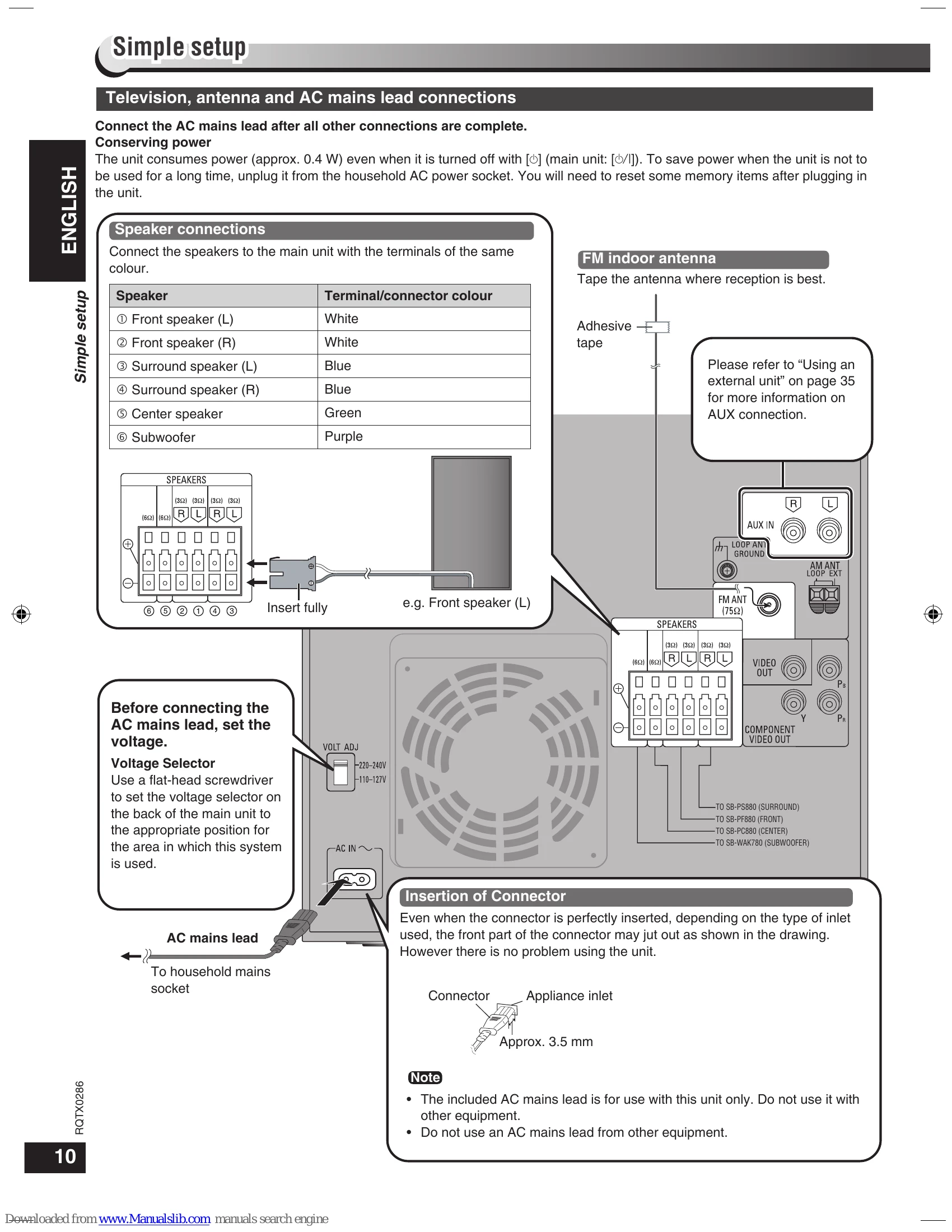
| No power. | • Insert the AC mains lead securely. | 10 |
| The unit is automatically switched to the standby mode. | • The unit was switched to standby by the sleep timer or auto-off function. | 34 |
| Operation | ||
| No response when any buttons are pressed. | • This unit cannot play discs other than the ones listed in these operating instructions. • The unit may not be operating properly due to lightning, static electricity or some other external factor. Turn the unit OFF and then back to ON. Alternatively, press [] to switch the unit to standby mode, disconnect the AC mains lead, and then reconnect it. • Condensation has formed. Wait 1 to 2 hours for it to evaporate. |
5,6 – |
| No operations can be performed with the remote control. | • Check that the batteries are installed correctly. • The batteries are depleted: replace them with new ones. • Point the remote control at the remote control sensor and operate. • The remote control and main unit are in different modes. Change the remote control mode to match the main unit mode. |
13 13 9, 13 35 |
| Cannot play DVDs. | • CD MODE is on. Press and hold [-CD MODE] to turn CD MODE off. • Check the video or audio connection. • Check the power or input setting of the connected equipment. • Check that the disc has something recorded in it. |
18 10, 11 35 |
| No picture or sound. | • While stopped and "DVD/CD" is the source, press and hold [■, -DEMO] on the main unit and [≥10] on the remote control until "INITIALIZED" disappears from the television. Turn the unit off and on again. All settings will return to the default values. | – |
| You have forgotten your ratings password. | – | – |
| Reset all the settings to Factory Preset. | • Change the remote control operating mode. | 35 |
| Other products respond to the remote control. | – | – |
| Specific operation impossible or incorrect | Page | |
| It takes time before play starts. | • Play may take time to begin when an MP3 track has still picture data. Even after the track starts, the correct play time will not be displayed. | 7 |
| Play does not start. | • This is normal on DivX video. DivX • This unit may not play WMA and MPEG4 that contains still picture data. • If a disc contains CD-DA and other formats, proper playback may not be possible. • DivX If playing DivX VOD content, refer to the website where you purchased it. (Example: www.divx.com/vod) |
– – – 7 |
| Folders deeper than the eighth layer on a data disc are not displayed correctly. WMA MP3 JPEG MPEG4 DivX | • Folders deeper than the eighth layer are displayed as the eighth layer. | – |
| A menu screen appears during skip or search. | • This is normal for Video CDs. | – |
| Playback control menu doesn't appear. VCD with playback control | • Press twice and then press [DVD/CD►]. | – |
| The program and random play functions do not work. DVD-V | • These functions do not work with some DVD-Videos. | – |
| Programmed items are not played. DVD-V | • Some items cannot be played even if you have programmed them. | – |
| Subtitle | Page | |
| No subtitles. | • Display the subtitles ("SUBTITLE" in On-Screen Menu 1 (Disc/Play)). • Subtitles may not be displayed depending on the disc. |
21 |
| Cannot select alternative languages. | • Try selecting from the disc's menu if one is available. | 23 |
| A-B repeat | Page | |
| Point B is automatically set. | • The end of an item becomes point B when it is reached. | 21 |