Parts/Service for SA-PM91DEE

Parts/Service for SA-PM91DEE

Brand: Panasonic

Category: Home Theater System

Document Type: Parts/Service

Language: EN
Uploaded: Nov. 21, 2025, 9 p.m.

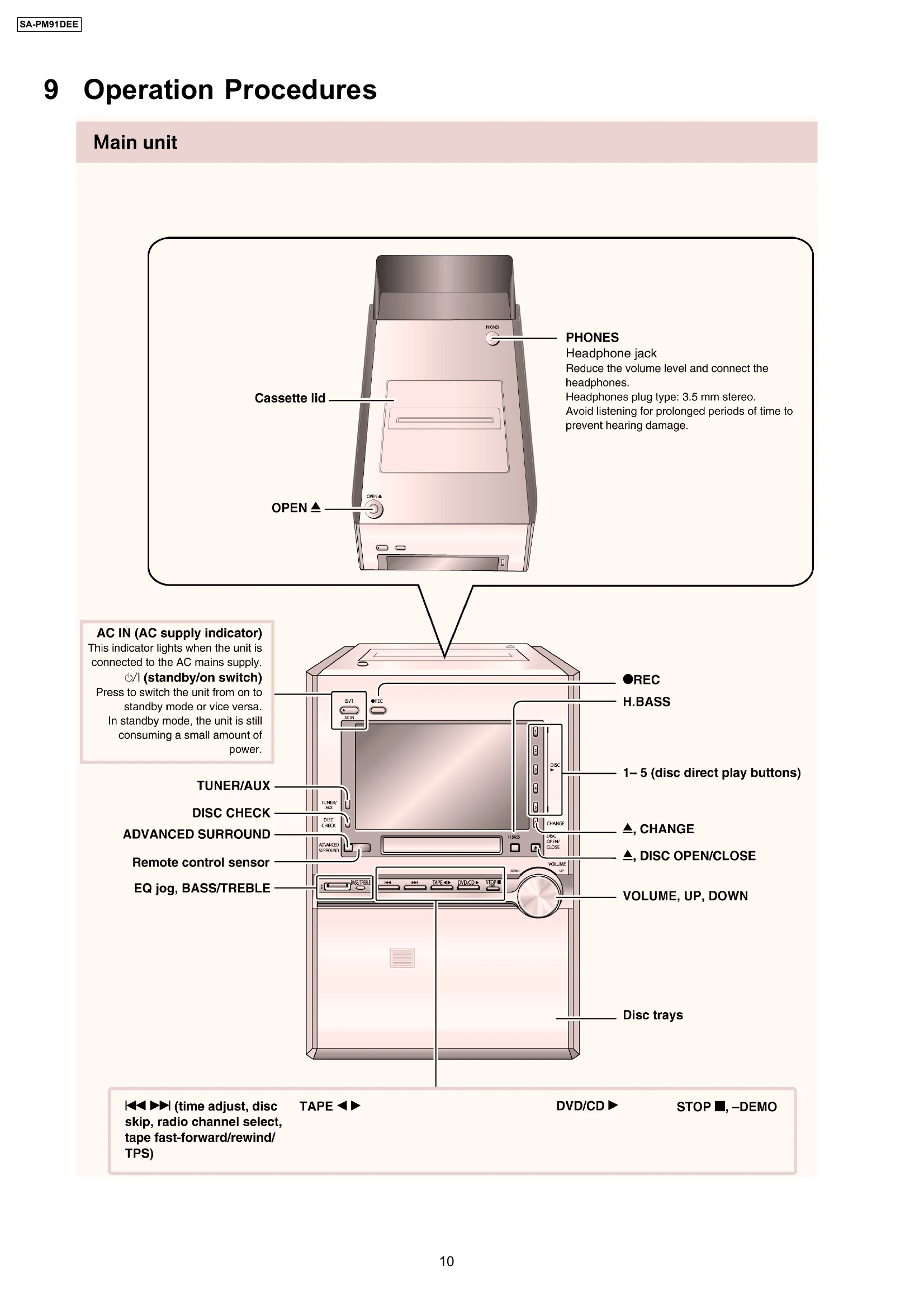
Main Unit Operation

The main unit features:

  • Phones Jack: For connecting headphones (3.5mm stereo). Volume should be reduced before connecting. Avoid prolonged listening to prevent hearing damage.
  • AC IN (AC Supply Indicator): Lights up when connected to AC mains.
  • Standby/On Switch: Toggles between standby and on modes. The unit consumes a small amount of power in standby.
  • Disc Trays: For inserting discs.
  • Cassette Lid: For accessing the cassette compartment.
  • OPEN ▲: Button to open/close disc trays.
  • Function Buttons: TUNER/AUX, DISC CHECK, ADVANCED SURROUND, EQ jog, BASS/TREBLE for various operations.
  • Playback Controls: Includes TAPE, DVD/CD, STOP, ▶▶ (time adjust, disc skip, etc.), ◀◀ (rewind), ▶ (play), II (pause), ■ (stop).
  • Disc Direct Play Buttons: 1-5 for direct disc playback.
  • REC Button: For recording.
  • H.BASS Button: For enhancing bass.
  • DISC OPEN/CLOSE Button: To open or close the disc tray.
  • CHANGE Button: To change functions or modes.
  • VOLUME, UP, DOWN Buttons: To adjust the volume.

Remote Control Operation

The remote control allows for:

  • CLOCK/TIMER, SLEEP: For setting time-related functions.
  • TV/TV/AV Button: Switches between TV and AV modes.
  • SLEEP, AUTO OFF, DIMMER: For sleep timer, auto power-off, and display dimming.
  • PLAY/REC, AUTO OFF: For playback, recording, and auto power-off.
  • DISPLAY, DIMMER: To display information and adjust screen brightness.
  • SOUND, A.ONLY: For sound settings.
  • SURROUND, M.RE-MASTER: For surround sound and sound remastering.
  • H.BASS, SUBWOOFER: For bass and subwoofer control.
  • GROUP Button: To group tracks or options.
  • REPEAT Button: To repeat playback.
  • PLAY MODE Button: To select playback mode.
  • Numbered Buttons (0-9): For direct track selection or input.
  • PGM Button: For programming playback sequences.
  • STOP, PAUSE, M.SKIP: For playback control.
  • QUICK REPLAY, TUNER/AUX, TAPE, DVD/CD: For quick access to functions and sources.
  • TOP MENU, DIRECT NAVIGATOR: For navigating menus.
  • FUNCTIONS, QUICK OSD: For accessing various functions and on-screen display.
  • V/REW, /FF, SETUP, CANCEL: For rewinding, fast-forwarding, setup, and cancelling operations.
  • SHIFT Button: Used in conjunction with other buttons for orange-labeled functions.
  • VOLUME, TV VOL: For volume adjustment.
  • MUTING Button: To mute audio output.
  • ANGLE/PAGE Button: For changing camera angles or page navigation.
  • RETURN, ANGLE/PAGE Button: To return to previous screens or navigate pages.
  • SLOW/SEARCH, TV CH V, ▲: For slow playback, channel tuning, and vertical navigation.
  • SHIFT, TV/AV Buttons: For shifting functions and switching between TV/AV modes.
  • -, +, VOLUME, TV VOL -, + Buttons: For volume adjustments.

Troubleshooting and error codes

Symptom Possible Cause Remedy
No sound is heard when the power is turned on. The protection circuitry may have operated. 1. Turn off the power. 2. Determine the cause of the problem and correct it. 3. Turn on the power once again after one minute.
Sound stops during a performance. The protection circuitry may have operated. 1. Turn off the power. 2. Determine the cause of the problem and correct it. 3. Turn on the power once again after one minute.
Privacy Policy