Manual for SA-DK10

Manual for SA-DK10

Brand: Panasonic

Category: Home Theater System

Document Type: Manual

Language: EN
Uploaded: Nov. 21, 2025, 7:26 p.m.

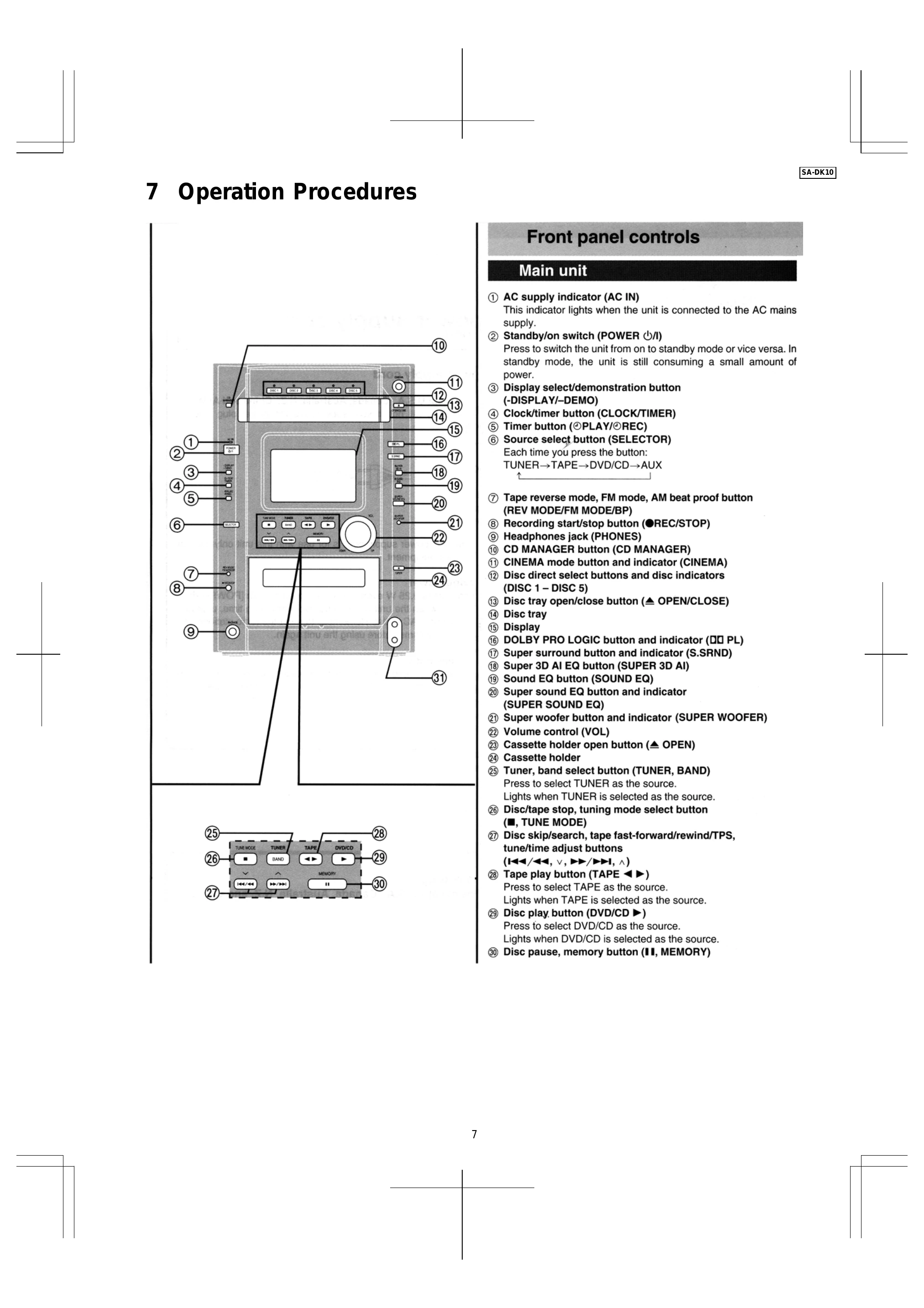
Main Unit Operation:

  • Power: Press the Standby/on switch (POWER) to switch between standby and on modes. The AC supply indicator lights when connected to mains.
  • Source Selection: Use the Source select button (SELECTOR) to cycle through TUNER, TAPE, DVD/CD, and AUX. The indicator lights when a source is selected.
  • Tuner Operation: Press TUNER, BAND to select TUNER and cycle through bands.
  • Tape Operation: Press TAPE ◄► to select TAPE. Use tuning mode select buttons (■, TUNE MODE) and adjustment buttons (/, v, /, ^) for tape control.
  • Disc Operation: Press DVD/CD to select DVD/CD source. Use Disc play button and Disc pause/memory button for playback control.
  • Volume: Use the Volume control (VOL) knob.
  • Cassette: Press the Cassette holder open button (OPEN) to access the cassette holder.

Remote Control Operation:

  • Functions largely mirror the main unit controls. Specific buttons include Sleep, Standby/on, numbered buttons, menu navigation (Cursor, Enter, Return), sound adjustments (Sound EQ, Super Surround, Super Woofer), and disc/tape controls.
  • SHIFT button is used in conjunction with other buttons for advanced functions.
  • Karaoke functions are available with specific buttons (Microphone volume, Echo, Key control, etc.).

Troubleshooting and error codes

SymptomPossible CauseRemedy
No sound is heard when the power is turned on, or sound stops during a performance. Protection circuitry has operated. 1. Turn off the power.
2. Determine and correct the cause of the problem (e.g., "shorted" speaker wires, or speakers with impedance less than rated).
3. Turn on the power again after one minute.
Privacy Policy