Brand: Panasonic
Category: Digital Camera
Document Type:
Language: EN
Brand: Panasonic
Category: Digital Camera
Document Type:
Language: EN
Uploaded: Aug. 9, 2025, 11:35 p.m.
Panasonic offers a 1-year limited warranty for the digital camera and peripherals in the USA and Canada.
Camera Handling: Keep away from excessive vibration, force, or pressure. Avoid dust, sand, and water. Prevent condensation by allowing the camera to adjust to temperature changes. Keep magnetized objects away from the speaker.
Basic Operations:
| Problem | Possible Cause | Solution |
|---|---|---|
| Camera does not turn on. | Battery is not charged. | Charge the battery. |
| Pictures are blurry. | Camera shake or incorrect focus. | Hold the camera steady. Press the shutter button halfway to focus before taking the picture. |
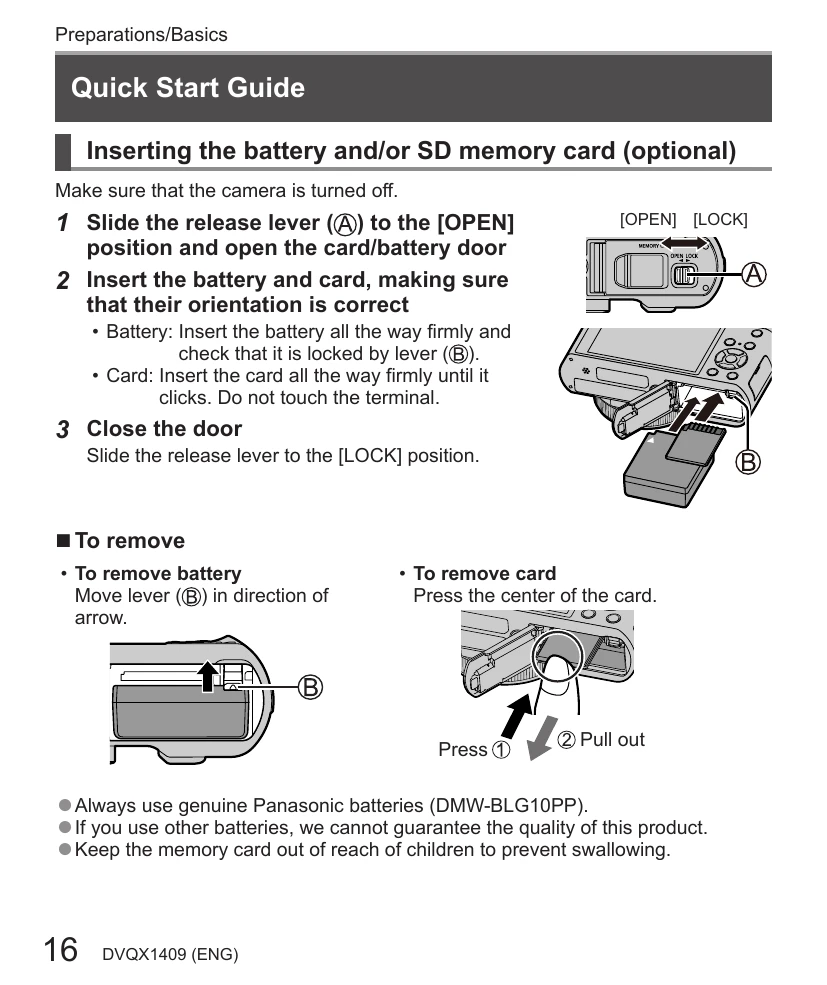
| Cannot record images. | Memory card is full or not inserted correctly. | Replace or format the memory card. Ensure the card is inserted properly. |
| Screen is fogged up. | Condensation due to sudden temperature change. | Turn off the camera and wait for about two hours for the fogging to clear naturally. |
| Charging error. | Incorrect connection or battery issue. | Check connections. Ensure the correct battery and charger are used. Refer to page 18 for charging lamp indications. |