Manual for HC-WXF991 / HC-VX981

Manual for HC-WXF991 / HC-VX981

Brand: Panasonic

Category: Camcorder

Document Type: Manual

Language: EN
Uploaded: Aug. 10, 2025, 12:39 a.m.

  • Preparation: Covers unboxing, inserting/removing battery, charging, inserting SD card, turning the unit on/off, and selecting modes (Recording, Playback, Motion Picture, Still Picture). Includes details on using the LCD monitor/viewfinder and touch screen operations.
  • Basic Operations: Explains how to record motion pictures and still pictures, including specialized recording modes like Motion Picture Recording Mode. Also covers playback of motion pictures and still pictures.
  • Advanced Recording: Details advanced features such as zoom usage, HDR Movie Mode, recording with the Sub Camera (Twin Camera), and various recording modes like Intelligent Auto, Creative Control, Cinema Like Effect, 4K Photo Mode, and Manual Recording with settings like White Balance and Shutter Speed/Iris adjustment.
  • Advanced Playback: Covers various playback operations, including creating still pictures from motion pictures, highlight index, repeat playback, slow motion playback, manual editing, and deleting/protecting scenes.
  • Copy/Dubbing: Explains how to copy/play back with a USB HDD and dubbing with a Blu-ray disc recorder.
  • Wi-Fi Functions: Details how to use Wi-Fi features, including linking to a cell phone, using the Baby Monitor, Home Cam, DLNA Play, and Live Cast. It also covers setting up Wi-Fi connections.
  • With a PC: Explains how to use the camcorder with a PC, including installing software and transferring data.
  • Wireless Twin/Multi-Camera: Covers using the camcorder as a wireless sub camera and multi-camera setups.
  • Optional Accessories: Information on attaching conversion lenses, filter kits, and the supplied shoe adapter.
  • Remote Pan Tilt Cradle: Instructions on connecting and using the optional Remote Pan Tilt Cradle for automated camera movements and settings.

Troubleshooting and error codes

Troubleshooting
Symptom Possible Cause / Solution
Unit does not turn on.
  • The battery is depleted. Charge the battery (→ 12).
  • The battery is not inserted correctly. Insert the battery correctly (→ 11).
  • The AC adaptor is not connected correctly. Connect the AC adaptor correctly (→ 12).
  • The battery may be faulty.
Cannot record motion pictures or still pictures.
  • The SD card is full. Replace the SD card or delete unnecessary scenes (→ 17).
  • The SD card is inserted incorrectly. Insert the SD card correctly (→ 17).
  • The SD card is write-protected. Unlock the write-protect switch (→ 16).
  • The SD card is not compatible. Use a compatible SD card (→ 16).
  • The SD card is faulty.
Recording stops unexpectedly.
  • The SD card may not be compatible or may be faulty. Format the SD card (→ 45) or replace it with a new one.
  • The battery may be depleted. Charge the battery (→ 12).
  • The unit may have overheated. Wait for the unit to cool down before continuing (→ 20).
Cannot play back recorded scenes.
  • The SD card may be faulty or the scenes may be corrupted.
  • The scenes were recorded with another device and are not compatible.
The screen is dark or unclear.
  • The lens is dirty. Clean the lens with a soft cloth.
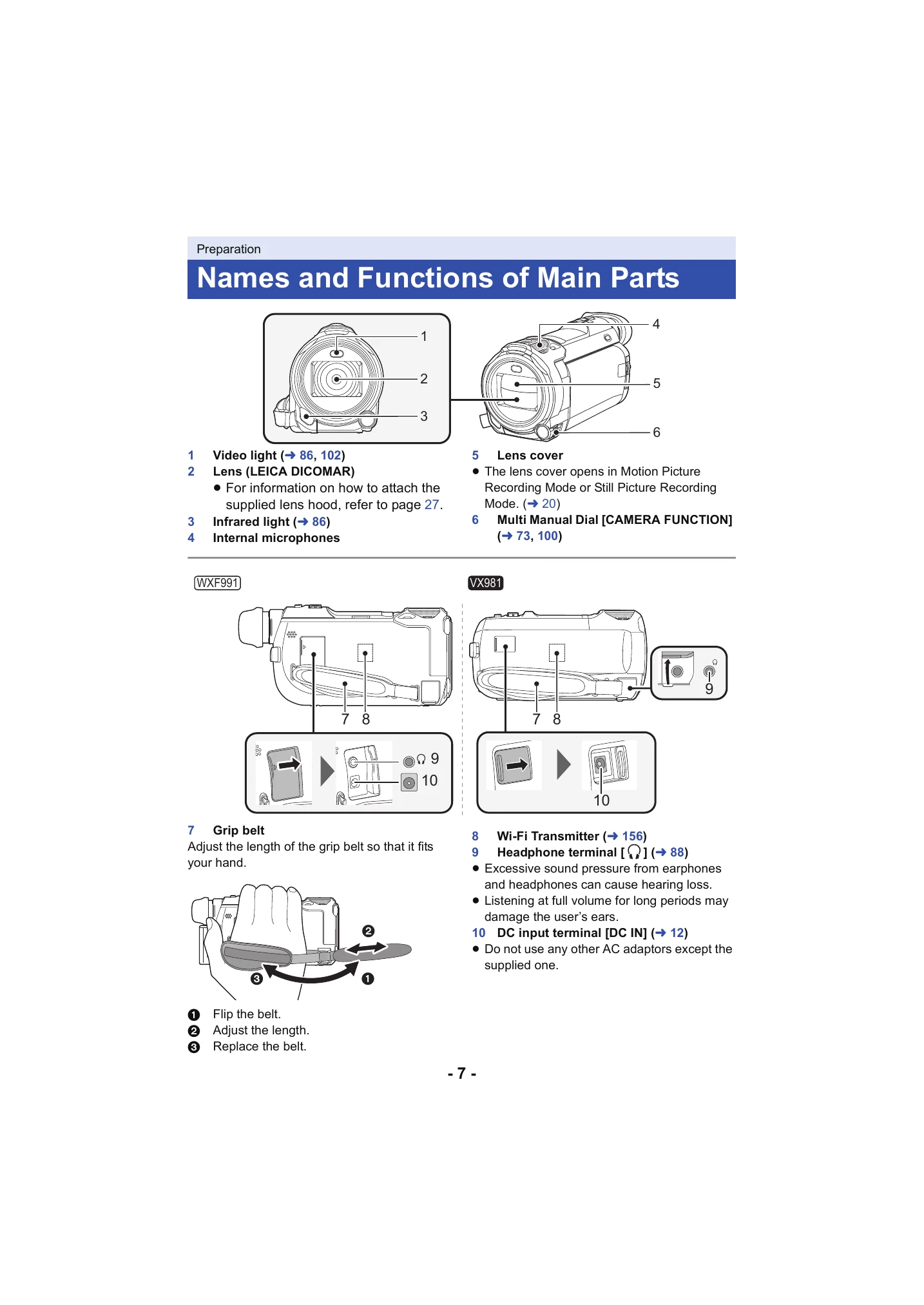
  • The lens cover is not opened. Open the lens cover (→ 7).
  • Condensation has occurred. Wait for the unit to acclimatize to the ambient temperature (→ 2).
Cannot connect to Wi-Fi.
  • Refer to "If the Wi-Fi connection cannot be established" (→ 192, 220).
Privacy Policy