Manual for AG-HVX200AP

Manual for AG-HVX200AP

Brand: Panasonic

Category: Camcorder

Document Type: Manual

Language: EN
Uploaded: Aug. 10, 2025, 12:42 a.m.

Before Use:

  • Read all instructions and heed warnings.
  • Install battery and AC adapter correctly.
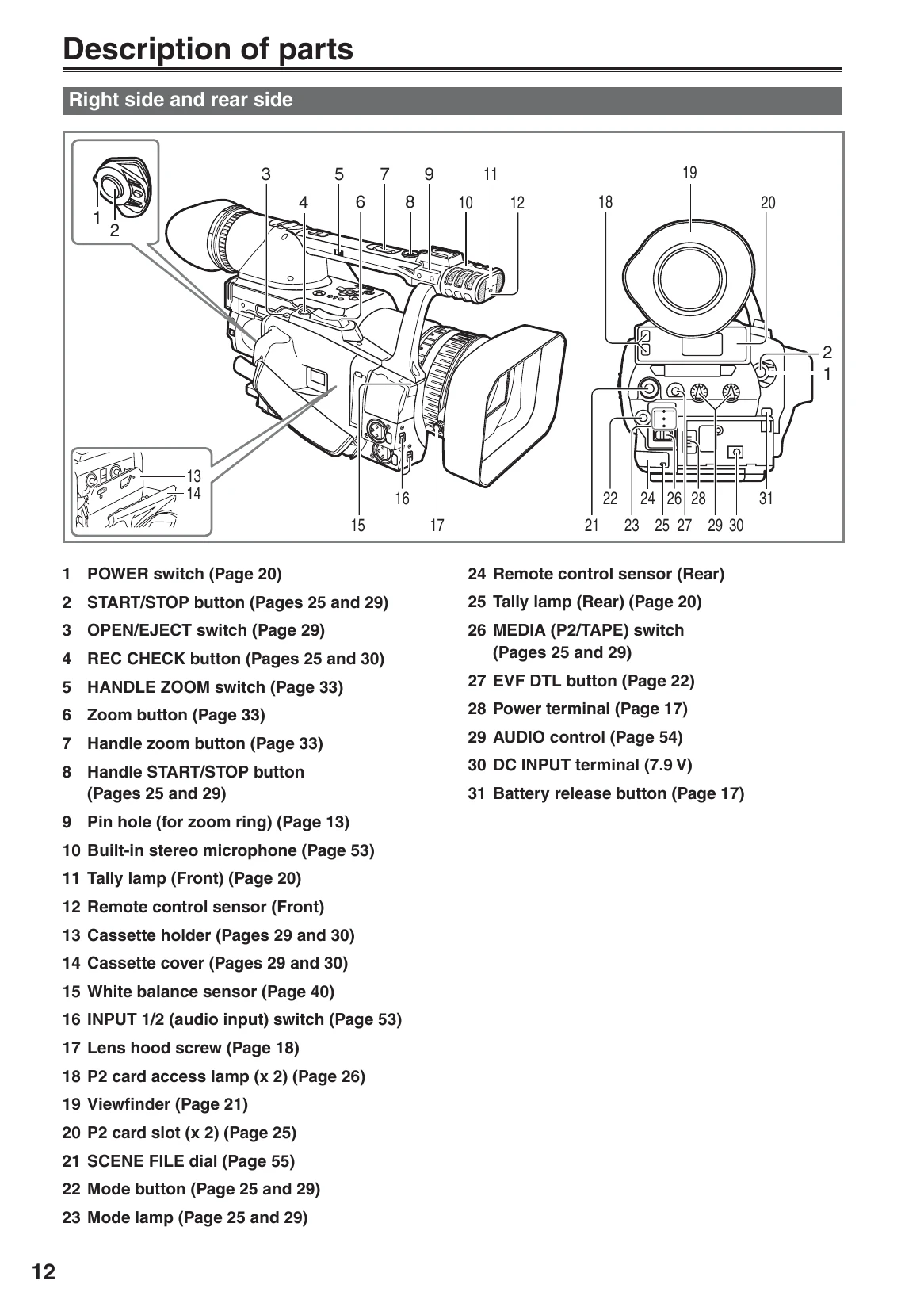
  • Familiarize yourself with camera parts and controls.
  • Attach hand strap and shoulder strap for safety.
  • Set up remote control if needed.
  • Turn on the camera and check viewfinder/LCD.
  • Adjust viewfinder diopter and LCD positioning.

Shooting:

  • Basic operations involve P2 card or cassette tape shooting.
  • Use auto or manual mode for shooting.
  • Explore zoom functions, white balance, shutter speed, and other settings.
  • Utilize shooting techniques for different targets.
  • Experiment with special recording functions like pre-recording and interval recording.
  • Adjust audio input and scene files as needed.

Playback and Editing:

  • Playback recorded clips using thumbnail or direct playback.
  • Utilize various playback functions like slow playback and fast forward.
  • Connect to external devices for editing.
  • Transfer data to PC or use 1394 host mode.

Troubleshooting and error codes

ProblemPossible CauseSolution
No powerBattery not charged or inserted correctly.Charge the battery or re-insert it.
Cannot recordP2 card or tape is full or not inserted correctly.Insert a new P2 card or tape, or check insertion.
Poor image qualityDirty lens or sensor.Clean the lens and sensor carefully.
Condensation insideUnit exposed to rapid temperature change.Turn off the unit, remove cassette, and let it dry.
Privacy Policy