Brand: Panasonic
Category: Camcorder
Document Type: Manual
Language: EN
Brand: Panasonic
Category: Camcorder
Document Type: Manual
Language: EN
Uploaded: Aug. 10, 2025, 12:44 a.m.
None
Charging the Battery: Fully charge the battery using the AC adapter before first use. Place the battery onto the AC adapter, connect the AC adapter to the power outlet, and wait for the "CHARGE" lamp to go off. Remove the battery upon completion.
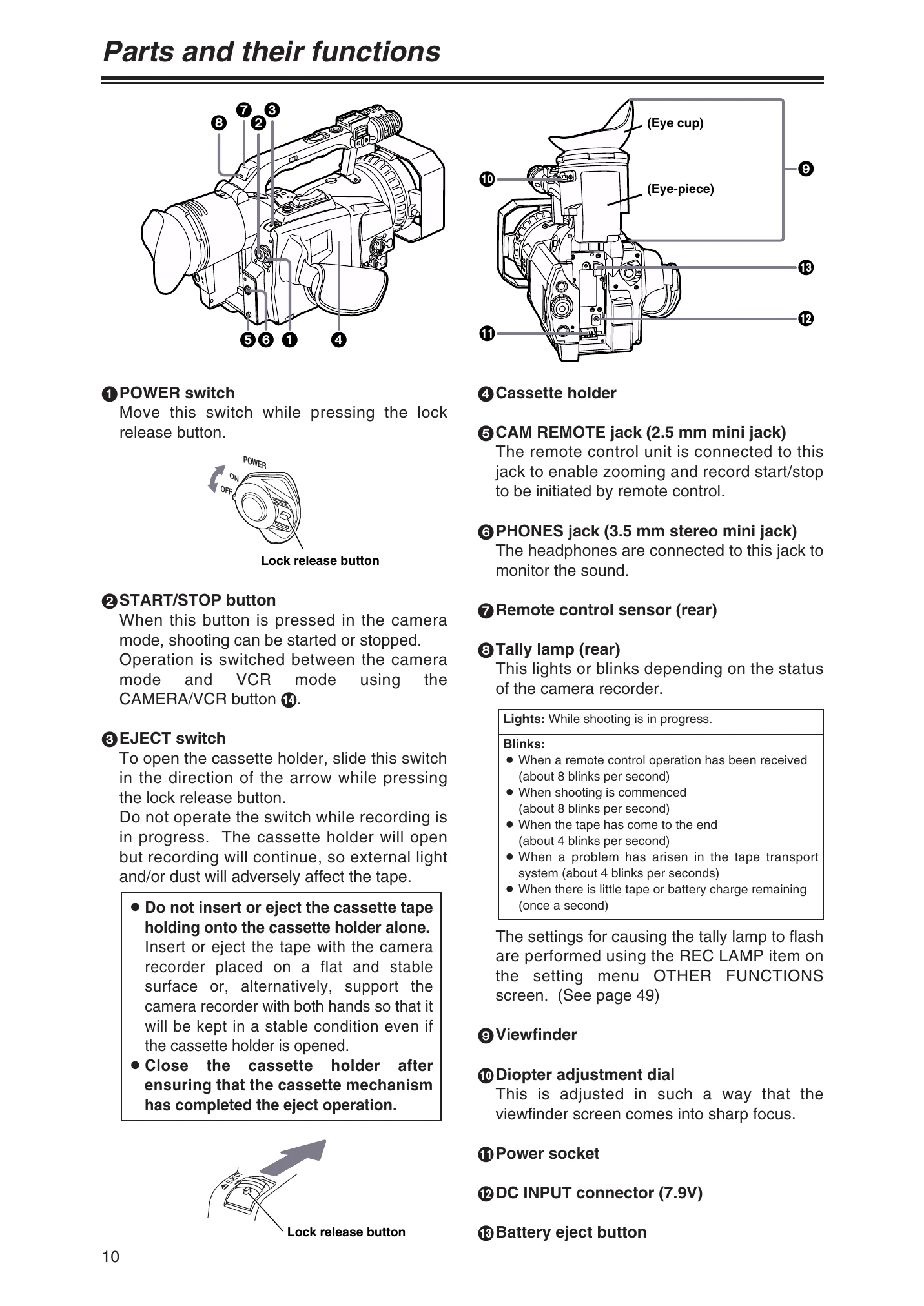
Mounting the Battery: Raise the viewfinder, push the battery in until it clicks, then return the viewfinder to its original position.
Supplying Power from AC Adapter: Raise the viewfinder, connect the DC cable to the AC adapter, connect the AC cable to the power outlet, and return the viewfinder to its original position.
Shooting - Face-to-face: Open and rotate the LCD monitor 180 degrees. For a mirror image, set SELFSHOOT to MIRROR in the DISPLAY SETUP screen.
Intermittent Recording: Set the shooting mode using INTERVAL REC, then set REC TIME and INTERVAL TIME. Press START/STOP to begin recording.
Backup Recording: Connect an external component to the DV connector. Set the DV CONTROL and DV CMD SEL items in the OTHER FUNCTIONS screen.
| Category | Problem | Solution |
|---|---|---|
| Power supply-related problems | No power. | Is the battery or AC adapter connected correctly? Check connections. |
| Power supply-related problems | No power. | Is the POWER switch at the ON position? |
| Power supply-related problems | The power goes off on its own. | Shooting temporarily stopped for more than 5 minutes to prevent battery drain and tape wear. Check TAPE PROTECT setting. |
| Power supply-related problems | The power goes off on its own. | Has condensation formed? If so, eject the cassette and wait for it to dry. |
| Power supply-related problems | The power goes off on its own. | Battery run down? Recharge or insert a charged battery. |
| Battery-related problems | The battery runs down quickly. | Was the battery adequately charged? |
| Battery-related problems | The battery runs down quickly. | Is the camera recorder used in a cold place? Battery life is affected by ambient temperature. |
| Battery-related problems | The battery runs down quickly. | Has the battery reached the end of its service life? |
| Problems during normal video recording | Recording is not possible even though the cassette tape has been inserted properly. | Is the accidental erasure prevention knob set to "SAVE"? |
| Problems during normal video recording | Recording is not possible even though the cassette tape has been inserted properly. | Has the cassette tape reached the end? Replace it. |
| Problems during normal video recording | Recording is not possible even though the cassette tape has been inserted properly. | Is the POWER switch at the ON position? |
| Problems during normal video recording | Recording is not possible even though the cassette tape has been inserted properly. | Is the VCR lamp lighted? Shooting is not possible in VCR mode. |
| Problems during normal video recording | Recording is not possible even though the cassette tape has been inserted properly. | Is the cassette holder open? VCR operations are not possible. |
| Problems during normal video recording | Recording is not possible even though the cassette tape has been inserted properly. | Has condensation formed? Eject cassette and wait for it to dry. |
| Problems during normal video recording | Recording is not possible even though the cassette tape has been inserted properly. | AUTO OFF/T REEL LOCK appears? Tape may have snapped. Check tape. |
| Problems during various kinds of video recording | No automatic focusing. | Is the manual focus mode set? Focus is adjusted automatically in auto focus mode. |
| Problems during various kinds of video recording | No automatic focusing. | Is a scene hard to focus in auto focus mode? Use manual focus mode. |
| Editing-related problems | No audio dubbing. | Is the accidental erasure prevention knob set to "SAVE"? Is an attempt made to edit parts shot in LP mode? |
| Display-related problems | Something is wrong with the time code display. | When reverse slow playback mode is set, time code display inconsistency is normal. |
| Display-related problems | Remaining tape display does not match actual tape remaining. | Display may not be accurate with short shooting sessions or may show 2-3 minutes less than actual remaining time. |
| Playback-related problems (video) | No playback, even when play button is pressed. | Has CAMERA/VCR button been pressed and VCR lamp lighted? |
| Playback-related problems (video) | Mosaic-type noise is generated during cue and review. | This is inherent to digital video and not a malfunction. |
| Playback-related problems (audio) | No playback sound is heard from the speaker. | Is the volume level set too low? Increase volume using AUDIO MON/VAR button. |
| Playback-related problems (audio) | More than one recorded stream of sound is heard. | MIX selected for 32K (12-bit) AUDIO item? Sound heard during recording and later recorded sound will be heard together. |
| Other types of problems | The cassette tape cannot be ejected. | Is power being supplied? Cassette can be ejected without powering on. |
| Other types of problems | A rattling sound is heard when the camera recorder is tilted. | This is due to the structure and is not a malfunction. |