Manual for C-2040ZOOM

Manual for C-2040ZOOM

Brand: OLYMPUS

Category: Digital Camera

Document Type:

Language: EN

Uploaded: Aug. 9, 2025, 11:45 p.m.
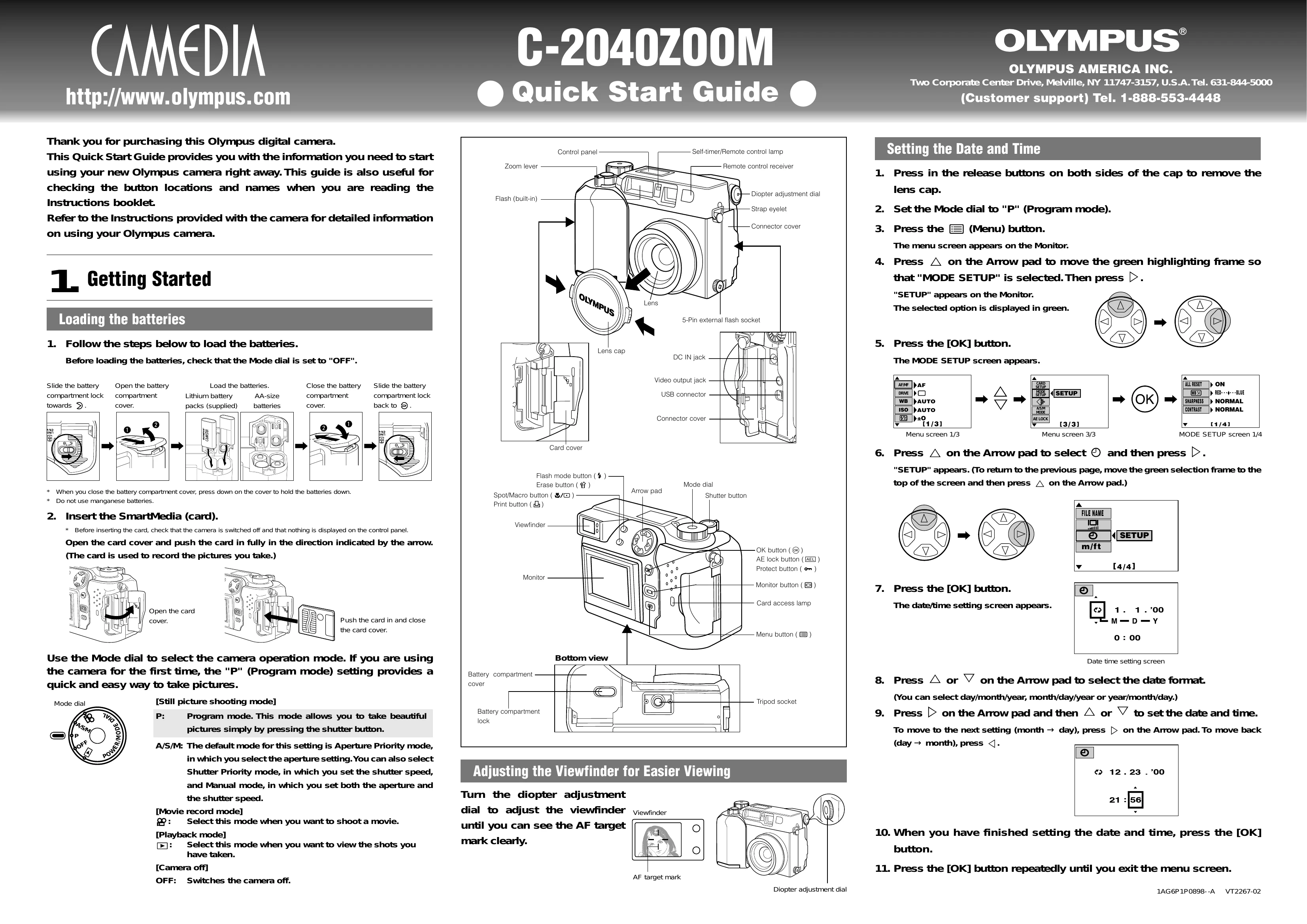
Getting Started

Loading Batteries

  1. Ensure the Mode dial is set to "OFF".
  2. Slide the battery compartment lock towards you to open the cover.
  3. Insert either AA-size batteries or a Lithium battery pack.
  4. Close the battery compartment cover, pressing down to secure the batteries.
  5. Slide the battery compartment lock back to its original position.

Inserting the SmartMedia Card

  1. Ensure the camera is switched off.
  2. Open the card cover.
  3. Push the SmartMedia card in fully until it clicks into place.
  4. Close the card cover.

Setting the Date and Time

  1. Remove the lens cap.
  2. Set the Mode dial to "P" (Program mode).
  3. Press the [Menu] button.
  4. Navigate to "MODE SETUP" using the Arrow pad and press [OK].
  5. Select "SETUP" and press [OK].
  6. Use the Arrow pad to select the date format and then set the date and time.
  7. Press [OK] to confirm and then press [OK] repeatedly to exit the menu.
Privacy Policy