Brand: OLYMPUS
Category: Digital Camera
Document Type:
Language: EN
Brand: OLYMPUS
Category: Digital Camera
Document Type:
Language: EN
Uploaded: Aug. 9, 2025, 11:44 p.m.
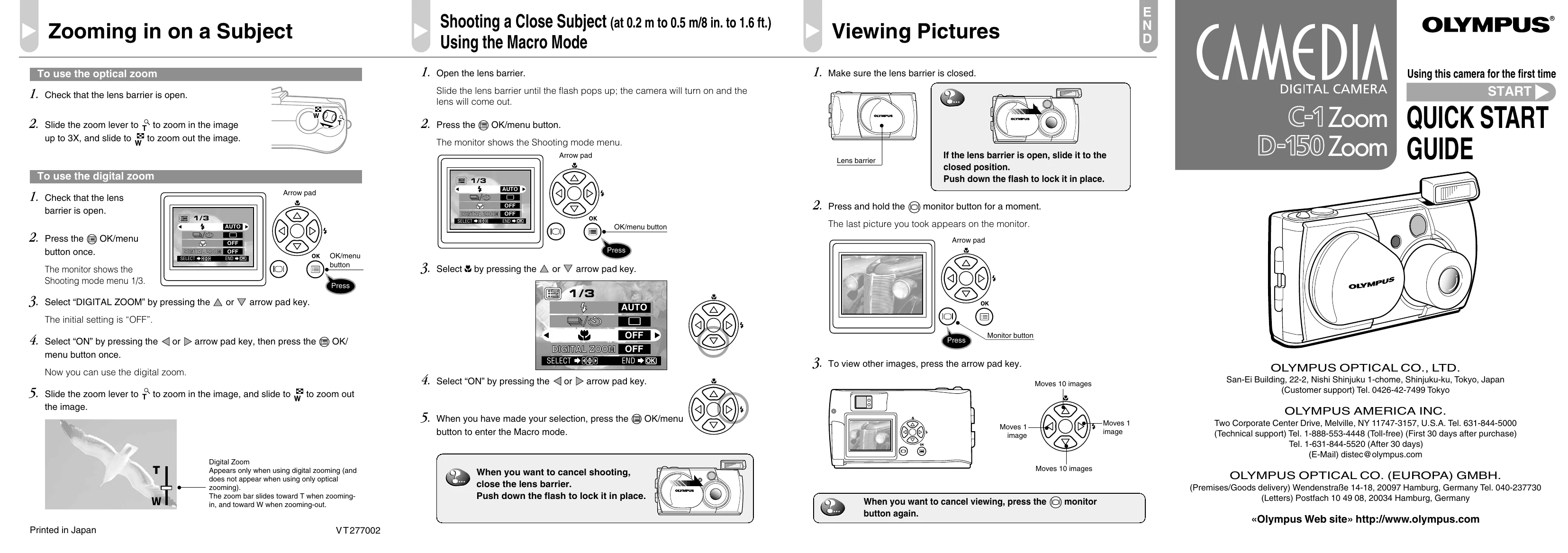
To use optical zoom, ensure the lens barrier is open and slide the zoom lever. For digital zoom, press OK/menu, select DIGITAL ZOOM, turn it ON, and use the zoom lever.
Open the lens barrier. Press OK/menu, then select the Macro mode by navigating the Shooting mode menu. To cancel, close the lens barrier.
Close the lens barrier. Press and hold the monitor button to view pictures. Use the arrow pad keys to navigate through images. Press the monitor button again to exit viewing mode.
Open the lens barrier. Press OK/menu to access Shooting mode. Use the arrow pad keys to cycle through flash modes (Auto-Flash, Red-Eye Reduction, Fill-In Flash, Night Scene, Flash Off). Press OK/menu to set the desired mode.