Brand: NEC
Category: Other
Document Type: Installation Guide
Language: EN
Brand: NEC
Category: Other
Document Type: Installation Guide
Language: EN
Uploaded: Nov. 21, 2025, 8:01 p.m.
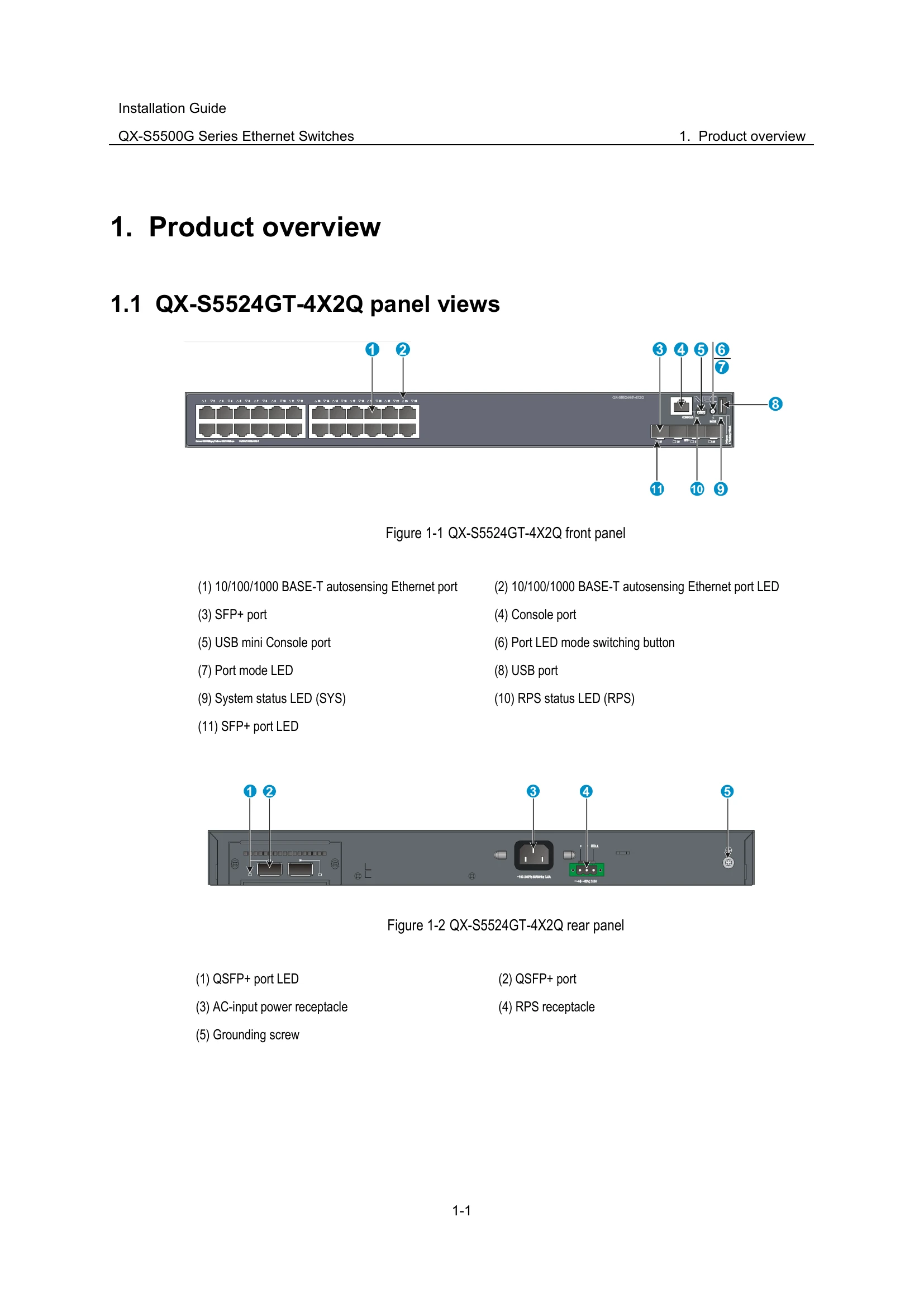
| LED mark | Status | Description |
| SYS | Steady green | The switch is operating correctly. |
| Flashing green (1 Hz) | The switch is performing power-on self test (POST). | |
| Steady red | The switch has failed the POST or is faulty. | |
| Flashing yellow (1 Hz) | Some ports have failed to pass POST or are faulty. | |
| Off | The switch is powered off. |
| LED mark | Status | Description |
| PWR1/PWR2 | Steady green | A power module is installed in power module slot and the power module is outputting power correctly. |
| Steady yellow | A power module is installed in power module slot, but the power module has failed or no power is input to the power module. | |
| OFF | No power module is installed in power module slot. |
| LED mark | Status | Description |
| RPS | Steady green | Both the RPS DC input and the AC input are normal. |
| Steady yellow | The RPS DC input is normal, but the AC input is disconnected or has failed. | |
| OFF | The RPS DC input is abnormal or no RPS is connected. |
| LED mark | Status | Description |
| Mode | Steady green | The port status LEDs are showing port rates. |
| Flashing yellow | The port status LEDs indicates the IRF member ID of the switch. For example, if the LEDs for ports 1 to 5 are steady green and the other LEDs are off, the IRF member ID of the switch is 5. | |
| LED mark | Description | ||
| Steady green (rate mode) | 10/100/1000BASE-T autosensing Ethernet port LED status | ||
| Steady green | A link is present on the port and the port is operating at 1Gbps. | ||
| Flashing green | The port is sending or receiving data at 1Gbps. | ||
| Steady yellow | A link is present on the port and the port is operating at 10/100Mbps. | ||
| Flashing yellow | The port is sending or receiving data at 10/100Mbps. | ||
| Flashing yellow (3Hz) | The port has failed POST. | ||
| Off | No link is present on the port. | ||
| Flashing yellow (IRF mode) | Steady green | The port status LEDs on the switch work in conjunction to indicate the IRF member ID of the switch. For example, if the LEDs for ports 1 to 5 are steady green and the other port LEDs are off, the IRF member ID of the switch is 5. | |
| LED mark | Description | ||
| Steady green (rate mode) | 100/1000Base-X SFP port LED status | ||
| Steady green | A link is present on the port and the port is operating at 1000 Mbps. | ||
| Flashing green | The port is sending or receiving data at 1000 Mbps. | ||
| Steady yellow | A link is present on the port and the port is operating at 100 Mbps. | ||
| Flashing yellow | The port is sending or receiving data at 100 Mbps. | ||
| Flashing yellow (3 Hz) | The port has failed POST. | ||
| Off | No link is present on the port. | ||
| Flashing yellow (IRF mode) | Steady green | The SFP port LEDs on the switch work in conjunction to indicate the IRF member ID of the switch. For example, if the LEDs for ports 1 to 5 are steady green and the other port LEDs are off, the IRF member ID of the switch is 5. | |
| LED mark | Description | |
| SFP+ port LED status | ||
| Steady green | A link is present on the port and the port is operating at 10 Gbps. | |
| Flashing green | The port is sending or receiving data at 10 Gbps. | |
| Steady yellow | A link is present on the port and the port is operating at 1 Gbps. | |
| Flashing yellow | The port is sending or receiving data at 1 Gbps. | |
| Flashing yellow (3 Hz) | The port has failed POST. | |
| Off | • No link is present on the port. • The port mode LED operates in IRF mode. |
|
| LED mark | Description | |
| QSFP+ port LED description | ||
| Steady green | A link is present on the port and the port is operating at 40 Gbps. | |
| Flashing green | The port is sending or receiving data at 40 Gbps. | |
| Steady yellow | A link is present on the port and the port is operating at 10 Gbps. | |
| Flashing yellow | The port is sending or receiving data at 10 Gbps. | |
| Off | No link is present on the port. | |
| Description | ||
| Management Ethernet port LED (ACT/LINK) status | Description | |
| Steady green | A link is present on the port. | |
| Flashing yellow | The port is sending or receiving data. | |
| Flashing yellow (3 Hz) | The port has failed POST. | |
| Off | No link is present on the port. | |
| LED mark | LED status | Description |
| SLOT | Steady green | The interface card is in position and is operating correctly. |
| Flashing yellow | The switch does not support the card model, or the card has failed. | |
| Off | The interface card slot is empty. |