Brand: NEC
Category: Other
Document Type: Manual
Language: EN
Brand: NEC
Category: Other
Document Type: Manual
Language: EN
Uploaded: Nov. 21, 2025, 8:39 p.m.
Refer to your NEC Authorized Supplier for warranty details and information on In-Mail Advanced Features.
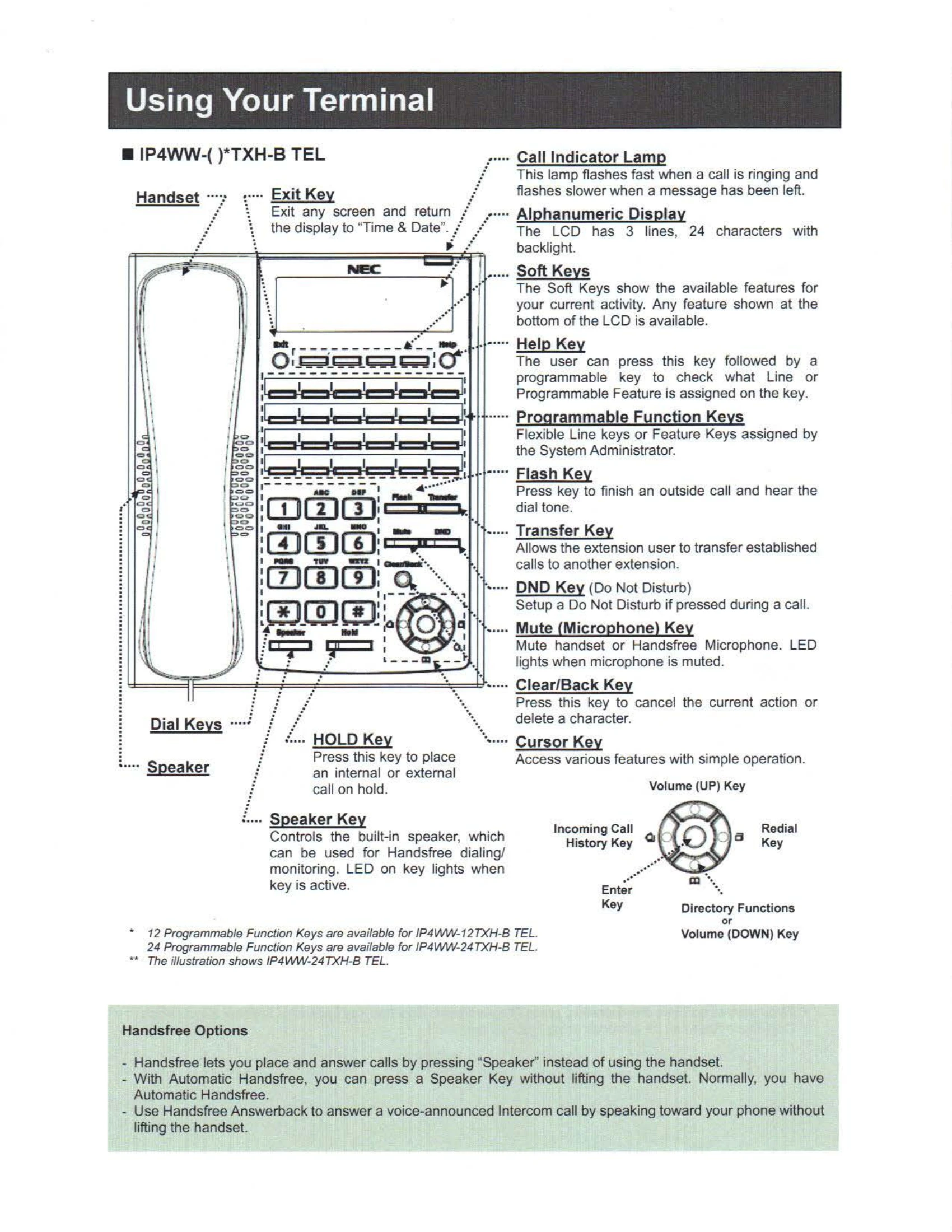
Handset: Used for calls. Features like Exit Key to return to Time & Date display.
Dial Keys: For dialing numbers.
Speaker: Enables handsfree dialing/monitoring. Key light indicates active status.
Key Functions:
Handsfree Options: Allows calls via speaker without lifting handset. Automatic Handsfree is standard. Handsfree Answerback answers Intercom calls by speaking.
Programmable Function Keys: Can be assigned as Trunk or other Function Keys for quick access.
DSS / One-Touch Keys: For Direct Station Selection or one-touch calls.
Placing Calls:
Transferring Calls: Directly to voicemail or to an outside number.
Placing Calls Quickly:
Do Not Disturb (DND): Configures incoming call handling (Trunk, Intercom, Transferred).
Conference: Allows multi-party calls.
Call Forwarding / Follow Me: Sets call forwarding options (Immediate, Busy, No Answer, Busy/No Answer, Both Ring, Follow Me).
Admin Functions: Setting Time and Date.
'Menu' Soft Key: Accesses various features via a menu structure or direct dialing of menu codes.
Log-On to In-Mail: Accesses voice mail features.
Main Menu Options: Listen to messages, record reply, forward messages, etc.
Mailbox Greeting: Record greetings for callers.
Mailbox Security Code: Set up a security code for access.
Listen to Left Messages: Access messages via Function Key, Soft Key, or Basic Operation.
Record Main Greeting(s): Record system greetings.
| Problem | Possible Cause | Solution |
|---|---|---|
| General Troubleshooting: | ||
| No dial tone | Handset off hook. | Hang up handset. |
| Cannot make calls | Line busy or no outgoing line available. | Wait and try again. Check line status. |
| Cannot receive calls | DND is activated. | Deactivate DND. |
| Call Forwarding not working | Incorrect service code or extension number. | Verify service code and extension number. |
| Voice Mail access issues | Incorrect mailbox number or security code. | Verify mailbox number and security code. |
| Specific Feature Issues: Refer to the relevant section in the manual for detailed troubleshooting steps for features like DND, Conference, Call Forwarding, and In-Mail. | ||