Brand: NEC
Category: Cordless Telephone
Document Type: Quick Start Guide
Language: EN
Brand: NEC
Category: Cordless Telephone
Document Type: Quick Start Guide
Language: EN
Uploaded: Nov. 21, 2025, 6:51 p.m.
Manual Publish Date: 2012-01-01
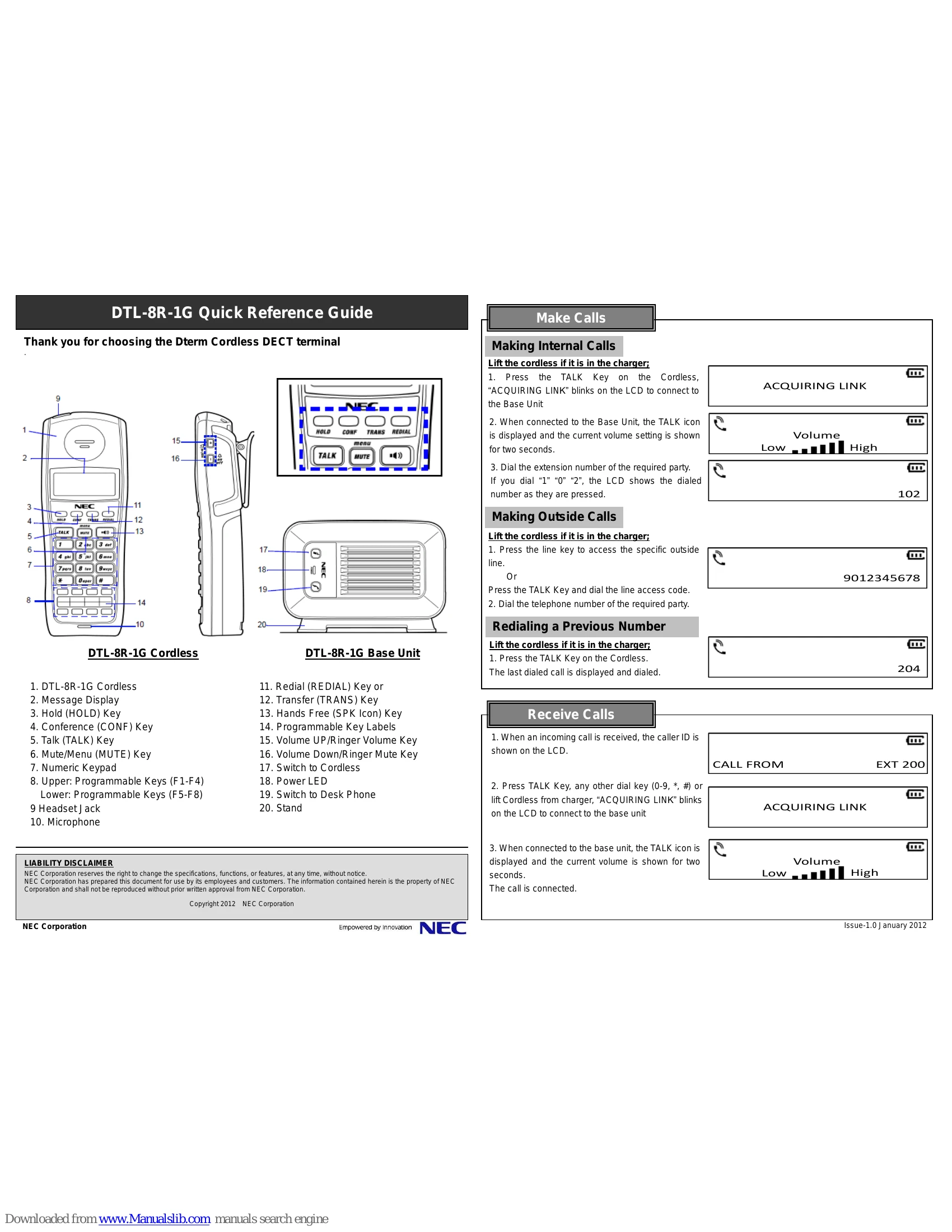
Lift the cordless, press TALK, then dial the extension number.
Lift the cordless, press the line key or TALK key, then dial the number.
Lift the cordless, press TALK to display and redial the last number.
When a call comes in, caller ID is shown. Press TALK or any dial key to answer. "ACQUIRING LINK" blinks, then the TALK icon is displayed.
Press HOLD to hold a call. Press TALK twice to retrieve.
Press CONF, dial number, press CONF twice to connect all parties.
Press Hands Free (SPK Icon) key to initiate a hands-free call.
Press TRANS, dial number, then press TRANS or TALK to transfer. Alternatively, wait for answer, announce, and press TRANS or TALK.
Press MUTE/menu to mute the microphone. Press again to unmute.
During ringing, press and hold Volume Down to mute the ring.
Adjust talk, speaker, or headset volume by pressing Volume UP or DOWN keys (Levels 1-6).
Press Volume UP in standby to cycle through settings: Vibrator, Low, High.
Navigate to "Change Ringer Type" via the menu and select from 6 available tones.
Press and hold Volume DOWN for 2 seconds in standby to turn ringer mute on or off.
Indicates the Base Unit is not connected to the phone system.
Handset cannot connect to the Base Unit. An error tone sounds, and the message displays for 5 seconds.
Indicates the Desk Phone is selected.
Handset is searching for the Base Station.
At the Base Unit: Press Cordless icon to switch to Cordless, Handset icon to switch to Desk Phone.
At the Cordless: (Requires "Base Key Option" setup) Press and hold F7 to switch to Cordless, F8 to switch to Desk Phone.