Manual for moto tag

Manual for moto tag

Brand: Motorola

Category: Navigation Device

Document Type: Manual

Language: EN
Uploaded: Nov. 21, 2025, 6:02 p.m.

Manual Publish Date: 2024-01-01

Warranty Information

Refer to motorola.com/accessory-legal for detailed warranty information.

Get started

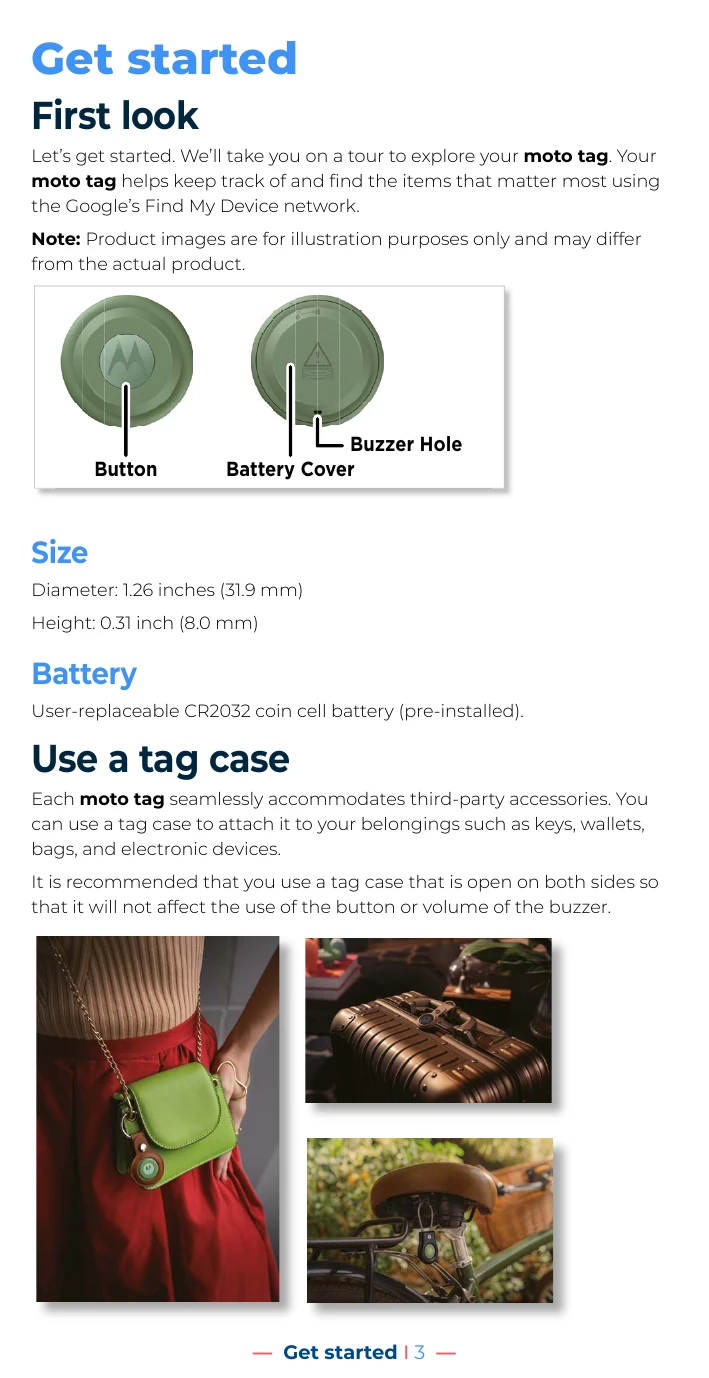
  • First look: Familiarize yourself with the moto tag's button and battery cover.
  • Size: The moto tag has a diameter of 1.26 inches (31.9 mm) and a height of 0.31 inch (8.0 mm).
  • Battery: It uses a user-replaceable CR2032 coin cell battery.
  • Use a tag case: The moto tag is compatible with third-party tag cases for attaching to belongings.
  • Button functions: Learn how to use the button for various actions like stopping ringing, resetting, and displaying identification.
  • Pair and connect: Quickly pair your moto tag with Android 9 or later devices using Google Fast Pair.

Use the tag

  • Basic info: Access the Find Device app to see your tag's status and rename it.
  • Find your tag: Use Bluetooth Low Energy and UWB technology, along with Google's Find My Device network, to locate your tag.
  • Share your tag: Allow trusted individuals to view your tag's location.
  • Find My Device settings: Ensure Find My Device is enabled for network locating capabilities.
  • Explore with your tag: Utilize the Moto Tag app for more advanced features.
  • Download and install Moto Tag app: Get the app from motorola.com/mymototag or by scanning the QR code.
  • Use Moto Tag app: Manage battery levels, play sounds, update firmware, and more.

Troubleshoot your tag

  • Unpair and reset: Learn how to unpair and reset an unresponsive tag.
  • Pairing notification stops popping up: Troubleshoot issues with pairing notifications.
  • Replace the battery: Follow instructions to replace the CR2032 battery.

Get more help

  • Legal, safety & regulatory information: Access important legal and safety information online.
  • Use & care: Follow guidelines for operating and cleaning your moto tag.
  • About water, splash, and dust resistance: Understand the IP67 rating and limitations.
  • Ultra Wideband information: Learn about UWB features and regional restrictions.
  • Service & repairs: Find support options at motorola.com/support.

Troubleshooting and error codes

Issue Solution
Tag is unresponsive Unpair and reset the tag.
Pairing notification stops popping up Reset the tag by pressing the button once, then holding for 5 seconds until a beep.
Need to replace the battery Follow the steps to press and turn the battery cover counter-clockwise, replace the CR2032 battery, and rotate the cover clockwise.
Privacy Policy