Brand: Motorola
Category: Navigation Device
Document Type: Quick Start Guide
Language: EN
Brand: Motorola
Category: Navigation Device
Document Type: Quick Start Guide
Language: EN
Uploaded: Nov. 21, 2025, 6:21 p.m.
Motorola warrants this accessory against defects in materials and workmanship for 1 year from purchase.
➕ A This means a feature is network/subscription dependent, or that it depends on the hands-free profile support supported by your Bluetooth-enabled mobile phone. Refer to your mobile phone manual for more information.
➕ ☒ This means a feature needs an optional accessory.
| Problem | Solution |
|---|---|
| Device does not turn on | Check that the device is charged. See page 4, "charge up". |
| No GPS signal | Ensure that the device is not obstructed from view of the sky. If you are in a garage or tunnel, the signal may be lost. |
| Bluetooth device not connecting | Turn your MOTONAV device and your phone off, then on again. See page 9, "connect it". |
| Audio is distorted or not playing | Check the volume settings. See page 9, "change the volume". |
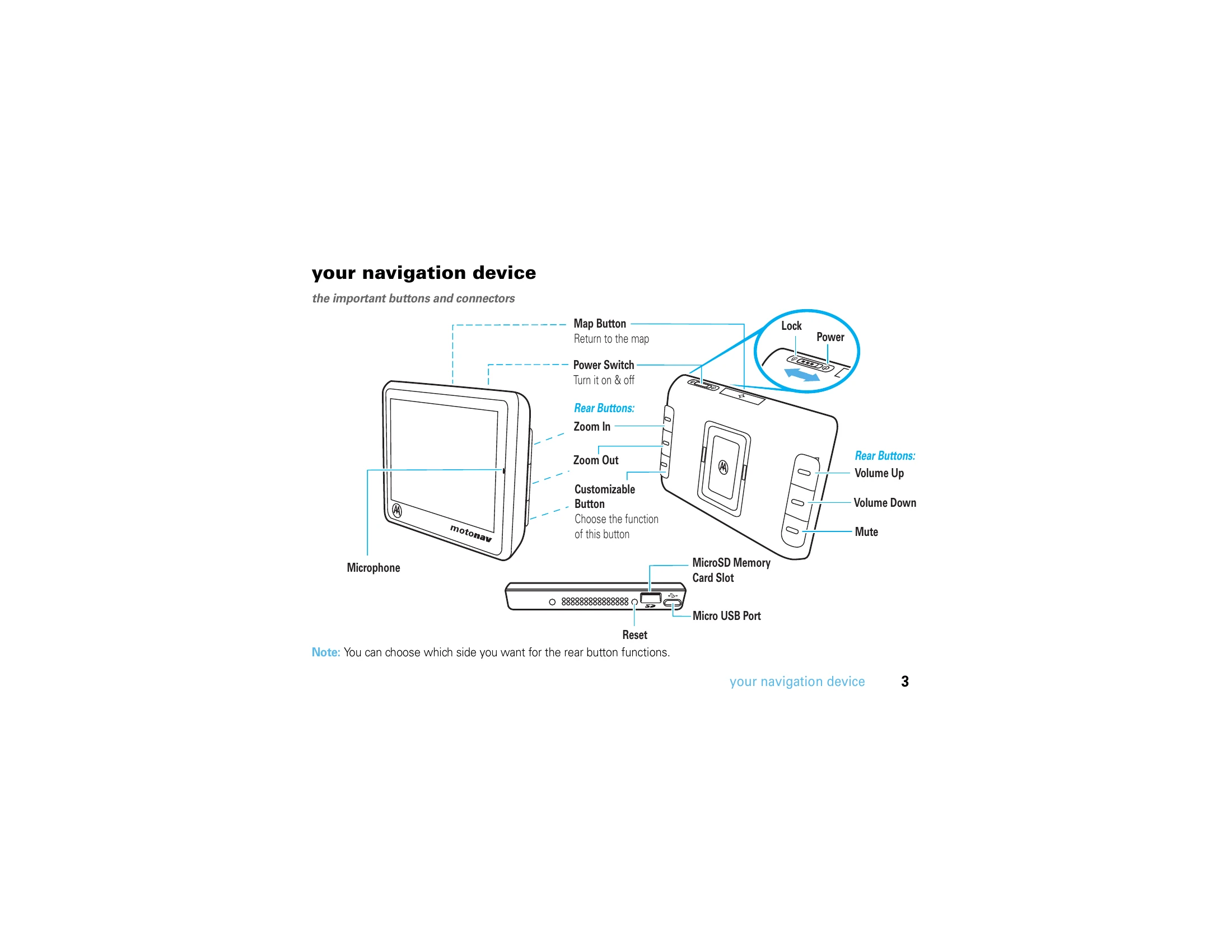
| Screen is unresponsive | Reset the device. Press and hold the Reset button (see page 3). |