Brand: Motorola
Category: Mobile Phone
Document Type:
Language: EN
Brand: Motorola
Category: Mobile Phone
Document Type:
Language: EN
Uploaded: Aug. 10, 2025, 12:13 a.m.
Motorola warrants its mobile phones, accessories, and software against defects for a specified period.
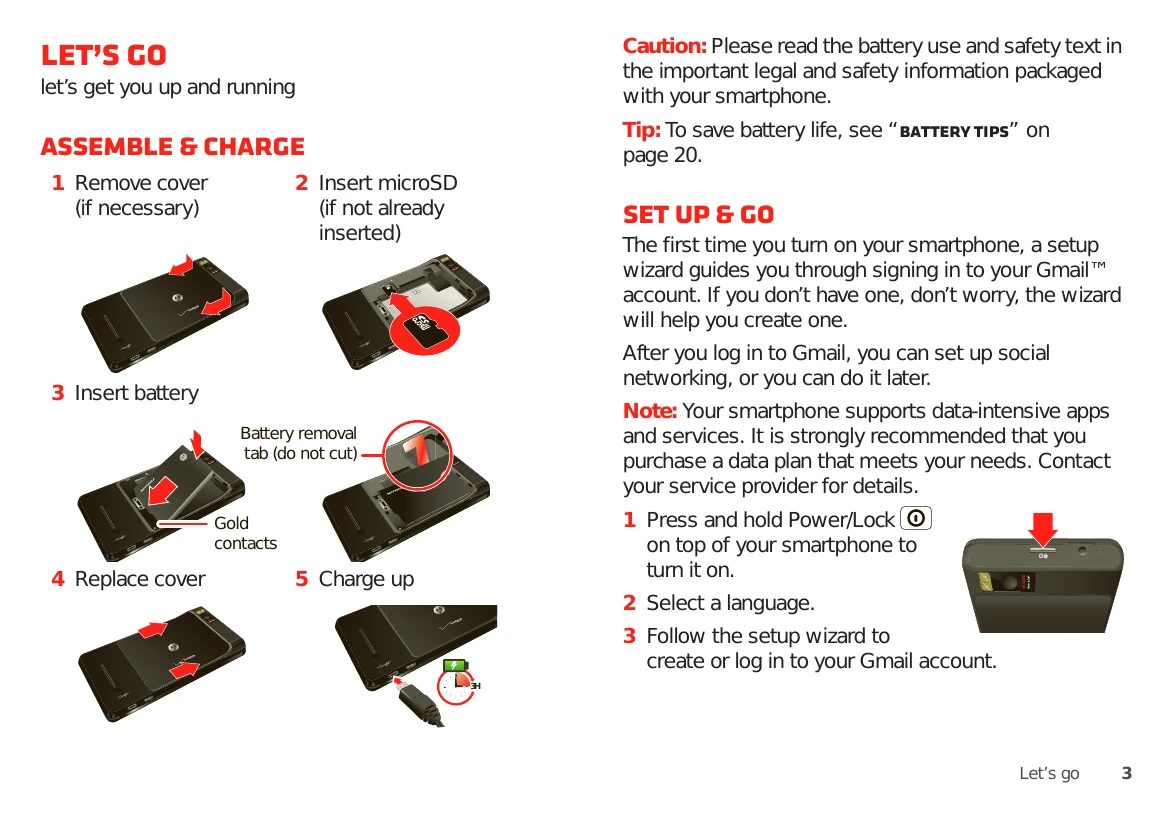
Assemble & Charge: Follow the 5 steps to insert your microSD card, battery, and charge your phone.
Set Up & Go: Turn on your phone using the Power/Lock button and follow the setup wizard to sign in to your Gmail account.
Touchscreen & Keys: Learn how to touch, touch & hold, drag, flick, and zoom on your touchscreen. Understand the function of the Menu, Home, Search, Back, and Power/Lock keys.
Home Screen: Navigate your home screen to access apps, widgets, and shortcuts. Customize your home screen by adding, moving, or deleting items.
Search: Use the search bar to find information on your phone or the web. You can also use voice search.
Apps & Updates: Browse, install, and manage applications from the Android Market. Update your smartphone's software for the latest features and security.
Calls: Make, answer, and manage calls. Use features like speakerphone, mute, and Bluetooth. Learn how to make conference calls and emergency calls.
Contacts: Add, view, edit, and organize your contacts. Synchronize contacts with your social networking accounts.
Text Entry: Use the touchscreen keypad or Swype™ text entry to type messages and other text. Learn tips for efficient text entry.
Tips & Tricks: Discover general tips for using your smartphone, including optimizing screen visibility, managing screen timeout, and using voice search.
Digital Living: Extend battery life by managing battery modes and turning off unnecessary features. Share, copy, and play media with friends and family using DLNA.
| Problem | Possible Cause | Solution |
|---|---|---|
| My phone is turned off and won't turn on. | Battery is not charged. | Charge battery. |
| I can't make or receive calls. | No service. Signal is weak. | Move to a location with better reception. |
| My phone is not connecting to Wi-Fi. | Wi-Fi is turned off. | Turn on Wi-Fi. |
| I can't download apps from Android Market. | No Internet connection. | Connect to Wi-Fi or mobile data. |
| The touchscreen is unresponsive. | Screen is dirty or wet. | Clean the screen with a dry cloth. |
| The phone is overheating. | Using the phone in extreme heat. | Move the phone to a cooler environment. |
| The battery drains quickly. | Background apps are running. | Close unused apps. |