Brand: Motorola
Category: Audio
Document Type: Quick Start Guide
Language: EN
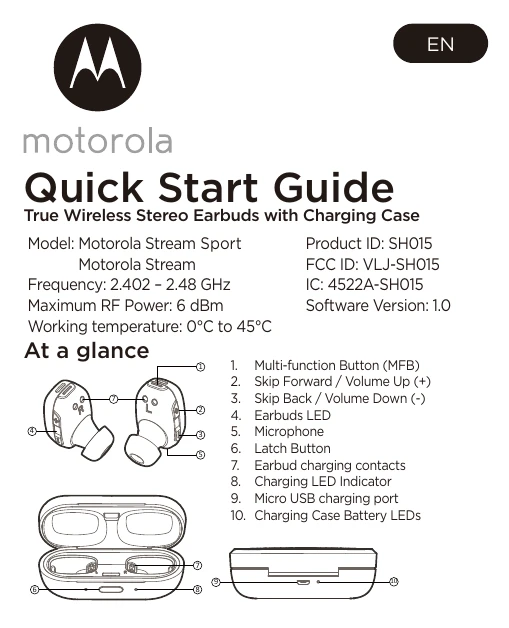
Brand: Motorola
Category: Audio
Document Type: Quick Start Guide
Language: EN
Uploaded: Nov. 21, 2025, 7:17 p.m.
1-year limited warranty for products and 90-day for accessories against manufacturing defects.
| Function | Operation |
|---|---|
| Play/Pause | Press MFB |
| Volume Down/Up | Press - / + |
| Previous / Next Track | Long press - / + |
| Answer / end call | Press MFB |
| Reject a call | Long Press MFB |
| Mute during call | Double press - |
| Re-dial last call | Double press MFB |
| Receiving call and reject on going call | Press MFB |
| Receiving call and hold on going call | Long Press MFB |
| Clear Pair List | Long Press MFB and - together |
| Issue a voice command | Double press + |
| Battery Level Check | Press + AND - together |