Brand: Motorola
Category: Audio
Document Type: Manual
Language: EN
Brand: Motorola
Category: Audio
Document Type: Manual
Language: EN
Uploaded: Nov. 21, 2025, 9:14 p.m.
Refer to the "Legal, safety & regulatory information" section for warranty details.
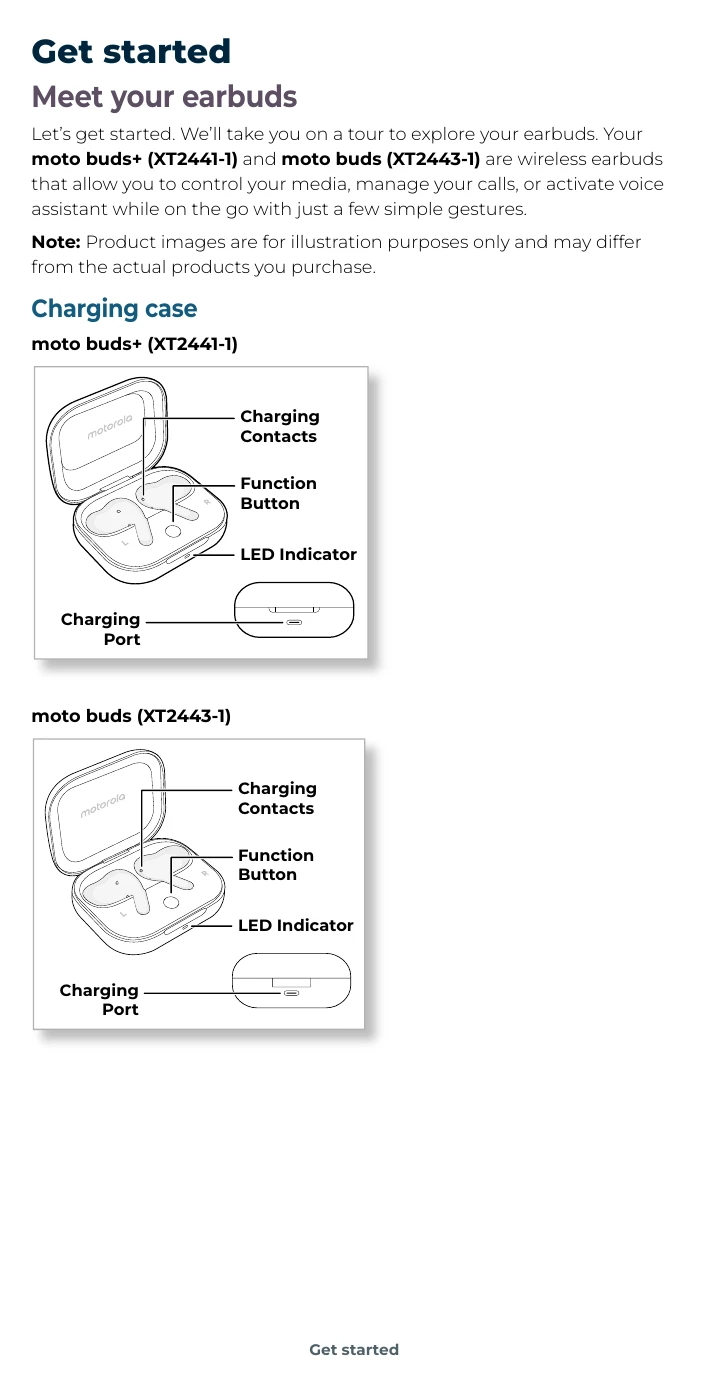
Your wireless earbuds allow you to control media, manage calls, and activate voice assistant with simple gestures.
Use the USB-C cable or a Qi-certified wireless charger for moto buds+.
Use Fast Pair for Motorola devices (Android 12+) or manual pairing for other devices. Ensure Bluetooth is on and earbuds are in the open case.
Connect to two devices simultaneously via the Moto Buds app.
Tap, double-tap, triple-tap, or long-press the earbud touch areas to control music, calls, and voice assistant.
Download the app to manage settings, customize gestures, and update firmware.
Switch between Off, Transparency, Adaptive, and Noise Cancellation modes.
Customize sound with Spatial Audio, Equalizer, Hi-Res Mode, Gaming Mode, or Volume boost.
Use the Moto Buds app to locate misplaced earbuds.