Brand: Motorola Solutions
Category: Body Worn Camera
Document Type: Quick Start Guide
Language: EN
Brand: Motorola Solutions
Category: Body Worn Camera
Document Type: Quick Start Guide
Language: EN
Uploaded: Nov. 21, 2025, 6:29 p.m.
Manual Publish Date: 2020-05-01
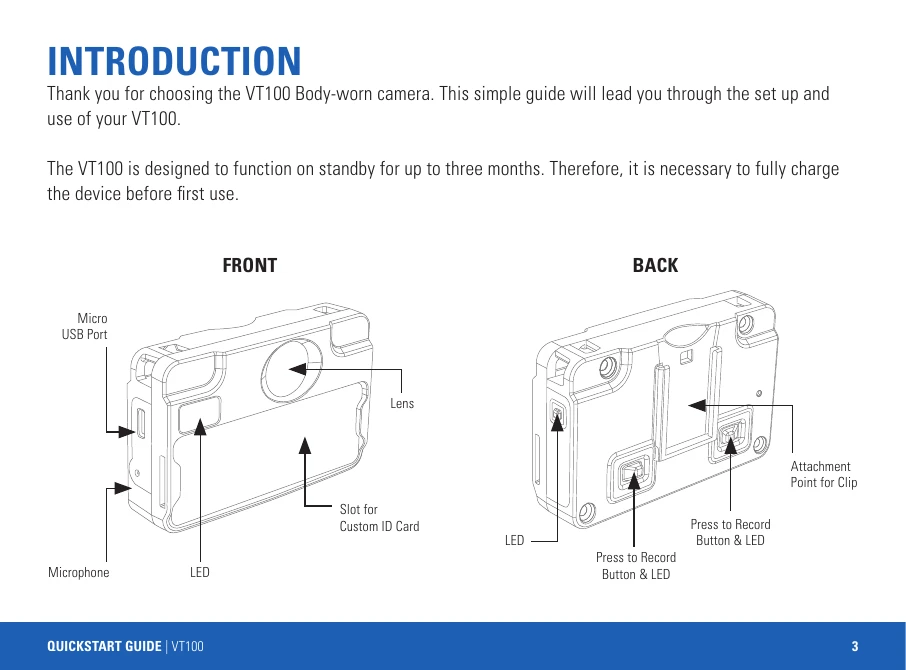
Connect the VT100 to power using either a USB charging cable (AC-USB-MICROB-100) or the VT100 14-Port Dock (VT-100-DOCK14). The LED on the right side will flash green while charging and turn solid green when fully charged. If configured for Wi-Fi, the back-right LED will flash blue when searching and turn solid blue when connected.
Press and hold either of the two buttons on the back of the device to power it up. The VT100 will vibrate briefly, and recording will start automatically. If configured for live streaming, it will also begin as soon as it is powered up.
Press and hold either of the back buttons for one second to stop recording. The front LED will turn off. If configured for livestreaming, the back-right LED will remain solid blue while connected to Wi-Fi. The device will automatically power down after ten seconds of inactivity.
The VT100 can be attached using various clips, including the Rotatable Long Alligator Clip, Klick Fast Stud, Sports Camera Pillar, and Epaulette Clip. Ensure the camera remains upright when capturing footage. The lanyard can also be used for attachment.