Brand: Mio
Category: Automotive Electronics
Document Type: Manual
Language: EN
Brand: Mio
Category: Automotive Electronics
Document Type: Manual
Language: EN
Uploaded: Aug. 10, 2025, 12:45 a.m.
Manual Publish Date: 2023-09-01
No specific warranty period or summary information is provided in this manual.
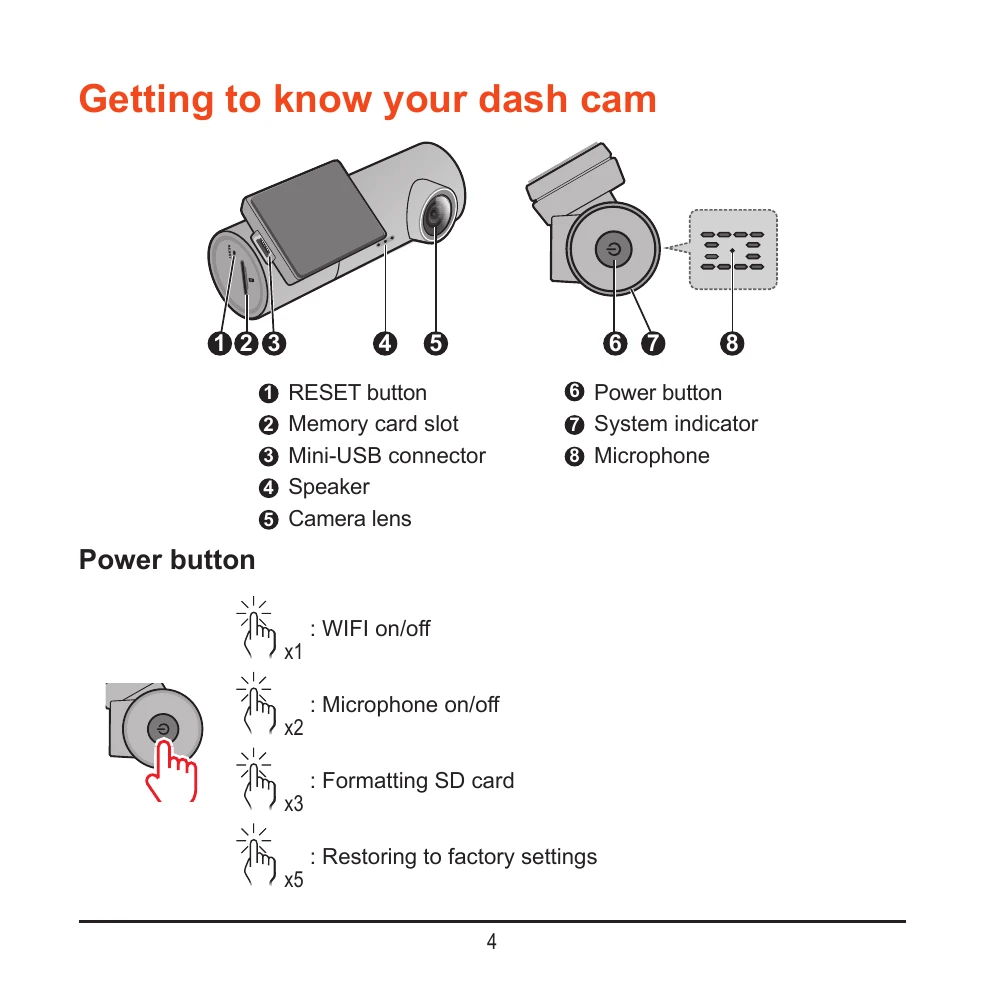
Familiarize yourself with the components of your MiVue J30 Series dash cam, including the power button, system indicator, microphone, and camera lens.
The system indicator light provides visual cues for the dash cam's status:
Connect your dash cam to your smartphone via Wi-Fi using the MiVue Pro app to view, share, and back up recordings. Follow the in-app instructions for setup.
Installation: Mount the dash cam securely using the provided mount, ensuring it doesn't obstruct your view. Connect the car charger and route the cables neatly.
Memory Card: Insert a Class 10 MicroSD card (8GB-128GB) for recording. Format the card using the MiVue Pro app before first use.
Powering On/Off: The dash cam turns on automatically when connected to power. To shut down, press and hold the power button.
Restarting: If the device becomes unresponsive, use a small rod to press the RESET button.
Date & Time: Set the correct date and time via the MiVue Pro app for accurate recording information.
Receive alerts for speed cameras to help monitor your speed. Customize alert settings in the MiVue Pro app.
Adjust various settings via the MiVue Pro app, including video quality, recording sound, G-sensor sensitivity, and safety camera alert preferences.
Use the MiVue Manager software on your computer to view, manage, and back up your recorded files. Connect the memory card to your computer to access the software.