Brand: Mio
Category: Automotive Electronics
Document Type: Manual
Language: EN
Brand: Mio
Category: Automotive Electronics
Document Type: Manual
Language: EN
Uploaded: Aug. 10, 2025, 12:46 a.m.
Manual Publish Date: 2024-11-01
None
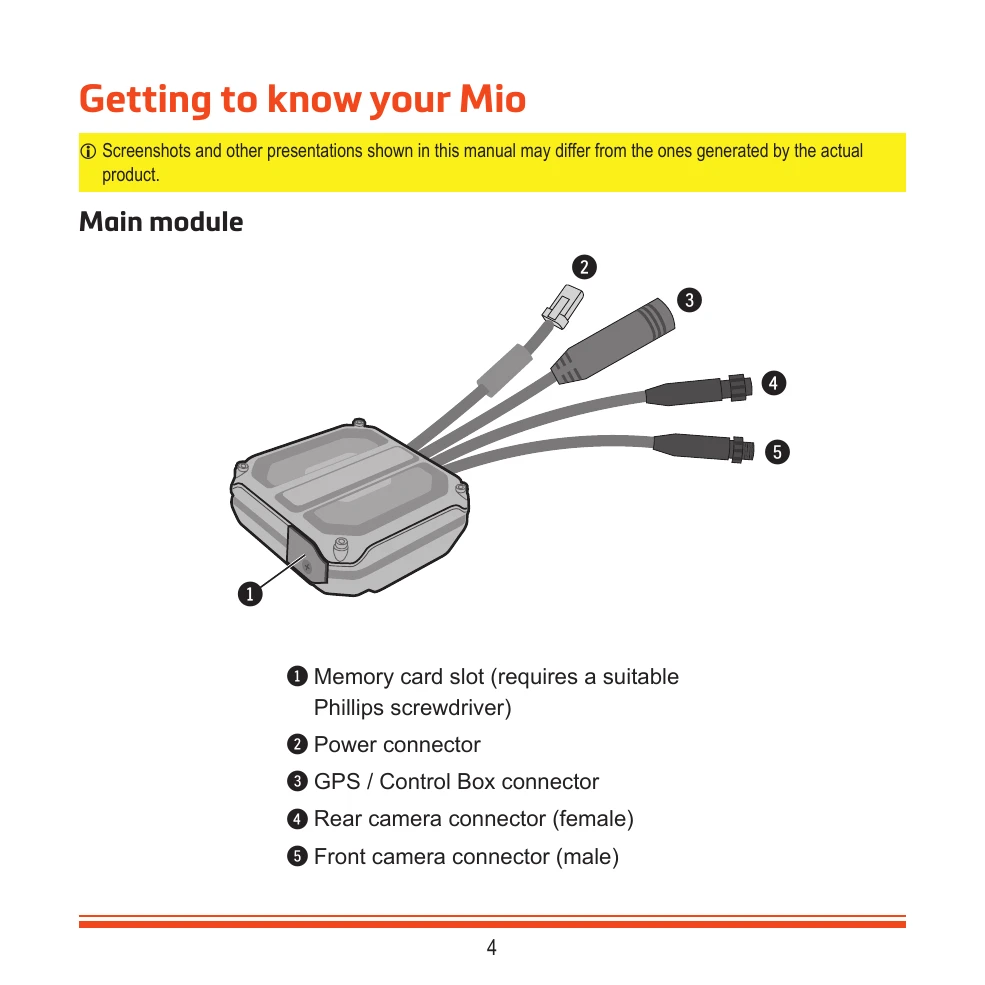
Insert a MicroSD card before powering on. Mount the dash cam securely and connect the components as shown in the diagrams. Adjust camera angles using the MiVue Pro app for optimal view.
Connect to your smartphone via Wi-Fi using the MiVue Pro app to view, share, and back up recordings. Change the default Wi-Fi password for security.
Customize video quality, resolution, frame rate, HDR, frequency, EV, G-sensor sensitivity, recording sound, and stamps via the MiVue Pro app.
| Red LED | Blue LED | Device Status |
|---|---|---|
 |
 |
Normal recording in progress |
 |
|
Event recording in progress |
|
 |
Trip lapse recording / Parking Mode monitoring enabled |
|
 |
WIFI is on / Updating firmware |
|
|
Formatting SD card |
|
|
WIFI initializing |
 |
|
SD card error |
|
|
Camera malfunction detected |
|
|
Speed camera warning |