Brand: Mio
Category: Automotive Electronics
Document Type: Manual
Language: EN
Brand: Mio
Category: Automotive Electronics
Document Type: Manual
Language: EN
Uploaded: Aug. 10, 2025, 12:46 a.m.
Manual Publish Date: 2023-10-01
None
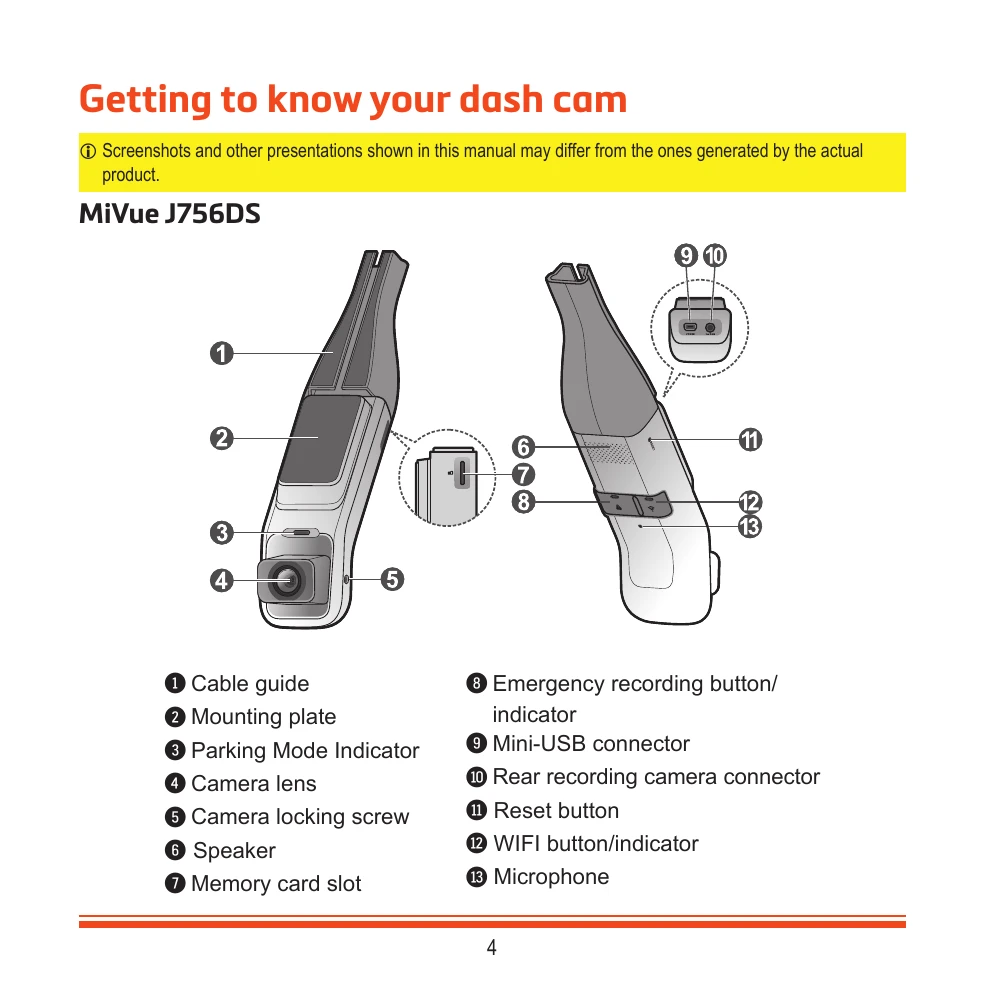
Getting to Know Your Dash Cam: Identifies components like the camera lens, mounting plate, and various buttons/indicators.
Getting Connected: Explains how to connect to the MiVue Pro app via Wi-Fi for viewing, sharing, and backing up videos. It also covers updating the dash cam firmware.
Using a Memory Card: Details the insertion, removal, and formatting of a MicroSD card for recording.
Using Your Dash Cam in a Vehicle: Provides precautions for mounting, connecting power (including SmartBox for parking mode), and installing the rear camera.
Recording Modes: Describes continuous recording, event recording (triggered by G-sensor), and parking mode (Smart Mode and Passive Power Mode).
Customizing Settings: Covers adjustments for video quality, parking mode sensitivity, and safety camera alerts.
MiVue Manager: Instructions for downloading, installing, and using the MiVue Manager software to view and manage recorded files.
For More Information: Includes care instructions, GPS information, safety precautions related to charging, and regulatory information.
| Problem | Possible Cause | Solution |
|---|---|---|
| Dash cam does not turn on | No power supply. | Check if the power adapter is properly connected to the dash cam and the vehicle's power outlet. Ensure the vehicle's power outlet is working. |
| Cannot record videos | Memory card is full or not inserted correctly. | Format the memory card or replace it with a new one. Ensure the memory card is inserted correctly. |
| Video quality is poor | Camera lens is dirty or blocked. / Condensation on lens. / Low light conditions. | Clean the camera lens. Allow the device to dry out if condensation occurs. Adjust EV settings for low light. |
| Wi-Fi connection fails | Wi-Fi is not enabled on dash cam or smartphone. / Incorrect password. | Ensure Wi-Fi is enabled on both devices. Re-enter the correct Wi-Fi password. |
| Parking Mode not working | SmartBox not connected properly or not enabled. / Incorrect settings. | Check SmartBox connections. Verify Parking Mode settings in the MiVue Pro app. |