Manual for 955W / 955WD

Manual for 955W / 955WD

Brand: Mio

Category: Automotive Electronics

Document Type: Manual

Language: EN
Uploaded: Aug. 10, 2025, 12:46 a.m.

Manual Publish Date: 2023-04-01

Warranty Information

This manual does not contain specific warranty information.

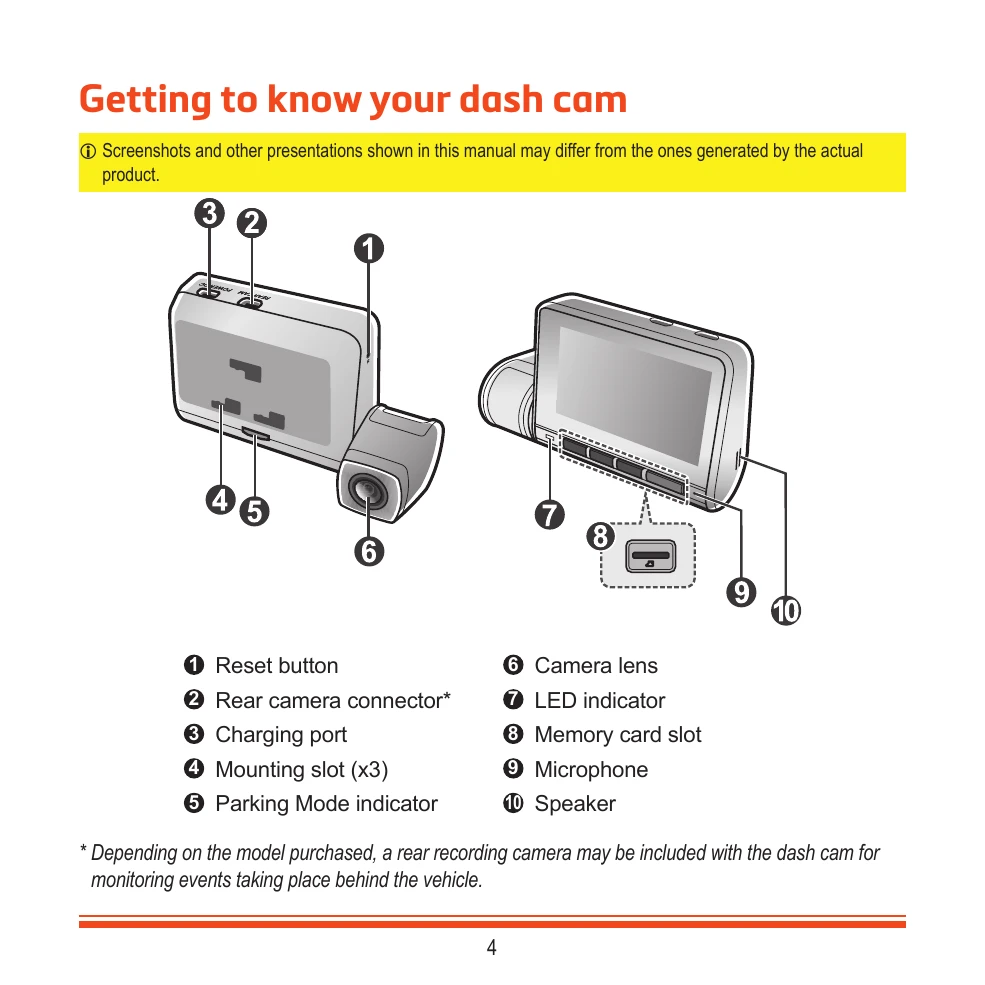
  • Getting to know your dash cam: Familiarize yourself with the components of your Mio dash cam, including the reset button, camera lens, and microphone.
  • Using a memory card: Insert a UHS Speed Class 3 (U3/V30) or better memory card and format it before use.
  • Mounting the dash cam: Securely mount the dash cam to your vehicle's windscreen, ensuring clear visibility and proper cable routing.
  • Turning your Mio on & off: The dash cam automatically turns on when the vehicle engine starts. Follow on-screen prompts for initial setup.
  • Dash cam interface: Understand the indicators and buttons on the dash cam for recording, dual camera, time, microphone, and GPS status.
  • Recording modes: Utilize continuous recording for everyday driving and event recording for triggered incidents. Parking mode offers additional monitoring when the vehicle is parked.
  • Camera mode: Take photos by pressing the camera button or through the system menu.
  • Playback mode: Review recorded videos and photos, with options to play, pause, and delete files.
  • Safety camera alerts: Receive alerts for speed cameras, with customizable settings for sound and distance. You can also add custom safety cameras.
  • Getting connected: Connect your dash cam to your smartphone via WIFI using the MiVue Pro app for viewing, sharing, and backing up recordings.
  • Customising the settings: Adjust various settings such as sound recording, camera preferences, driving safety features (LDWS, FCWS, BCW), parking mode, video resolution, and system options like date/time and voice commands.
  • Caring for your device: Protect your dash cam from moisture, extreme temperatures, and physical damage. Clean with a soft, lint-free cloth.
Privacy Policy